

ANTHROPIC_BASE_URL with a Bifrost credential instead of an Anthropic login.
Tested on Claude Code versions:
Before you begin
You need:- Claude Code installed. See Set up Claude Code.
- The Bifrost gateway URL. Claude Code uses the
/anthropicpath, for examplehttps://bifrost.example.com/anthropic. - A Bifrost credential that allows the models you plan to use:
- Virtual key (OSS and Enterprise): a
sk-bf-*key. A new virtual key with no provider configuration denies all providers, so confirm the key allows your model. - Enterprise SSO (Enterprise): a user provisioned through User Provisioning with an assigned access profile or virtual key.
- Virtual key (OSS and Enterprise): a
Choose a setup
Signing in with your identity provider (Enterprise): to have users authenticate with their work account instead of a virtual key, run Code sessions in Claude Desktop on 3P. Its configuration covers Code sessions as well as Chat and Cowork. See Claude Desktop: Authenticate with SSO.
Launch through Bifrost CLI
Bifrost CLI starts Claude Code with the gateway URL, credential, and model already set for that session. It does not modify~/.claude/settings.json.
--settings file whose apiKeyHelper runs bifrost auth print-token. The token is never written to Claude settings, and the temporary file is removed when Claude Code exits. With a virtual key, the key is set in the child process environment only.
See Coding harness integrations for model selection, persistent configuration, and removal.
Static virtual key
Use this when a fixed virtual key is acceptable. Claude Code sendsANTHROPIC_AUTH_TOKEN as Authorization: Bearer <token>, which Bifrost accepts as a virtual key. No Anthropic account login is required.
1
Verify the key against Bifrost
200 with a JSON message confirms the URL, key, and model. A 401 means the key was rejected; a 403 usually means the key does not allow that provider or model.2
Persist the configuration
Add an To scope the configuration to one repository, use
env block to your user settings, ~/.claude/settings.json (%USERPROFILE%\.claude\settings.json on Windows). Merge it into the existing file instead of replacing it..claude/settings.local.json and make sure it is gitignored.3
Verify in Claude Code
Follow Verify requests reach Bifrost.
Use a Claude subscription through Bifrost
To keep billing on a Claude Pro, Max, Team, or Enterprise subscription while Bifrost applies governance and logging, sign in to Claude Code with/login and send the virtual key in a custom header instead of ANTHROPIC_AUTH_TOKEN:
Authorization: Bearer sk-ant-oat…. On the /anthropic route, Bifrost forwards that token to Anthropic instead of selecting a provider key, and uses x-bf-vk for governance. Do not set ANTHROPIC_AUTH_TOKEN, ANTHROPIC_API_KEY, or apiKeyHelper in this mode; any of them replaces the subscription login. Subscription usage limits still apply.
Dynamic credentials with apiKeyHelper
Claude Code’sapiKeyHelper setting runs a command that prints the current credential. Use it whenever the credential expires, rotates, or comes from a vault or SSO tool.
The setting is named
apiKeyHelper. Claude Code has no apiKeyScript setting.How Claude Code uses the helper
Use Bifrost CLI SSO (recommended for Enterprise)
bifrost auth print-token prints a current Bifrost session token for the signed-in user. If the access token has expired, the CLI refreshes it with the stored refresh token before printing. Requests are governed by the user’s access profile or selected assigned virtual key.
1
Install Bifrost CLI and sign in
Follow Install the CLI, then:
2
Configure Claude Code
In
~/.claude/settings.json, merge:- macOS / Linux
- Windows
- Use the full path to
bifrost; the helper shell may not load your interactivePATH. - Pin
--contextso the helper does not follow a laterbifrost context use. - Remove
ANTHROPIC_AUTH_TOKENandANTHROPIC_API_KEYfrom the sameenvblock and from your shell. Both take precedence overapiKeyHelper.
3
Verify
Start
claude and follow Verify requests reach Bifrost. Bifrost logs show the signed-in user for each request.401. When the refresh token expires or is revoked, the helper fails until you run bifrost auth login again.
To use a specific assigned virtual key instead of the gateway’s default for your user, run bifrost virtual-keys assigned and then bifrost auth select-virtual-key <id>. The selection applies to the context.
Use your own credential script
Any command that prints a credential Bifrost accepts works as a helper:
Example for a virtual key stored in HashiCorp Vault:
~/bin/bifrost-credential.sh
~/.claude/settings.json
vault command with your provider’s token command. Set CLAUDE_CODE_API_KEY_HELPER_TTL_MS below the token lifetime, and make the script exit non-zero when it cannot produce a token.
Verify requests reach Bifrost
- Start
claudefrom a new terminal. - Run
/status. On the Status tab, confirm:Anthropic base URLshows your Bifrost URL ending in/anthropic.- The credential line names
ANTHROPIC_AUTH_TOKENorapiKeyHelper, not a claude.aiLogin method.
- Send a short prompt and confirm a normal response.
- In the Bifrost dashboard, open Logs and confirm the request appears with the expected virtual key or user, provider, and model.
/status shows no Anthropic base URL, the variable did not reach the session. If it shows a claude.ai login, the Bifrost credential is missing or outranked; see Credential precedence.
Credential precedence
Claude Code chooses one credential, in this order (abbreviated from Anthropic’s authentication precedence):- Cloud-provider credentials, when
CLAUDE_CODE_USE_BEDROCK,CLAUDE_CODE_USE_VERTEX, orCLAUDE_CODE_USE_FOUNDRYis set ANTHROPIC_AUTH_TOKENANTHROPIC_API_KEYapiKeyHelperCLAUDE_CODE_OAUTH_TOKEN, Anthropic profiles, and the claude.ai login from/login
--settings on the command line, .claude/settings.local.json, .claude/settings.json, then ~/.claude/settings.json. A value in a settings-file env block overrides the same variable exported in your shell.
Caveats
- Unset
CLAUDE_CODE_USE_*variables. Any of them routes Claude Code to that cloud provider instead ofANTHROPIC_BASE_URL. - Managed login policy. If managed settings set
forceLoginMethodorforceLoginOrgUUID, Claude Code refusesANTHROPIC_AUTH_TOKEN,ANTHROPIC_API_KEY, andapiKeyHelperat startup. An administrator must remove those keys to use Bifrost credentials. - Restrict destinations centrally. Administrators can set
allowedProvidersto["customEndpoint"]and pinANTHROPIC_BASE_URLin managed settings so Claude Code only reaches Bifrost. See Restrict which API providers a machine may use. - Features that need a claude.ai login. Remote Control and voice dictation are unavailable while a gateway credential is active.
- Credential storage. Keep credentials in user or local settings, or behind
apiKeyHelper. Bifrost CLI stores SSO tokens and virtual keys in the operating-system keyring. - Background traffic. Claude Code still sends nonessential traffic, such as update checks and telemetry, outside the gateway. Set
CLAUDE_CODE_DISABLE_NONESSENTIAL_TRAFFIC=1on networks that only allow egress to Bifrost; this also disables auto-updates.
Bifrost’s Settings → Client Settings → Allowed Headers list controls CORS responses for browser-based clients. The Claude Code CLI does not send CORS preflight requests and does not require changes to this list.
Troubleshooting
Model configuration
Claude Code maps itssonnet, opus, and haiku aliases through ANTHROPIC_DEFAULT_SONNET_MODEL, ANTHROPIC_DEFAULT_OPUS_MODEL, and ANTHROPIC_DEFAULT_HAIKU_MODEL. ANTHROPIC_MODEL or --model selects the session model. A model value in settings that names a specific model ID overrides the alias mapping for new sessions, so remove it or set it to an alias when you manage models through these variables.
The env snippets below show only the model variables. Add them to the same env block as your base URL and credential.
Using alias
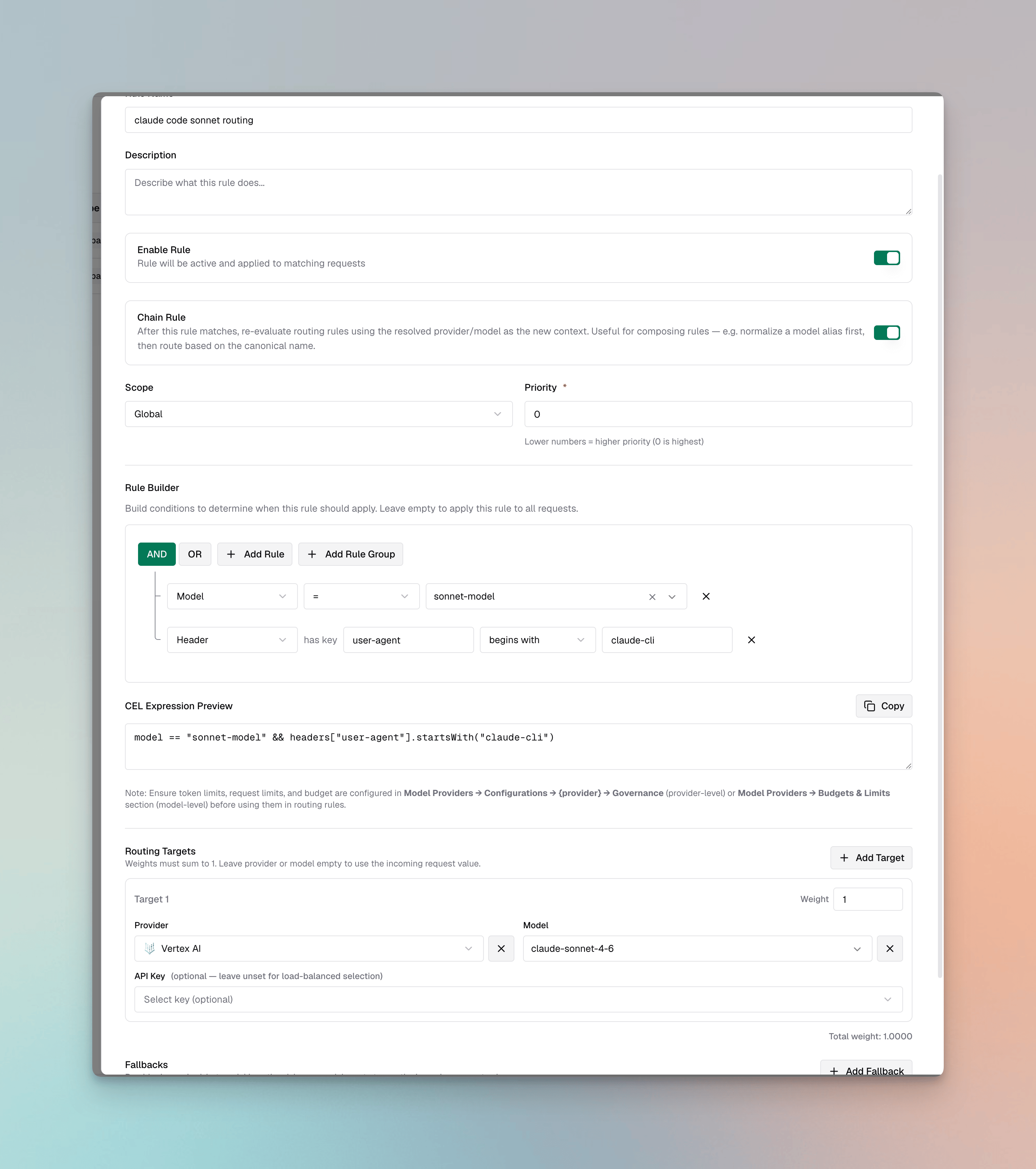
This approach uses Bifrost’s dynamic aliasing via routing rules. The namessonnet-model and haiku-model are arbitrary labels that Claude Code sends, and a routing rule rewrites them to whatever provider and model you want at request time. Because the rewrite is rule-based, you can route the same alias to different targets per scope, per header, or per other request attributes.
- Add these routing rules in Bifrost.
sonnet-model route
- Keep it at the global level and assign the priority you want.
- Add a model condition
model=sonnet-model. This option is not available out of the box, so type the string and selectCreate sonnet-model. - Add a second header condition that checks whether
user-agentstarts withclaude-cli. - Map the model to any model configured in Bifrost, from Anthropic, OpenAI, Gemini, or another provider. The example uses
vertex/claude-sonnet-4-6.
haiku-model route
- Repeat the steps above, replacing
sonnet-modelwithhaiku-model.
- Set the aliases in Claude Code:
sonnet-model may not be recognized by Claude Code for features that depend on the model name. See Auto mode classifier compatibility.
Using provider-specific model pinning
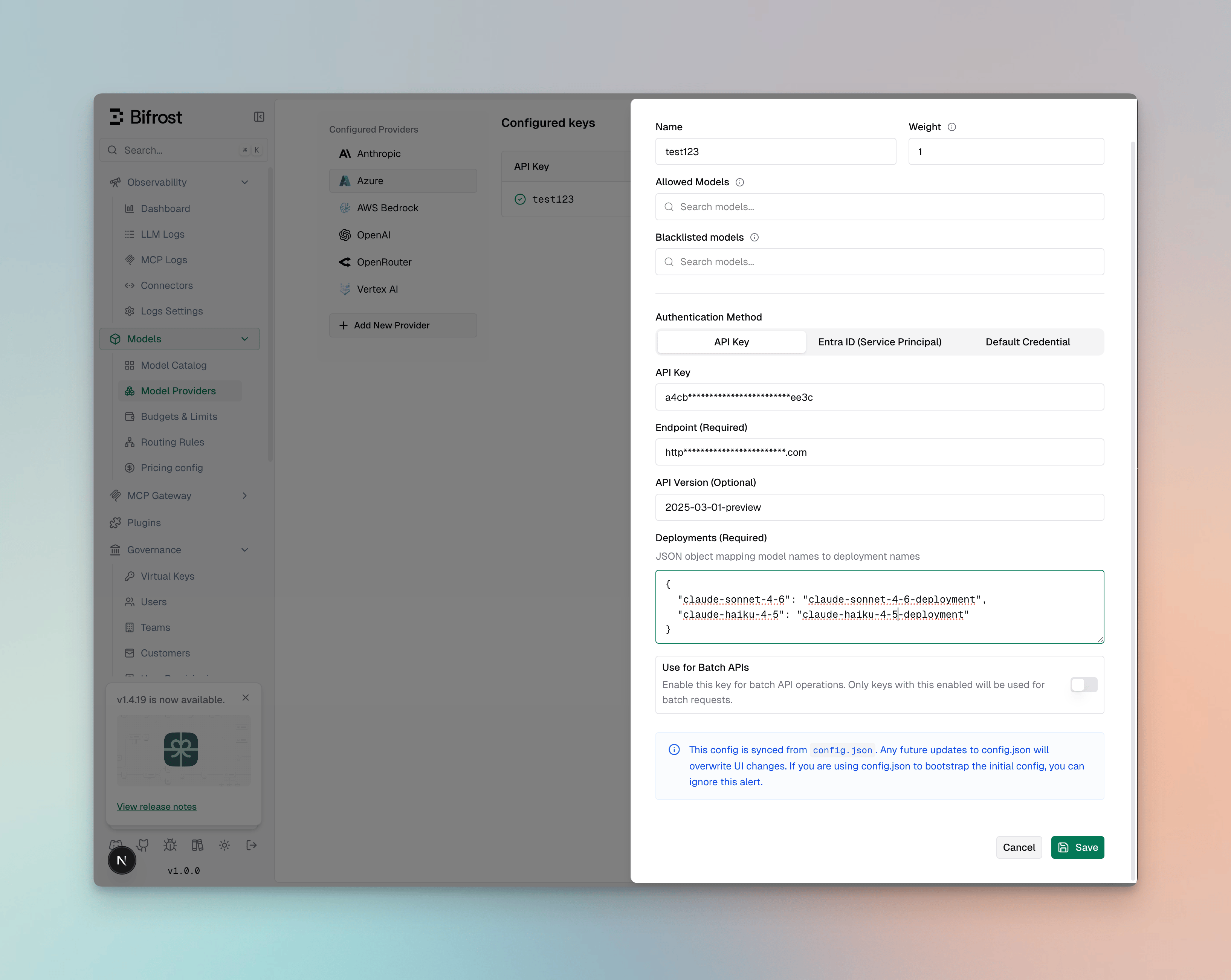
This approach pins Claude Code’s model aliases to specific provider and model identifiers. It behaves like Bifrost’s static aliasing: the value you set is the exact target Bifrost forwards to. You can pin any model on any provider configured in Bifrost, as long as the model supports the tool calling Claude Code needs.- Anthropic
- Bedrock
- Vertex
- Azure
- Other providers
Anthropic models do not need a provider prefix.
Choose a model at launch or mid-session
/model <name> switches to any provider and model configured in Bifrost, for example /model vertex/claude-haiku-4-5 or /model openai/gpt-5.5. Run /model without arguments to see the current model.
Claude Code can also add Bifrost’s models to the /model picker. Set CLAUDE_CODE_ENABLE_GATEWAY_MODEL_DISCOVERY=1; Claude Code then reads /anthropic/v1/models at startup and lists IDs that contain claude or anthropic. Bifrost CLI enables this automatically for sessions it launches.
Auto mode classifier compatibility
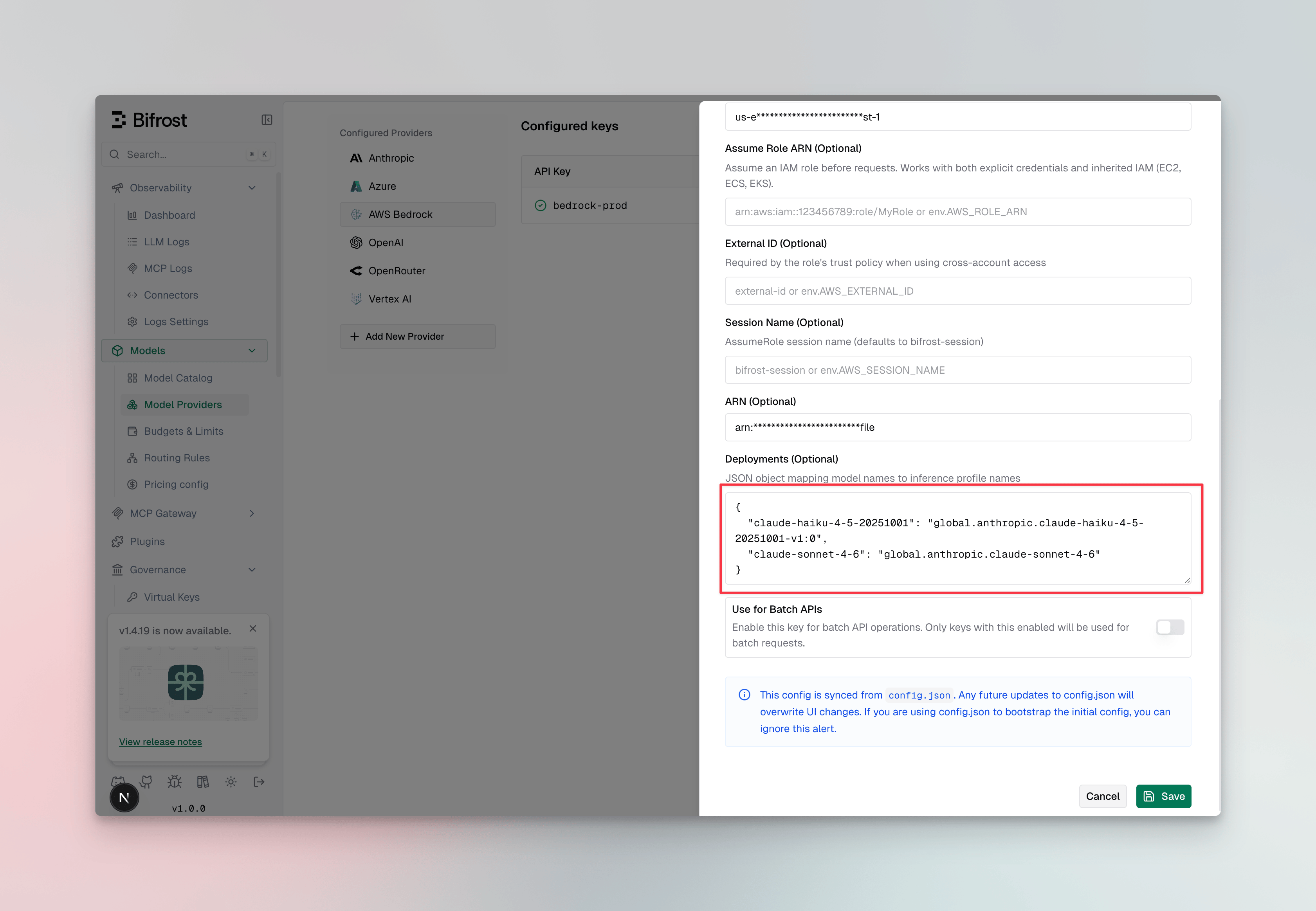
Claude Code can perform eligible auto mode classifier checks on the server without separate classifier requests. This requires both a supported Claude Code model name and an upstream platform that has server-side checks enabled. When you use a Bifrost model alias, keep a recognizable Claude model name in the value sent by Claude Code. Provider prefixes are supported, so values such asbedrock/claude-sonnet-5-5 can work. An arbitrary alias such as sonnet-model can route to the same model in Bifrost but may not be recognized by Claude Code as an auto mode-compatible model.
For Bedrock models that require an inference profile, you can expose a recognizable alias from the Bedrock key and map it to the profile ID:
Model naming is only one eligibility check. Anthropic enables server-side checks by platform, region, and credential. A correctly named model can still use local classifier requests if the upstream platform has not enabled the feature for that environment.
/status in Claude Code. Auto mode server should read Enabled. If Claude Code reports that the session is not eligible:
- Confirm
/modelshows the intended provider and recognizable Claude model name. - Confirm the provider key maps that alias to a callable deployment or inference profile.
- Check whether the upstream response contains
delta.safeguard_results. - Make sure
CLAUDE_CODE_DISABLE_EXPERIMENTAL_BETASis not set to1.
CLAUDE_CODE_AUTO_MODE_SERVER=0 to suppress the notice and use Claude Code’s local classifier. Those classifier requests remain billable. Anthropic documents the current behavior and version requirements in Auto mode classifier request charges.
Provider compatibility
Bifrost lets Claude Code talk to any model on any provider it’s configured for. The only hard requirement is that the model you pick properly supports tool calling for the operations you intend to perform. Claude Code relies heavily on tool use for file edits, bash, code editing, web search, computer use, and citations.- Claude-specific server-side tools (
web_search,computer_use,citations) are only available on Claude-family models on providers that expose them. Non-Claude models might silently lack these capabilities. - Streaming tool-call arguments must be implemented correctly by the upstream. Some providers (notably OpenRouter at the time of writing) do not stream function-call arguments properly. Tool calls arrive with empty
argumentsfields and Claude Code fails on file operations. If this happens, switch to a different provider in your Bifrost configuration. - Azure-hosted models must explicitly support tool use; verify before pinning.
claude-sonnet-4-6 direct from Anthropic) to confirm the issue is provider- or model-specific rather than Bifrost configuration.
Using Bifrost as an MCP Gateway
Bifrost can also act as an MCP server, aggregating every MCP tool you’ve connected (filesystem, GitHub, web search, databases, etc.) behind a single/mcp endpoint. Pointing Claude Code at it means one config entry instead of N, plus per-VK tool filtering, centralized governance, and observability for every tool call.
Adding Bifrost as an MCP server
Use theclaude mcp add CLI with the HTTP transport:
--scope controls where the entry is stored: local (default, current project only), project (writes a checked-in .mcp.json), or user (available across all your projects).
Or write it directly into .mcp.json / ~/.claude.json:
X-Api-Key: <vk> or x-bf-vk: <vk> if the Authorization header conflicts with another tool in the chain.
To remove the server later:
When you need an identity header
For setups that only use global MCPs (auth typenone, headers, or oauth), Claude Code can connect to /mcp without any header and get the full global tool set. Identity headers only become load-bearing when per-user MCPs (per_user_oauth or per_user_headers) are in the mix — and even then the connection itself still succeeds; only tool calls into the per-user server return an error until an identity is present.
For a per-user-headers MCP without identity, the tool call returns:
You can attach a VK even when you don’t strictly need per-user auth — it’s how Bifrost scopes tool filtering and governance per caller.
Recommended: disable auto tool injection
When the same Claude Code instance routes inference through Bifrost’s LLM gateway and connects to/mcp, the same tool can reach the model twice — once because the LLM gateway auto-injects every configured MCP tool, and once because Claude Code’s own MCP client discovers it via /mcp. Bifrost auto-dedupes tools for Claude Code specifically, but turning the inject toggle off is still recommended — it cleanly separates the two paths and matches what other MCP-host clients expect.
See Recommended: disable auto tool injection for the toggle.
Verifying
Run/mcp inside Claude Code. bifrost should appear as connected with a tool count next to it. The same panel surfaces reconnect, re-authenticate, and disconnect actions.
FAQs
SDK auth failed: HTTP 405 ... after clicking Re-authenticate
SDK auth failed: HTTP 405 ... after clicking Re-authenticate
The full error reads:This appears whenever the gateway auth mode is
headers: clicking Re-authenticate makes Claude Code probe /register (RFC 7591 Dynamic Client Registration), but registration and discovery aren’t served in that mode, so the SDK logs the parse error. The /mcp connection itself keeps working.To make Re-authenticate work, switch mcp_server_auth_mode to both or oauth — Bifrost then serves real Dynamic Client Registration and the error disappears. If you’re staying on headers, use Reconnect in the /mcp panel to refresh tools instead. See the upstream Claude Code bug report for context.Got new credentials, but bifrost rejected them on reconnect
Got new credentials, but bifrost rejected them on reconnect
Claude Code completed an OAuth flow, but the token it presented to
/mcp was rejected. Two common causes:- You recently switched
mcp_server_auth_mode. Claude Code caches OAuth state per server, and tokens issued under the old mode are no longer accepted. Remove and re-add the server (claude mcp remove bifrost, then add it again). - A VK header is being sent alongside the OAuth token. Bifrost rejects requests carrying two credential types at once (
conflicting credentials). This typically happens inbothmode when the VK is configured under a non-standard header: Claude Code only treats a configuredAuthorizationheader as “use header auth” — withx-bf-vkorX-Api-Keyit may still run the OAuth flow and then send the OAuth token and your VK header together, which Bifrost rejects.
both mode, configure the VK as Authorization: Bearer <vk> (not x-bf-vk / X-Api-Key), or drop the header entirely and authenticate via OAuth.Failed to reconnect to bifrost. and the MCP shows status failed
Failed to reconnect to bifrost. and the MCP shows status failed
You’ll see this when clicking Reconnect in
/mcp if the request reaches Bifrost without a valid identity:- No
Authorization/x-bf-vk/X-Api-Keyheader andenforce_auth_on_inference=true - Sending only
x-bf-mcp-session-idwhileenforce_auth_on_inference=true - A VK that doesn’t exist or has been disabled
enforce_auth_on_inference=false if you intend to use session-id (or unauthenticated) callers. After updating the header, re-add the server or click Reconnect again.MCP is connected but no tools are showing up
MCP is connected but no tools are showing up
Three things to check, in order:
- The upstream MCP is still connected in Bifrost. Bifrost’s health monitor marks a server
disconnectedafter 5 consecutive failed pings, and disconnected servers serve zero tools. Reconnect from the Bifrost MCP page or viaPOST /api/mcp/client/{id}/reconnect. - The attached VK allows the tools. If you’re sending a VK, its
mcp_configsallowlist must include the MCP client name and the tools you expect to see. A VK with no entry for that MCP exposes none of its tools. - The MCP isn’t running in Code Mode. Code-mode MCPs don’t expose their raw tools through
tools/list— they’re exposed as meta tools (list_tools,call_tool, etc.) that the LLM uses to discover and call the underlying tools indirectly. From a stock MCP client’s perspective the server looks like it only has a handful of meta tools.
A per-user MCP returns an mcp_auth_required URL on first call
A per-user MCP returns an mcp_auth_required URL on first call
Expected behavior for
per_user_oauth and per_user_headers MCPs. Open the URL surfaced in the tool result — for OAuth flows it points at the upstream provider’s consent page; for headers flows it points at a Bifrost form to enter your values. Bifrost stores the credential against your identity and the next tool call executes normally. See Per-User OAuth and Per-User Headers.If Claude Code behaves unexpectedly after any change to Bifrost’s MCP auth settings, remove and re-add the server — Claude Code caches auth tokens per MCP server, and stale cached credentials can survive Reconnect.