

Overview
Bifrost Enterprise supports Singulr AI as a third-party guardrail provider for LLM requests and responses. Singulr owns the policies and their decisions. Configure prompt-injection, PII, PHI, or other policies in Singulr, then attach the Singulr profile to a Bifrost rule to choose which traffic is evaluated. Singulr returns anallow, block, or redact decision; Bifrost enforces it inline.
- Allow: Bifrost continues the request or response unchanged.
- Block: Bifrost returns a guardrail intervention and does not continue that phase.
- Redact: Singulr returns entity spans. Bifrost validates those spans, replaces the matching runtime text, and persists the redacted values in Bifrost logs.
Singulr selects whether a policy allows, blocks, or redacts. The Singulr profile does not expose a separate Bifrost
action, redaction_strategy, or redaction_mode setting. Its redaction behavior is fixed to runtime replacement after Bifrost validates the spans returned by Singulr.Streaming output: For
output and both rules, Bifrost holds the response until generation is complete, evaluates the complete response with Singulr once, then releases the allowed/redacted response or returns a guardrail intervention. It does not send individual stream chunks to Singulr.Prerequisites
- Bifrost Enterprise with guardrails enabled
- A Singulr API key
- A Singulr Application ID and Guardrail ID for the application/policy you want to enforce
- Required policies enabled in Singulr for the selected guardrail
- Network egress from Bifrost to the Singulr API over HTTPS
Set Up Policies in Singulr
Before creating the Bifrost profile:- Create or select the Singulr application that represents the workload you want to protect.
- Create or select its guardrail configuration.
- Enable the required Singulr policies, such as prompt injection, PII, or PHI.
- Configure each policy’s decision in Singulr: allow, block, or redact.
- Copy the API key, complete Application ID, and Guardrail ID into Bifrost.
How It Works
- Create a Bifrost provider configuration with
provider_name: "singulr-ai". - Attach it to a guardrail rule that applies to
input,output, orboth. - Bifrost sends the selected conversation to Singulr before the LLM call, or sends the completed assistant response after the call.
- Singulr evaluates the applicable policies and returns
allow,block, orredact. - Bifrost maps that decision to the request or response path.
messages and the final assistant output in a separate response object. Singulr uses the context for evaluation, but Bifrost only permits redaction of the final assistant response.
Configuration Fields
Configure Bifrost
- Web UI
- API
- config.json
- Helm
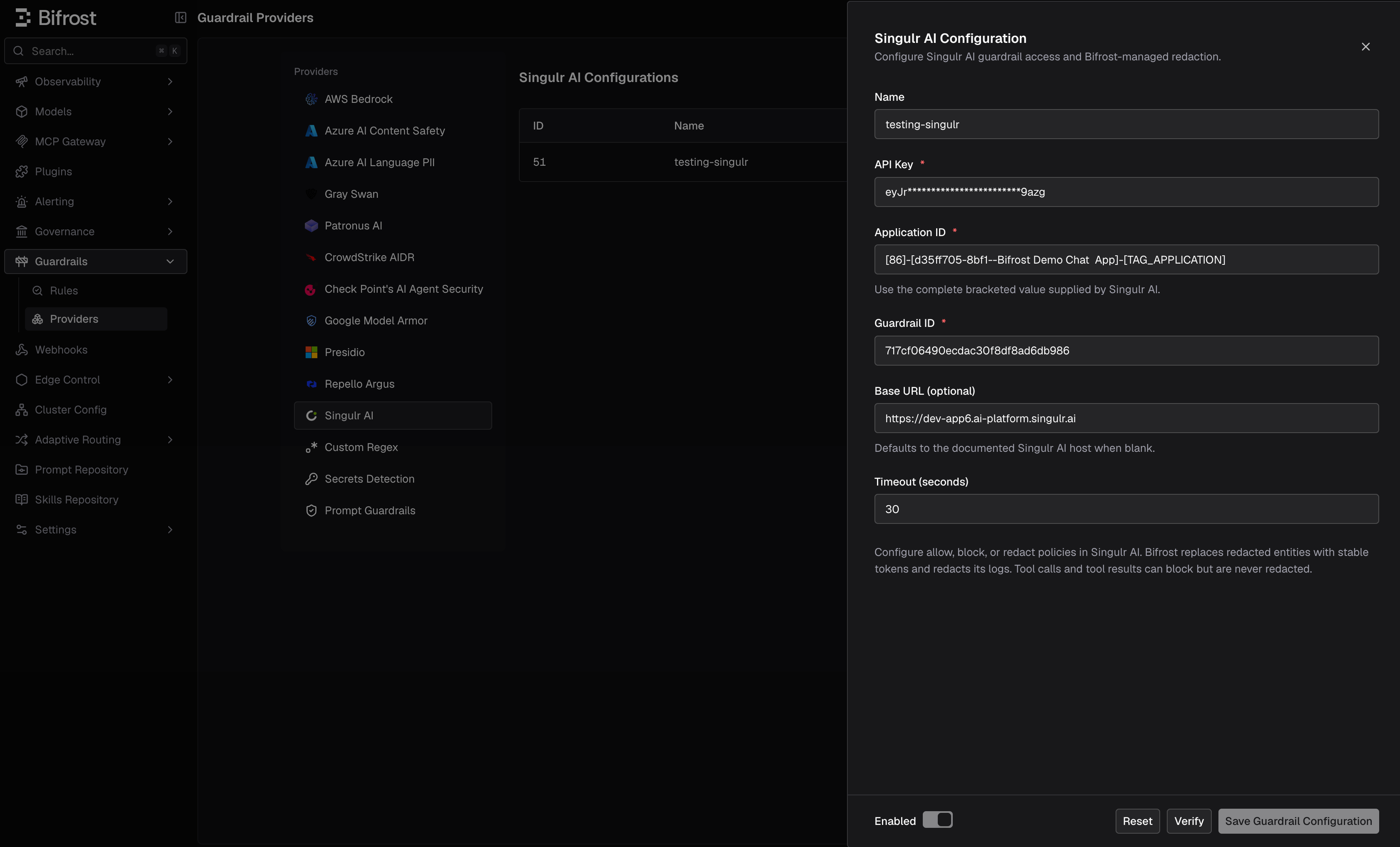
- Go to Guardrails > Providers.
- Select Singulr AI and click Add Configuration.
- Enter a descriptive Name.
- Enter the API Key, complete Application ID, and Guardrail ID supplied by Singulr.
- Leave Base URL blank to use the default Singulr API root, unless Singulr has provided a different endpoint.
- Set the timeout, enable the configuration, optionally click Verify, then save it.
- Under Guardrails > Rules, attach the saved Singulr profile to an input, output, or both-phase rule.
Supported Content and Limitations
- LLM input and output: Singulr evaluates text-bearing request and response content. Input redaction targets the current message; output redaction targets the final assistant response.
- Conversation context: Bifrost can include prior conversation when evaluating input or output. Prior turns provide context but are not redaction targets.
- Tool calls and tool results: Singulr can block content in tool-call arguments and tool-result content, but Bifrost does not redact those fields with Singulr spans.
- Images and files: This integration sends text content, not image pixels, file bytes, or arbitrary binary payloads.