

Overview
Vertex AI is Google’s unified ML platform providing access to Google’s Gemini models, Anthropic Claude models, and other third-party LLMs through a single API. Bifrost performs conversions including:- Multi-model support - Unified interface for Gemini, Anthropic, and third-party models
- OAuth2 authentication - Service account credentials with automatic token refresh
- Project and region management - Automatic endpoint construction from GCP project/region
- Model routing - Automatic provider detection (Gemini vs Anthropic) based on model name
- Request conversion - Conversion to underlying provider format (Gemini or Anthropic)
- Embeddings support - Vector generation with task type and truncation options
- Model discovery - Paginated model listing with deployment information
Supported Operations
Unsupported Operations (❌): Text Completions, Speech, Transcriptions, Files, and Batch are not supported by Vertex AI. These return
UnsupportedOperationError.Vertex-specific: Endpoints vary by model type. Responses API available for both Gemini and Anthropic models.Setup & Configuration
Vertex AI requires Google Cloud project configuration and authentication credentials. Four authentication methods are supported.The
aliases field (mapping model names to fine-tuned model IDs or endpoint
identifiers) requires v1.5.0-prerelease2 or later. On v1.4.x, use
deployments inside vertex_key_config instead - see the v1.5.0 Migration
Guide
for details.1. Service Account JSON (Recommended for Production)
Provide a credential JSON string inauth_credentials. The JSON must contain a type field. Supported types: service_account (most common), impersonated_service_account, authorized_user, external_account, external_account_authorized_user. The document names the token, impersonation and credential-source URLs the Google client dials, so setting, changing or removing it through the API is held to the same rule as a key endpoint: a request admitted without any credential check (dashboard authentication disabled or unconfigured, or a whitelisted route) is refused with 403. A request that passed a credential check may set it: an authenticated admin session, or, while the setup lock is active, a request carrying the configured setup token (see Provider endpoint URLs).
An
external_account JSON (a Workload Identity Federation credential config) is accepted here
too. File, URL and executable credential_source shapes, for example a projected Kubernetes
ServiceAccount token, are handled by Google’s library as-is. The AWS shape
("environment_id": "aws1", produced by gcloud ... create-cred-config --aws) is resolved by
Bifrost through the AWS SDK default chain, so it works on EKS with IRSA or Pod Identity exactly
like AWS Workload Identity Federation; the structured
block is the recommended form because it needs no credential file.- Web UI
- API
- config.json
- Go SDK
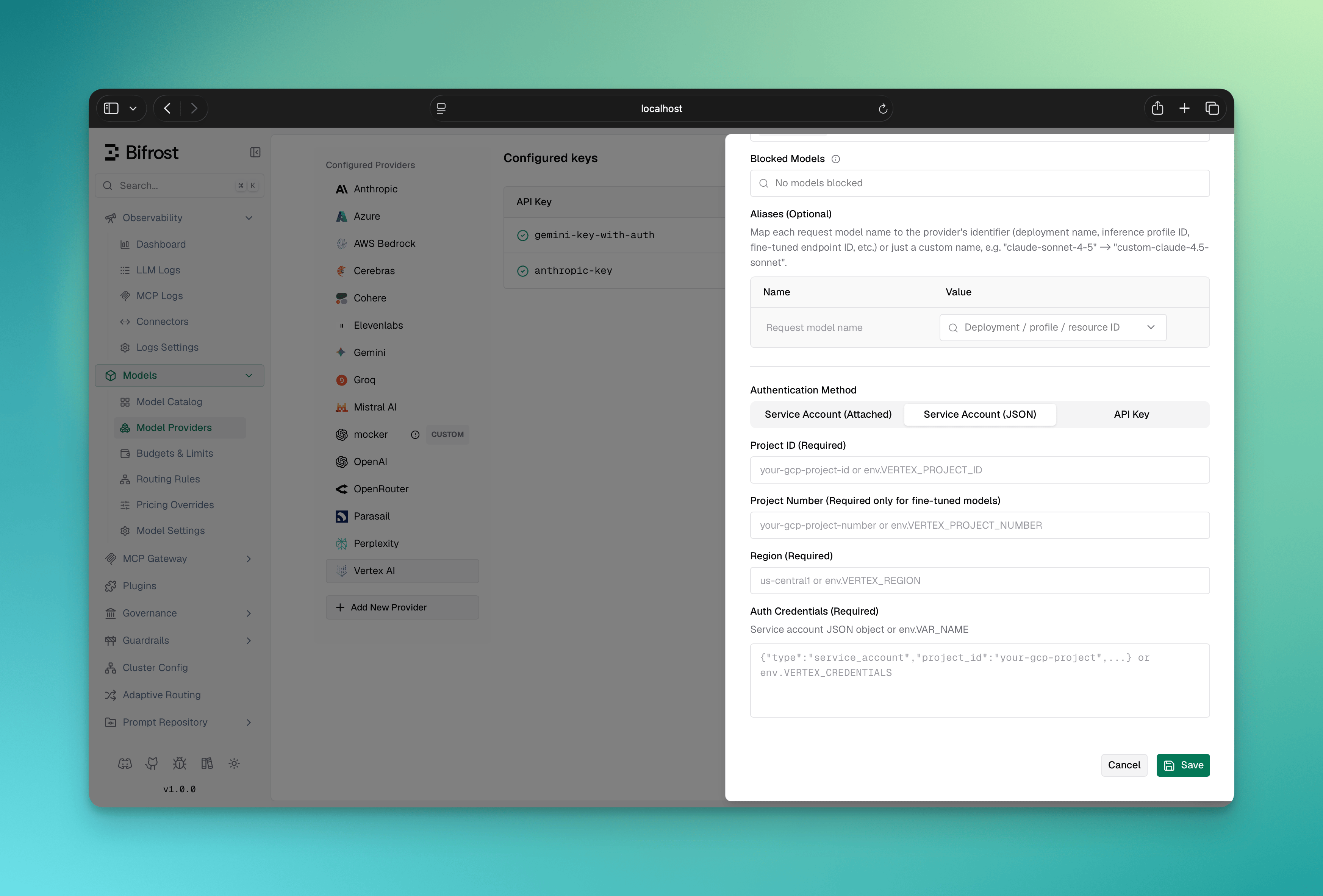
- Navigate to “Model Providers” → “Configurations” → “Google Vertex”
- Click “Add Key” (or edit an existing key)
- Under Authentication Method, select “Service Account (JSON)”
- Set Project ID: Your Google Cloud project ID
- Set Project Number (Required only for fine-tuned models): Your GCP project number; leave blank for standard models
- Set Region: e.g.,
us-central1 - Set Auth Credentials: Paste your service account JSON or reference an env var (e.g.,
env.VERTEX_CREDENTIALS) - Configure Aliases: Map model names to fine-tuned model IDs (if using fine-tuned models)
- Save
2. Application Default Credentials
Leaveauth_credentials empty. Bifrost calls google.FindDefaultCredentials() - Google’s ADC library - which resolves credentials in this order:
GOOGLE_APPLICATION_CREDENTIALSenv var (path to a JSON credential file)- Application default credential file (
~/.config/gcloud/application_default_credentials.json, written bygcloud auth application-default login) - GCE/GKE/Cloud Run/App Engine metadata server (attached service account or Workload Identity)
- Web UI
- API
- config.json
- Go SDK
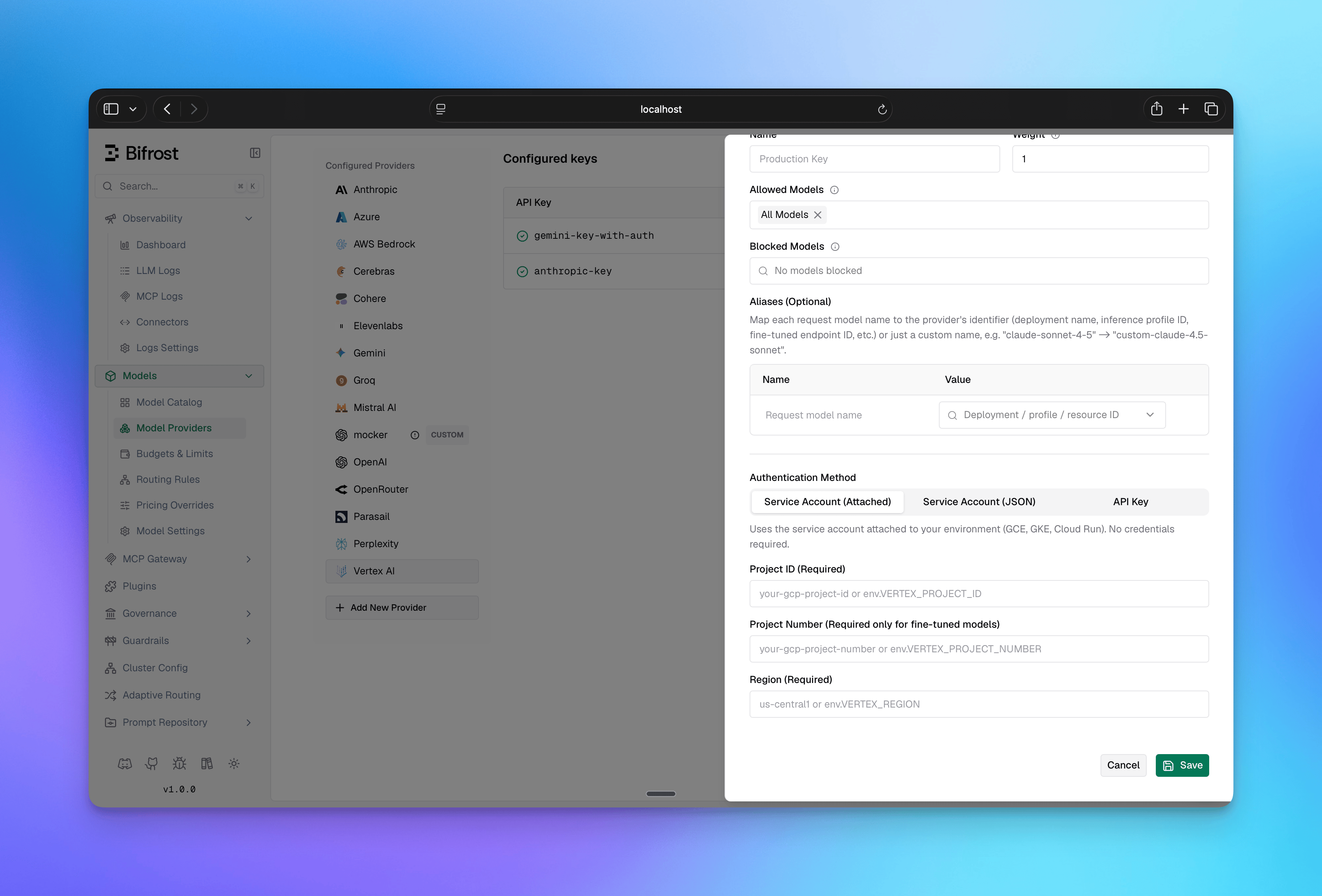
- Navigate to “Model Providers” → “Configurations” → “Google Vertex”
- Click “Add Key” (or edit an existing key)
- Under Authentication Method, select “Service Account (Attached)”
- Set Project ID: Your Google Cloud project ID
- Set Project Number (Required only for fine-tuned models): Your GCP project number; leave blank for standard models
- Set Region: e.g.,
us-central1 - Configure Aliases if needed
- Save
GOOGLE_APPLICATION_CREDENTIALS is set in your environment, or that Workload Identity / gcloud is configured.3. API Key (Gemini and Fine-Tuned Models Only)
Setvalue to your Vertex API key. API key authentication is supported only for Gemini models and fine-tuned Gemini models. For Anthropic models on Vertex, use Service Account or Application Default Credentials.
- Web UI
- API
- config.json
- Go SDK
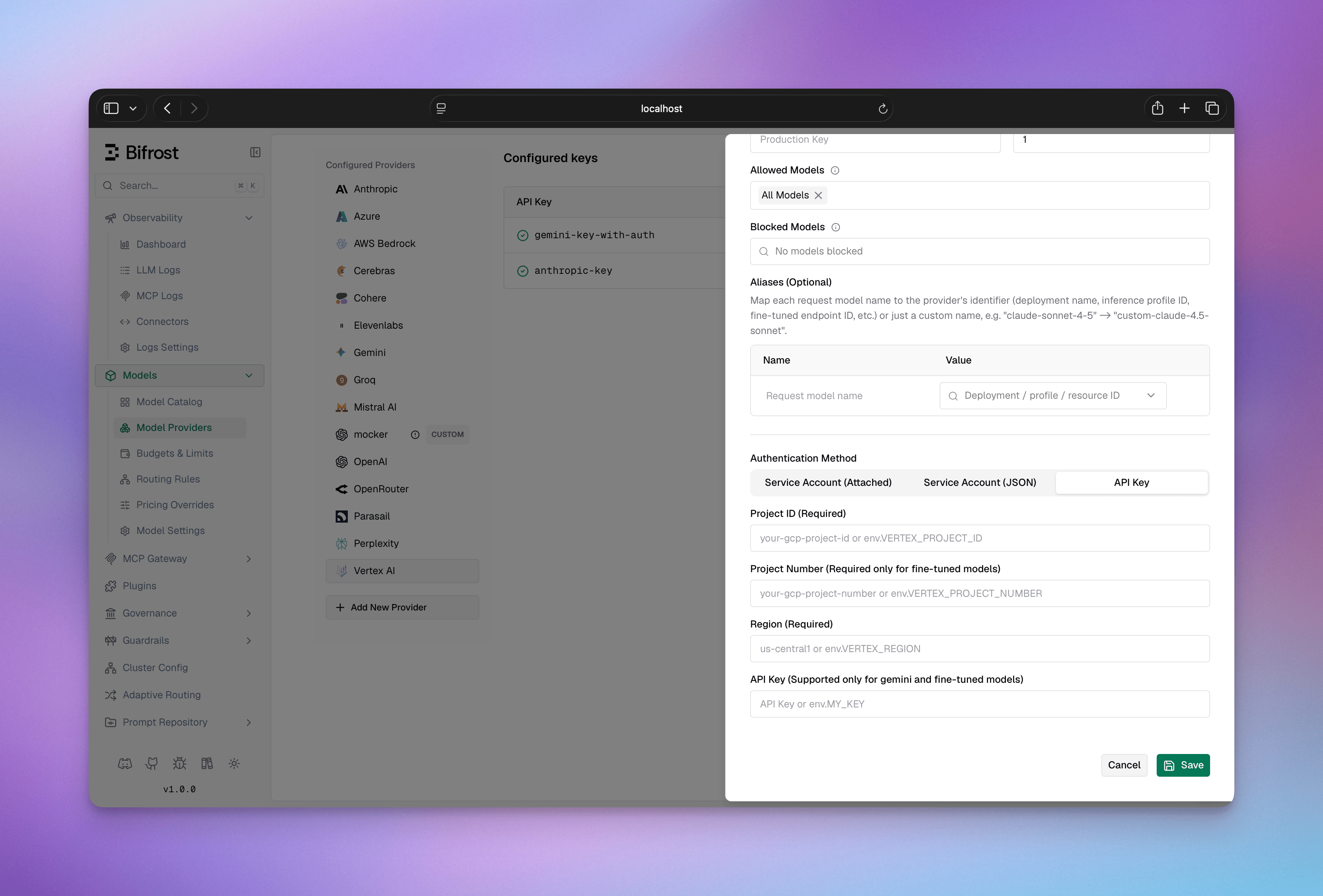
- Navigate to “Model Providers” → “Configurations” → “Google Vertex”
- Click “Add Key” (or edit an existing key)
- Under Authentication Method, select “API Key”
- Set API Key: Your Vertex AI API key
- Set Project ID: Your Google Cloud project ID
- Set Project Number (Required only for fine-tuned models): Your GCP project number; leave blank for standard models
- Set Region: e.g.,
us-central1 - Configure Aliases: Map short names to fine-tuned model IDs (e.g.,
my-model→123456789) - Save
Vertex AI support for fine-tuned models is currently in beta. Requests to
non-Gemini fine-tuned models may fail, so please test and report any issues.
vertex_key_config fields:
Key-level fields:
4. AWS Workload Identity Federation (EKS)
Setaws_workload_identity to federate the AWS identity attached to the Bifrost workload (EKS IRSA or Pod Identity, ECS task role, EC2 instance profile, or AWS_* env vars) into a GCP token through a Workload Identity Pool AWS provider. No GCP service account key and no static AWS key are required. Bifrost resolves AWS credentials with the AWS SDK default chain, signs an STS GetCallerIdentity request with them, and exchanges that signature at the GCP Security Token Service. The default chain consults static credentials first: if AWS_ACCESS_KEY_ID and AWS_SECRET_ACCESS_KEY are present in the workload environment, Bifrost federates as that key rather than as the attached role, so remove them when the attached role is the intended identity. When service_account_email is set the federated token is swapped for a service-account token; otherwise the federated principal calls Vertex AI directly.
This block takes precedence over auth_credentials and the two must not be combined. The AWS side and the GCP side are set up in AWS Workload Identity Federation below.
PROJECT_NUMBER in the audience is the numeric project number, not the project ID you enter elsewhere in the key. Look it up with:
env.VAR_NAME references. GovCloud and China partitions are supported: the STS host is derived from the region.
- Web UI
- API
- config.json
- Go SDK
- Navigate to “Model Providers” → “Configurations” → “Google Vertex”
- Click “Add Key” (or edit an existing key)
- Under Authentication Method, select “Workload Identity (AWS)”
- Set Project ID: Your Google Cloud project ID
- Set Region: e.g.,
us-central1 - Set Workload Identity Provider Audience: the
//iam.googleapis.com/...resource name of the AWS provider in your pool - (Optional) Set Service Account to Impersonate, AWS Region and AWS Role ARN to Assume
- Save
GKE Workload Identity Federation
When running Bifrost on GKE, Workload Identity Federation (WIF) lets pods authenticate to Vertex AI without managing service account keys. The pod inherits an IAM identity through the Kubernetes ServiceAccount, and Bifrost picks it up automatically via Application Default Credentials. What you need:- The GCP-side prerequisites below (API enabled, IAM service account, WIF binding)
- A Bifrost Vertex key using “Service Account (Attached)” auth - see Application Default Credentials for Web UI, API, config.json, and Go SDK setup. For Helm, see Helm - Google Vertex AI.
- The Kubernetes ServiceAccount annotated for WIF:
IAM_SA_NAME with the IAM Service Account created in Step 3 below.
GCP Prerequisites
Step 1: Enable the Vertex AI API
Step 1: Enable the Vertex AI API
The Vertex AI API must be enabled in your project. Search for WIF uses the IAM Credentials API for token exchange. Enable it as well:
aiplatform in the API Library or run:Step 2: Enable Workload Identity on GKE
Step 2: Enable Workload Identity on GKE
Autopilot clusters: WIF is always enabled. Skip this step.Standard clusters: Enable the workload identity pool and GKE metadata server:Verify:
Step 3: Create an IAM Service Account and grant Vertex access
Step 3: Create an IAM Service Account and grant Vertex access
Create a dedicated IAM Service Account (or use an existing one) and grant it the Vertex AI User role:
Step 4: Bind the Kubernetes ServiceAccount to the IAM Service Account
Step 4: Bind the Kubernetes ServiceAccount to the IAM Service Account
Allow the Kubernetes ServiceAccount to impersonate the IAM Service Account:Replace If deploying with the Bifrost Helm chart, set the annotation via
NAMESPACE and KSA_NAME with your Bifrost pod’s namespace and Kubernetes ServiceAccount name.Then annotate the Kubernetes ServiceAccount so GKE knows which IAM identity to map:serviceAccount.annotations in your values file - see Helm - Google Vertex AI for the full example.Verify
From inside the Bifrost pod, confirm the GKE metadata server returns a token:NAMESPACE and POD_NAME with your Bifrost namespace and any running Bifrost pod name (e.g., bifrost-0 for a StatefulSet or use kubectl get pods -n NAMESPACE to find it).
A JSON response with an access_token field confirms WIF is working. Then send a request through Bifrost to a Vertex model (e.g., vertex/gemini-2.5-flash) to verify end-to-end.
Troubleshooting
AWS Workload Identity Federation
When running Bifrost on AWS (EKS, ECS, EC2), Workload Identity Federation lets the workload’s IAM role authenticate to Vertex AI without a GCP service account key. GCP trusts your AWS account through a Workload Identity Pool AWS provider; Bifrost proves the workload’s identity with a signed STSGetCallerIdentity request and receives a GCP token in return.
What you need:
- The GCP-side prerequisites below (APIs enabled, pool and AWS provider, IAM grant)
- An IAM role attached to the Bifrost workload: an IRSA or EKS Pod Identity role on EKS, an ECS task role, or an EC2 instance profile. It needs no AWS permissions for this flow;
sts:GetCallerIdentityis always allowed. Do not also setAWS_ACCESS_KEY_ID/AWS_SECRET_ACCESS_KEYin the pod: the SDK default chain prefers static credentials over the attached role, and the exchange would then run as that key. - A Bifrost Vertex key using “Workload Identity (AWS)” auth - see AWS Workload Identity Federation (EKS) for Web UI, API, config.json, and Go SDK setup. For Helm, see Helm - Google Vertex AI.
GCP Prerequisites (AWS)
Step 1: Enable the required APIs
Step 1: Enable the required APIs
sts.googleapis.com performs the token exchange. iamcredentials.googleapis.com is only used when you impersonate a service account (service_account_email).Step 2: Create a Workload Identity Pool and an AWS provider
Step 2: Create a Workload Identity Pool and an AWS provider
audience for the Bifrost key is the provider’s full resource name:projects/... value with //iam.googleapis.com/ if the command omits it.Step 3: Grant Vertex AI access
Step 3: Grant Vertex AI access
Pick one of the two models. The principal in both is the pool-scoped identity of your AWS role:Option A - direct access (no service account). Leave Option B - impersonate a service account. Set
service_account_email empty in the Bifrost key and grant the role directly:service_account_email in the Bifrost key, give the service account Vertex access, and let the federated principal impersonate it:Step 4: Attach the IAM role to the Bifrost workload (EKS)
Step 4: Attach the IAM role to the Bifrost workload (EKS)
With IRSA, annotate the Kubernetes ServiceAccount and let the EKS webhook inject the web identity token:With EKS Pod Identity, two prerequisites come first. The cluster needs the Pod Identity Agent add-on, which is what actually hands credentials to the pod:And the IAM role’s trust policy must let the EKS Pod Identity service assume it and tag the session (an IRSA-style OIDC trust policy does not work here):Then create the association:Either way the pod receives a credentials source the AWS SDK default chain understands. A region is not guaranteed: IRSA on EKS usually injects
AWS_REGION, but a self-managed webhook may not, and Pod Identity does not set one. If neither the environment nor instance metadata provides a region, set aws_region in the key or AWS_REGION in the pod. If deploying with the Bifrost Helm chart, set the annotation via serviceAccount.annotations - see Helm - Google Vertex AI.Verify (AWS)
From inside the Bifrost pod, confirm the AWS identity is the expected role:vertex/gemini-2.5-flash). In GCP, the Cloud Audit Log entry for the Vertex call identifies the caller under protoPayload.authenticationInfo. With direct access and the google.subject=assertion.arn mapping above, principalSubject is principal://iam.googleapis.com/projects/PROJECT_NUMBER/locations/global/workloadIdentityPools/POOL_ID/subject/arn:aws:sts::AWS_ACCOUNT_ID:assumed-role/BIFROST_ROLE_NAME/SESSION. With impersonation, principalEmail is the service account email and the federated AWS identity appears as principalSubject inside serviceAccountDelegationInfo[]. The principalSet://.../attribute.aws_role/... form from Step 3 is the IAM binding target and does not appear as the logged identity.
Troubleshooting (AWS)
Beta Headers
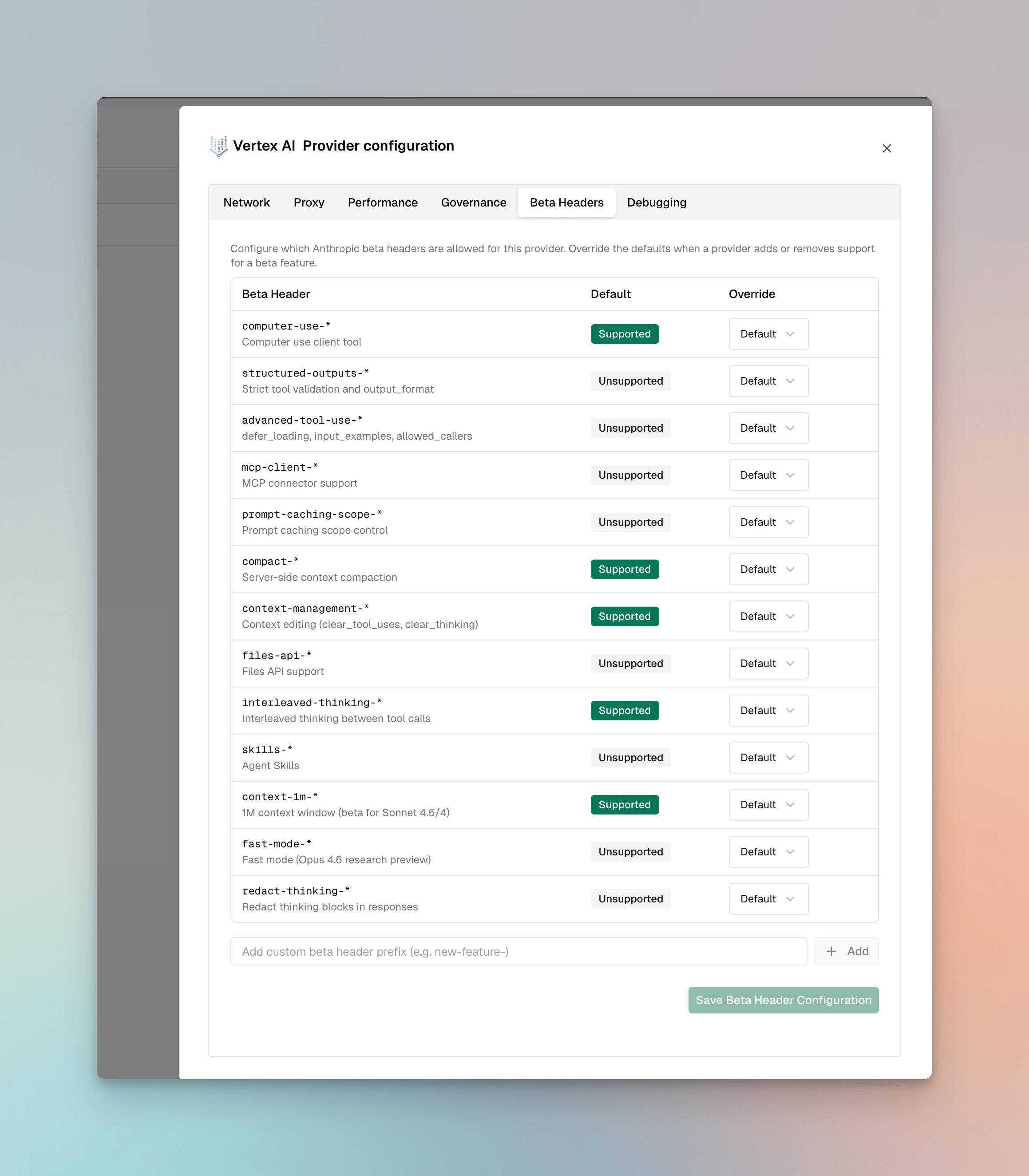
For Anthropic models on Vertex AI, Bifrost validatesanthropic-beta headers and drops unsupported headers from the request.
Supported: computer-use-*, compact-*, context-management-*, interleaved-thinking-*, context-1m-*
Not supported: structured-outputs-*, advanced-tool-use-*, mcp-client-*, prompt-caching-scope-*, files-api-*, skills-*, fast-mode-*, redact-thinking-*
You can override these defaults per provider via the Beta Headers tab in provider configuration or via beta_header_overrides. See the full support matrix in the Anthropic provider docs.
1. Chat Completions
Request Parameters
Core Parameter Mapping
Key Configuration
The key configuration for Vertex requires Google Cloud credentials:project_id- GCP project ID (required)region- GCP region for API endpoints (required)- Examples:
us-central1,us-west1,eu-west1,global
- Examples:
auth_credentials- Service account JSON credentials (optional if using default credentials)aws_workload_identity- AWS → GCP Workload Identity Federation block; takes precedence overauth_credentials(see section 4)
Authentication Methods
-
Service Account JSON (recommended for production)
-
Application Default Credentials (for local development)
- Requires
GOOGLE_APPLICATION_CREDENTIALSenvironment variable - Leave
auth_credentialsempty
- Requires
-
AWS Workload Identity Federation (Bifrost running on AWS)
Gemini Models
When using Google’s Gemini models, Bifrost converts requests to Gemini’s API format.Parameter Mapping for Gemini
All Gemini-compatible parameters are supported. Special handling includes:- System prompts: Converted to Gemini’s system message format
- Tool usage: Mapped to Gemini’s function calling format
- Streaming: Uses Gemini’s streaming protocol
Anthropic Models (Claude)
When using Anthropic models through Vertex AI, Bifrost converts requests to Anthropic’s message format.Parameter Mapping for Anthropic
All Anthropic-standard parameters are supported:- Reasoning/Thinking:
reasoningparameters converted tothinkingstructure - System messages: Extracted and placed in separate
systemfield - Tool message grouping: Consecutive tool messages merged
- API version: Automatically set to
vertex-2023-10-16for Anthropic models
Special Notes for Vertex + Anthropic
- Responses API uses special
/v1/messagesendpoint anthropic_versionautomatically set tovertex-2023-10-16- Minimum reasoning budget: 1024 tokens
- Model field removed from request (Vertex uses different identification)
prompt_cache.auto_injectapplies to Claude models only. Vertex serves Claude and Gemini side by side, and only Claude takes a per-block cache marker; Gemini caches through acachedContentresource instead, so injection is a no-op there. See Prompt caching.
Region Selection
The region determines the API endpoint:
Availability varies by region. Check GCP documentation for model availability.
Multi-region-only models
Some models (e.g. Claude Opus 4.7/4.8) are published only on Google’s multi-region pool endpoints. When such a model is requested with a single US or Europe region, Bifrost automatically promotes the call to the matching pool endpoint (aiplatform.us.rep.googleapis.com / aiplatform.eu.rep.googleapis.com) and rewrites the locations/ path segment to us / eu. Set force_single_region: true on the Vertex key (or per-deployment) to disable this and keep the exact region you configured — for example when you serve these models from a single region via provisioned throughput. Endpoint rewrites are emitted at debug log level.
Streaming
Streaming format depends on model type:- Gemini models: Standard Gemini streaming with server-sent events
- Anthropic models: Anthropic message streaming format
2. Responses API
The Responses API is available for both Anthropic (Claude) and Gemini models on Vertex AI.Request Parameters
Core Parameter Mapping
Gemini Models
For Gemini models, conversion follows Gemini’s Responses API format.Anthropic Models (Claude)
For Anthropic models, conversion follows Anthropic’s message format:instructionsbecomes system messagereasoningmapped tothinkingstructure
Configuration
- Gateway
- Go SDK
Special Handling
- Endpoint:
/v1/messages(Anthropic format) anthropic_versionset tovertex-2023-10-16automatically- Model and region fields removed from request
- Raw request body passthrough supported
3. Embeddings
Embeddings are supported for Gemini and other models that support embedding generation.Request Parameters
Core Parameters
Advanced Parameters
Useextra_params for embedding-specific options:
- Gateway
- Go SDK
Embedding Parameters
Task Type Effects
Different task types optimize embeddings for specific use cases:RETRIEVAL_DOCUMENT- Optimized for documents in retrieval systemsRETRIEVAL_QUERY- Optimized for queries searching documentsSEMANTIC_SIMILARITY- Optimized for semantic similarity tasksCLASSIFICATION- For classification tasksCLUSTERING- For clustering tasks
Response Conversion
Embeddings response includes vectors and truncation information:values- Embedding vector as floatsstatistics.token_count- Input token countstatistics.truncated- Whether input was truncated due to length
4. Image Generation
Image Generation is supported for Gemini and Imagen on Vertex AI. The provider automatically routes to the appropriate format based on the model type.Request Parameters
Core Parameter Mapping
Model Type Detection
Vertex automatically detects the model type and uses the appropriate conversion:- Gemini Models: Uses Gemini format (same as Gemini Image Generation)
- Imagen Models: Uses Imagen format (detected via
IsImagenModel())
Configuration
- Gateway
- Go SDK
Request Conversion
Vertex converts requests based on model type:- Gemini Models: Uses
gemini.ToGeminiImageGenerationRequest()- same conversion as standard Gemini (see Gemini Image Generation) - Imagen Models: Uses
gemini.ToImagenImageGenerationRequest()- Imagen-specific format with size/aspect ratio conversion
map[string]interface{} and the region field is removed before sending to Vertex API.
Response Conversion
- Gemini Models: Responses converted using
GenerateContentResponse.ToBifrostImageGenerationResponse()- same as standard Gemini - Imagen Models: Responses converted using
GeminiImagenResponse.ToBifrostImageGenerationResponse()- Imagen-specific format
Endpoint Selection
The provider automatically selects the endpoint based on model type:- Fine-tuned models:
/v1beta1/projects/{projectNumber}/locations/{region}/endpoints/{deployment}:generateContent - Imagen models:
/v1/projects/{projectID}/locations/{region}/publishers/google/models/{model}:predict - Gemini models:
/v1/projects/{projectID}/locations/{region}/publishers/google/models/{model}:generateContent
Streaming
Image generation streaming is not supported by Vertex AI.5. Image Edit
Image Edit is supported for Gemini and Imagen models on Vertex AI. The provider automatically routes to the appropriate format based on the model type. Request ParametersRequest Conversion Vertex uses the same conversion functions as Gemini:
- Gemini Models: Uses
gemini.ToGeminiImageEditRequest()- same conversion as standard Gemini (see Gemini Image Edit) - Imagen Models: Uses
gemini.ToImagenImageEditRequest()- Imagen-specific format with edit mode mapping and mask configuration (see Gemini Image Edit)
ConfigurationError.
Request Body Processing:
- All request bodies are converted to
map[string]interface{}for Vertex API compatibility - The
regionfield is removed before sending to Vertex API - For Gemini models, unsupported fields are stripped via
stripVertexGeminiUnsupportedFields()(removesidfrom function_call and function_response)
- Gemini Models: Responses converted using
GenerateContentResponse.ToBifrostImageGenerationResponse()- same as standard Gemini - Imagen Models: Responses converted using
GeminiImagenResponse.ToBifrostImageGenerationResponse()- Imagen-specific format
- Gemini models:
/v1/projects/{projectID}/locations/{region}/publishers/google/models/{model}:generateContent - Imagen models:
/v1/projects/{projectID}/locations/{region}/publishers/google/models/{model}:predict
6. List Models
Request Parameters
None required. Automatically uses project_id and region from key config.Response Conversion
Lists models available in the specified project and region with metadata and deployment information:Custom vs Non-Custom Models
To provide a complete model listing experience, Bifrost performs multi-pass model discovery:Three-Pass Model Discovery
-
First Pass - Custom Models from API Response
- Queries Vertex AI’s List Models API
- Returns only custom fine-tuned models deployed to your project
- Custom models are identified by having deployment values that contain only digits
- Example:
"deployment": "1234567890"
-
Second Pass - Non-Custom Models from Aliases
- Adds standard foundation models from your
aliasesconfiguration - Non-custom models have alphanumeric deployment values (e.g.,
gemini-pro,claude-3-5-sonnet) - Filters by the key-level
modelsallowlist, if specified - Example:
"deployment": "gemini-2.0-flash"
- Adds standard foundation models from your
-
Third Pass - Allowed Models Not in Aliases
- Adds models specified in
modelsthat weren’t in thealiasesmap - Ensures all explicitly allowed models appear in the list
- Uses the model name itself as the deployment value
- Skips digit-only model IDs (reserved for custom models)
- Adds models specified in
Model Filtering Logic
- If
modelsis empty and no aliases are configured: No models are returned - If
modelsis empty but aliases are configured: Only aliased models are returned - If
modelsis["*"]: All models from all three passes are included (unrestricted) - If
modelsis non-empty: Only models/aliases whose request names appear inmodelsare included - Duplicate Prevention: Each model ID is tracked to prevent duplicates across passes
Model Name Formatting
Non-custom models from aliases and allowed models are automatically formatted for display:gemini-pro→ “Gemini Pro”claude-3-5-sonnet→ “Claude 3 5 Sonnet”gemini_2_flash→ “Gemini 2 Flash”
Example Configuration
- With Custom Models Only
- With Foundation Models
- With Allowed Models Filter
Pagination
Model listing is paginated automatically. If more than 100 models exist,next_page_token will be present. Bifrost handles pagination internally.
Caveats
Project ID and Region Required
Project ID and Region Required
Severity: High Behavior: Both project_id and region required for all
operations Impact: Request fails without valid GCP project/region
configuration Code:
vertex.go:127-138OAuth2 Token Management
OAuth2 Token Management
Severity: Medium Behavior: Tokens cached and automatically refreshed
when expired Impact: First request slightly slower due to auth; cached for
subsequent requests Code:
vertex.go:34-55Anthropic Model Detection
Anthropic Model Detection
Severity: Medium Behavior: Automatic detection of Anthropic vs Gemini
models Impact: Different conversion logic applied transparently Code:
vertex.go chat/responses endpointsModel-Specific Responses API Handling
Model-Specific Responses API Handling
Severity: Low Behavior: Responses API automatically routes to
Anthropic or Gemini implementation based on model Impact: Different
conversion logic applied transparently per model Code:
vertex.go:836-1080Anthropic Version Lock
Anthropic Version Lock
Severity: Low Behavior:
anthropic_version always set to
vertex-2023-10-16 for Claude Impact: Cannot override Anthropic version
for Claude on Vertex Code: utils.go:33, 71Embeddings Precision Preservation
Embeddings Precision Preservation
Severity: Low Behavior: Vertex returns float64 embeddings, and Bifrost
preserves that precision in normalized embedding responses Impact: No
precision loss in the
/v1/embeddings response path Code:
embedding.go:84-91List Models API Returns Only Custom Models
List Models API Returns Only Custom Models
Severity: High Behavior: Vertex AI’s List Models API only returns
custom fine-tuned models, NOT foundation models Impact: Bifrost performs
three-pass discovery to include foundation models from aliases and the
key-level
models allowlist Why: This is a Vertex AI API limitation -
foundation models must be explicitly configured Code: models.go:76-217Configuration
HTTP Settings: OAuth2 authentication with automatic token refresh | Region-specific endpoints | Max Connections 5000 | Max Idle 60 seconds Scope:https://www.googleapis.com/auth/cloud-platform
Endpoint Format: https://{region}-aiplatform.googleapis.com/v1/projects/{project}/locations/{region}/{resource}
Note: For global region, endpoint is https://aiplatform.googleapis.com/v1/projects/{project}/locations/global/{resource}
Video Generation
Vertex AI routes video generation through Gemini’s Veo models using thepredictLongRunning endpoint. All parameters are identical to Gemini Video Generation.
Only Veo models are supported (e.g.,
veo-2.0-generate-001). Passing a
non-Veo model name returns a configuration error.