

Looking for comprehensive provider routing documentation?For a detailed guide covering how adaptive load balancing works with governance routing, the two-level architecture (provider + key selection), Model Catalog integration, and example scenarios, see the Provider Routing Guide.This page focuses on the technical implementation and performance characteristics of adaptive load balancing.
Overview
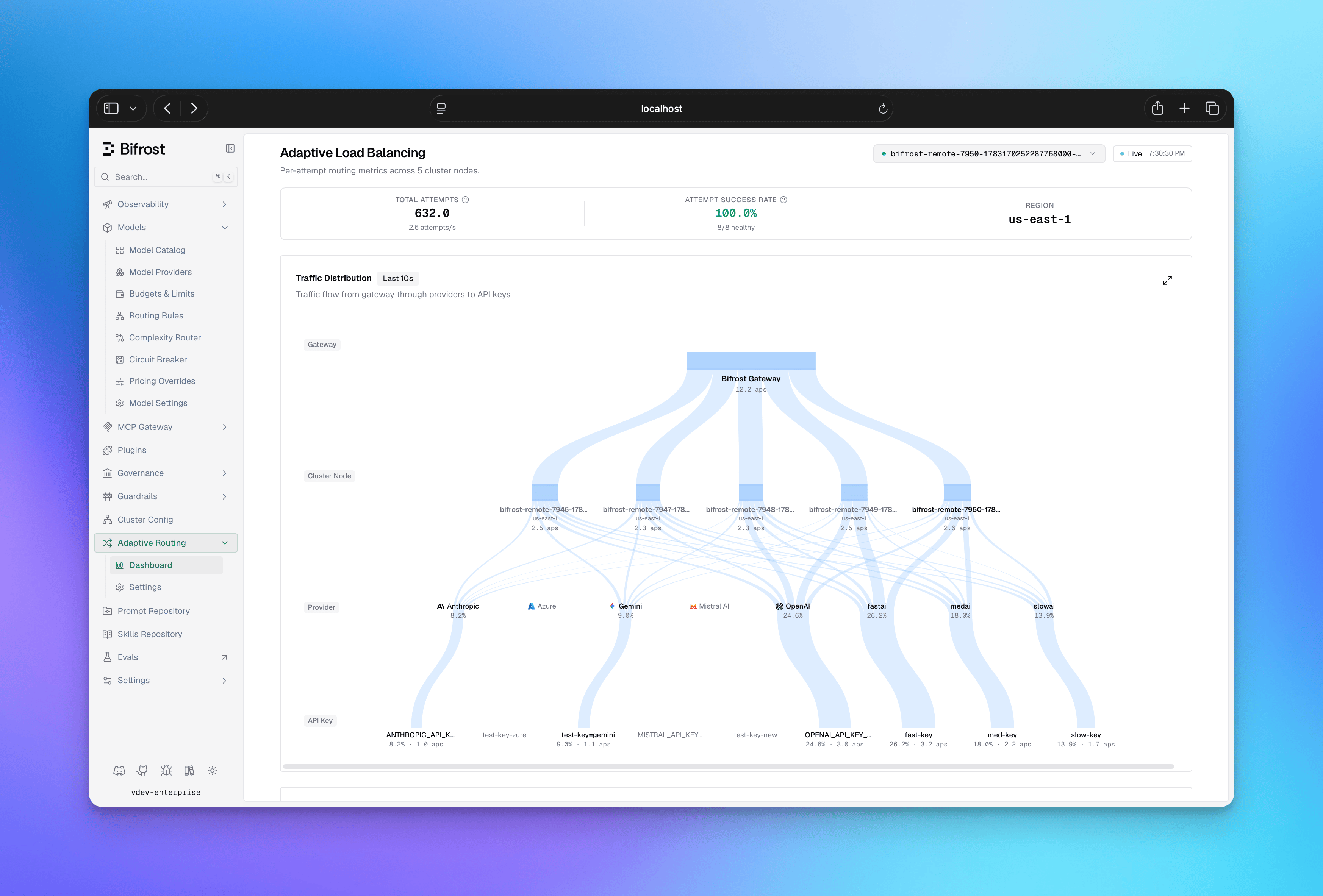
Architecture
The load balancing system operates at two levels:- Direction-level (provider + model): Decides which provider to use for a given model
- Route-level (provider + model + key): Decides which API key to use within a provider
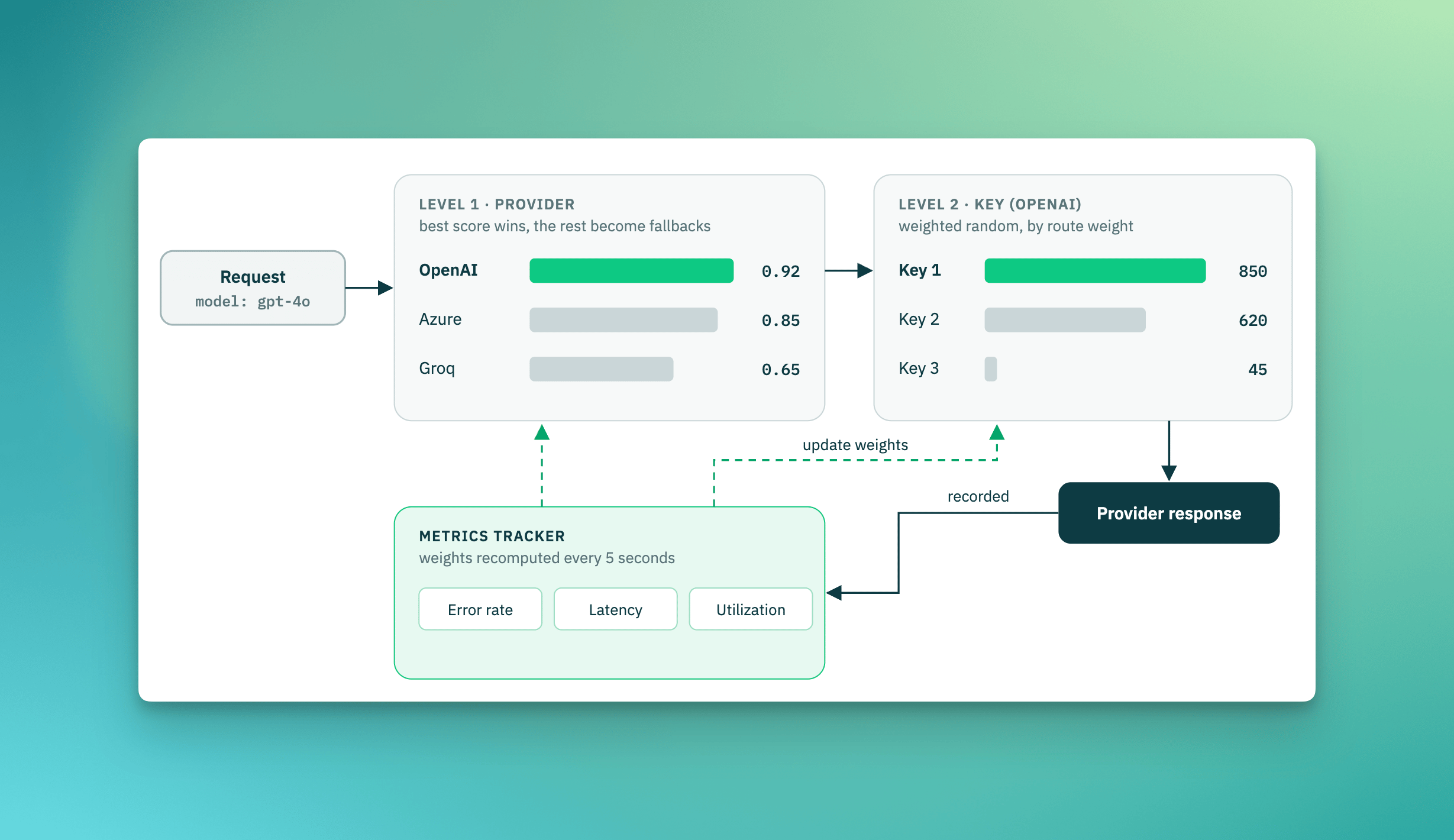
How Weight Calculation Works
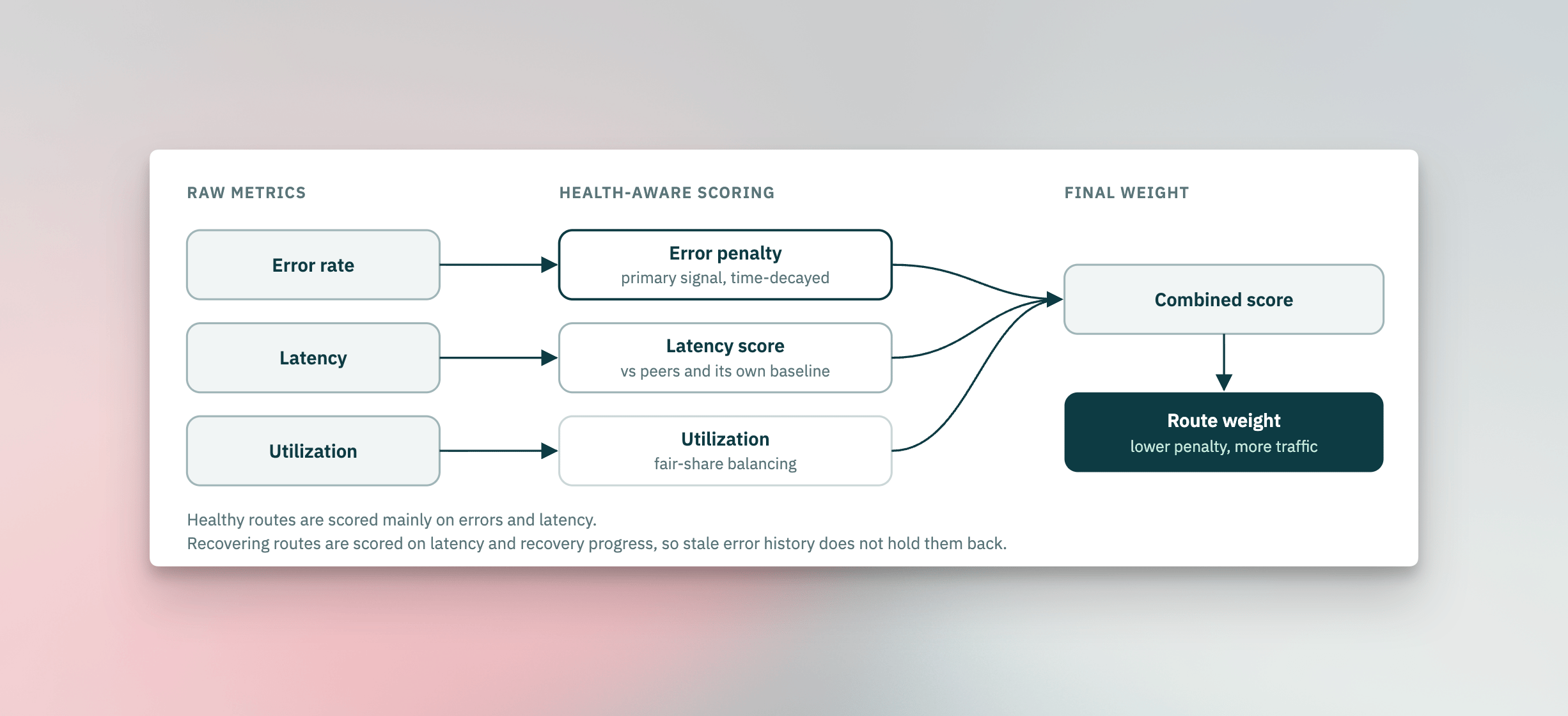
Every 5 seconds, the system recalculates a weight for each route from its recent performance. Three signals drive the score, in priority order:
Which signals apply depends on the route’s health: healthy routes are scored mainly
on errors and latency, while routes that are actively recovering are scored on latency
and recovery progress so they aren’t held back by stale error history. The combined
score maps to a weight on a fixed scale - lower penalties mean higher weight, which
means more traffic - with a floor so no route is ever fully starved while it has a
chance to recover.
Key Capabilities
- Automatic Route Health Management: Routes automatically transition between 4 states (Healthy, Degraded, Failed, Recovering) based on error rates and latency. A provider refusal that names the key fails its route at once, without waiting for the error rate to build (see Held Keys). No manual intervention required when a route fails or recovers.
- Fair Traffic Distribution: The system prevents any single route from being overloaded while still favoring better performers. Low-weight routes always get minimum traffic to prove recovery.
- Real-time Dashboard: Provides visibility into weight distribution, performance metrics (error rates, latency), state transitions, and actual vs expected traffic per route.
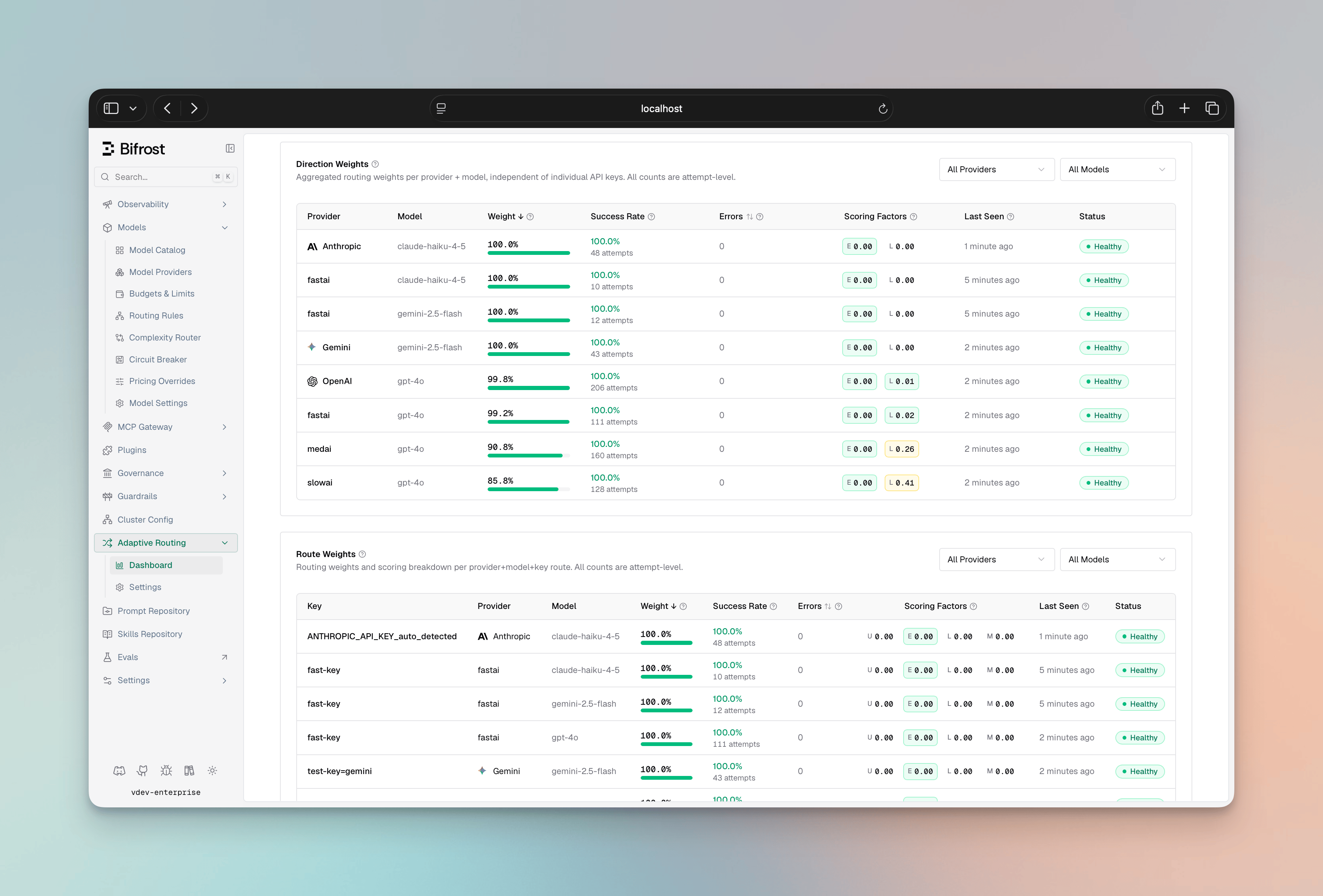
- Multi-Factor Scoring: Routes are scored from error rate (the primary, time-decayed signal), a token-aware latency score (comparing a route both to its peers and to its own recent baseline), and fair-share utilization. Recovering routes are scored to favor quick, safe recovery.
- Smart Key Selection: Traffic is distributed probabilistically - higher-weight keys get proportionally more requests, but lower-weight keys keep a small share so potentially-recovered routes are continually re-probed instead of always picking the single best route.
- Performance Thresholds: Pre-tuned error-rate and latency triggers drive state transitions - a route is marked Degraded at the first signs of trouble, Failed on sustained errors, a rate-limit hit, or a provider refusal of the key, and promoted back to Healthy only after it has proven itself on live traffic.
Held Keys
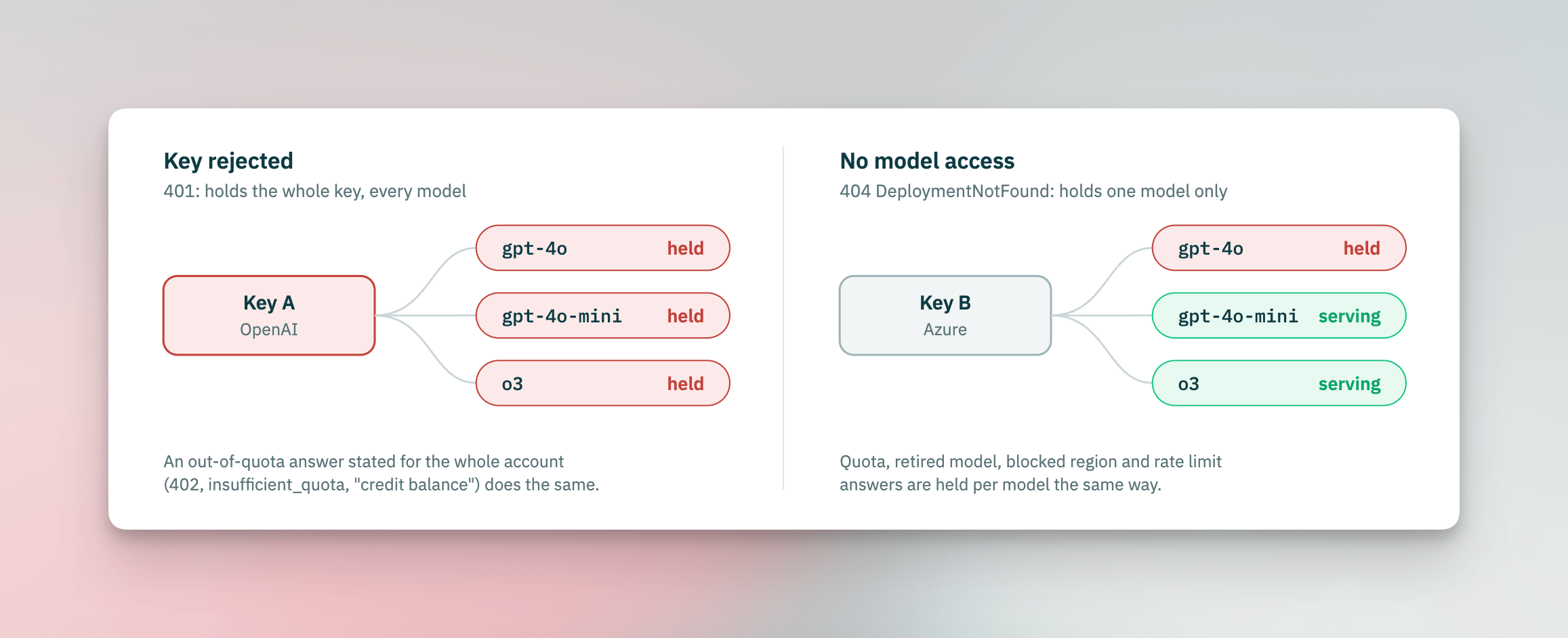
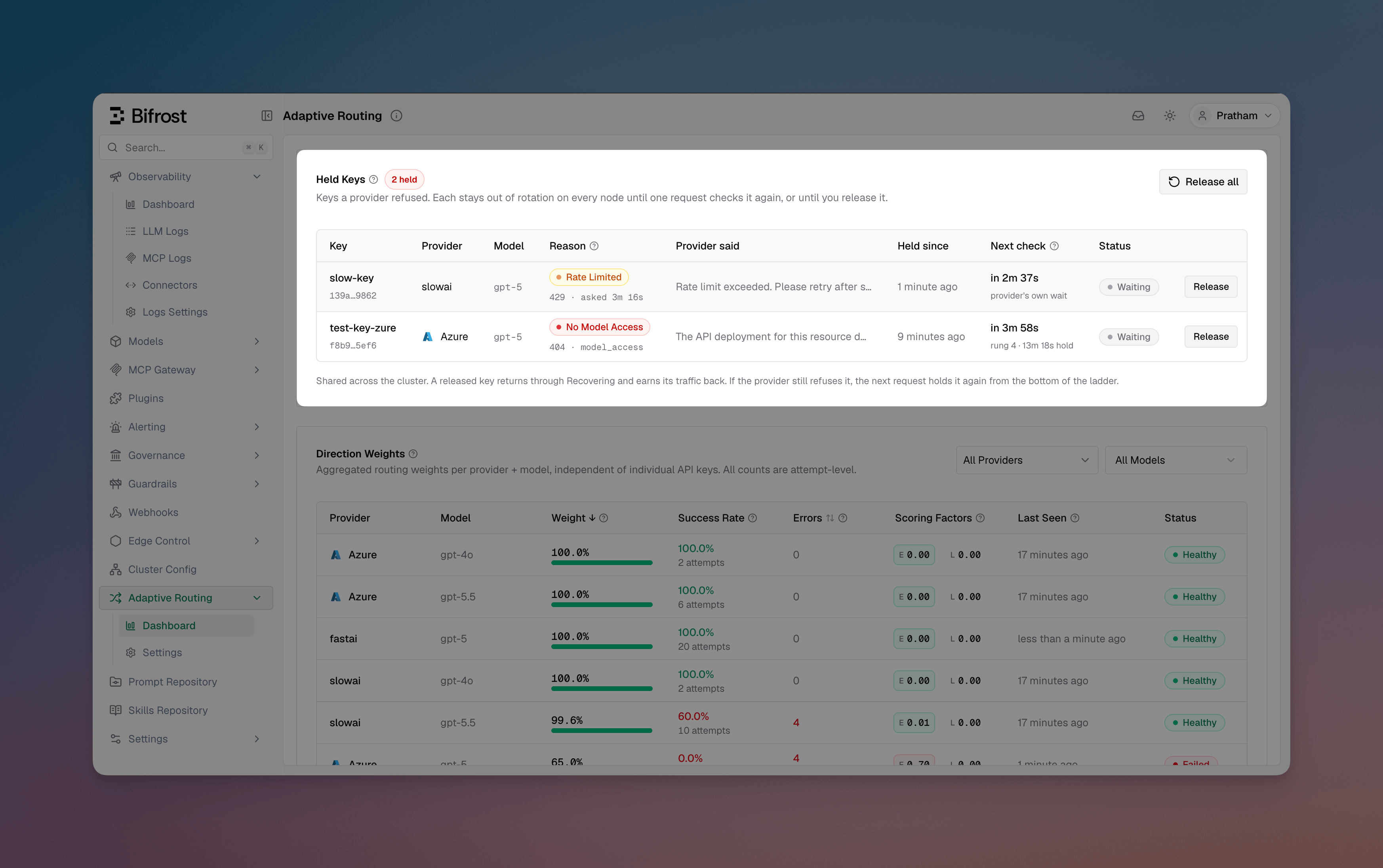
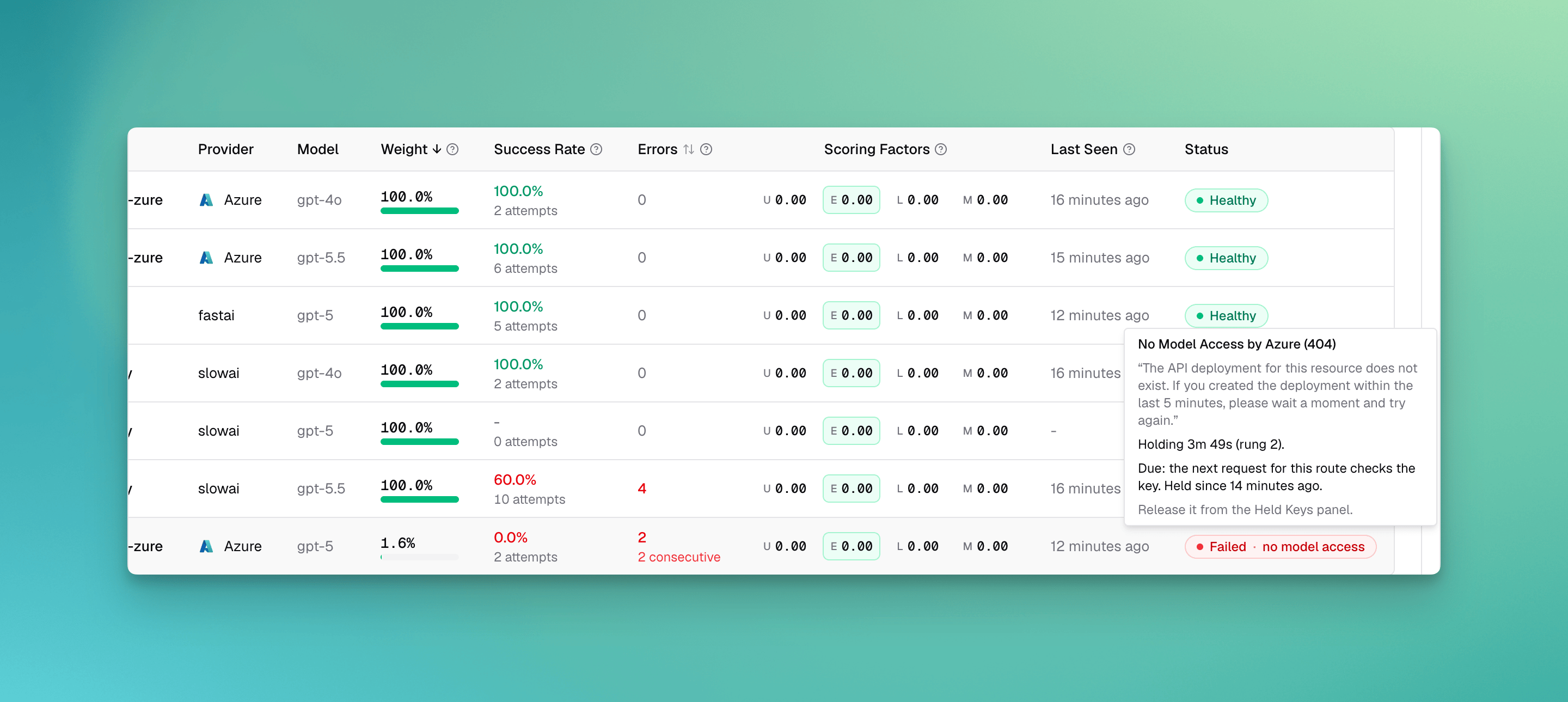
Error rates describe how a key is doing. Some provider answers say more than that: the key is rejected, its account is out of credit, it cannot reach the model, the model was retired, the provider refuses the region, or it is rate limited. These answers repeat on every request until something changes, so waiting for an error rate to climb only costs requests. When a provider gives one of these answers, the load balancer holds the key. A held key is out of rotation, and its route reads Failed on the dashboard with the provider’s reason. After a wait, one request is let through to check whether the key serves again. The failure classes come from how Bifrost classifies failures.What holds a key
Transient failures (network errors, and a
500, 502, 503, 504 or 529 that does not report a rate limit), request errors (caller_fault) and unrecognised failures (unknown) never hold a key: none of them says anything about the key. A 5xx that reports a rate limit is classed rate_limit and holds the model like a 429.
A hold on one model leaves the key serving its other models. A key that cannot reach gpt-4o on one Azure resource keeps serving gpt-4o-mini there.
How long a key is held
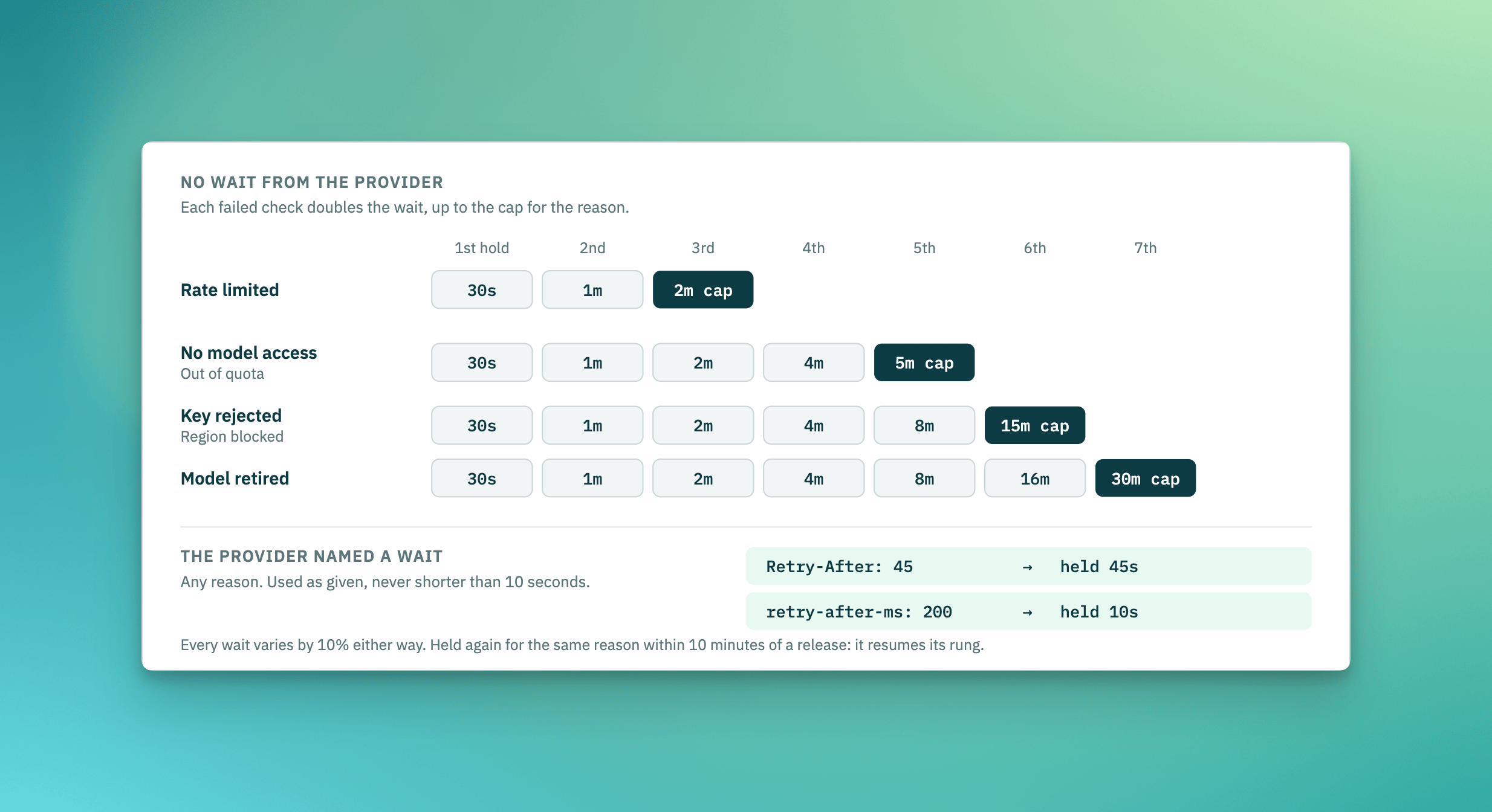
- When the provider says how long to wait, that wait is used, whatever the reason. It is read from the same headers and error details as provider retry hints, and never shorter than 10 seconds, so a provider that answers with a sub-second wait does not get a refused call every second.
- Otherwise the wait climbs a ladder. It starts at 30 seconds and doubles after each failed check, up to the cap for the reason in the table above.
- A wait from the ladder varies by 10 percent either way, so the nodes of a cluster do not all check the same key in the same second. A wait the provider stated is used as given, so the 10 second floor always holds.
- Refusals from requests that were already in flight when the key was held do not lengthen the wait. Only a failed check moves the key up the ladder.
- A key that a served request released, and that is held again for the same reason within 10 minutes, resumes the rung it was on, so a key that keeps flapping does not restart at 30 seconds each time. After an operator releases it or the key is edited, the ladder starts again at 30 seconds.
Checking a held key again
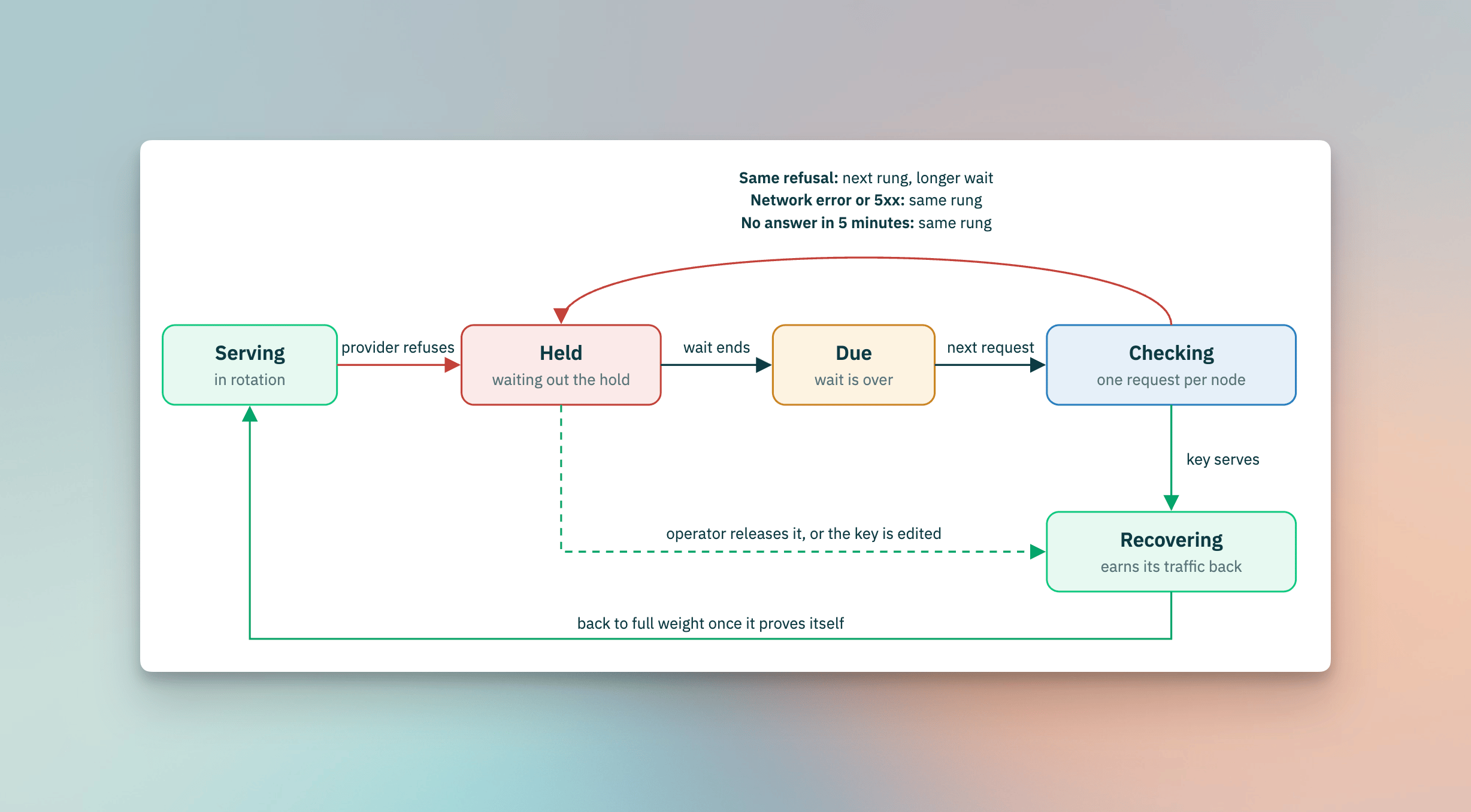
When the wait is over, the key is due. The next request that could use the key is let through to it, and only that one request per node: every other request keeps skipping the key until the answer comes back.
A check that never reports back, such as a cancelled request, frees the slot after 5 minutes. Any other request that reaches the key, for example one pinned to it, settles the hold the same way a check does.
When every key is held
- Key selection skips held keys. When every key of the provider that could serve the request is held, the request is sent anyway rather than refused inside Bifrost, and its answer counts as a check.
- Provider selection treats a provider as Failed for a model only when every configured key that can serve that model is failed. A key that has never been sent a request keeps the provider in rotation, since it is exactly the key selection would try next.
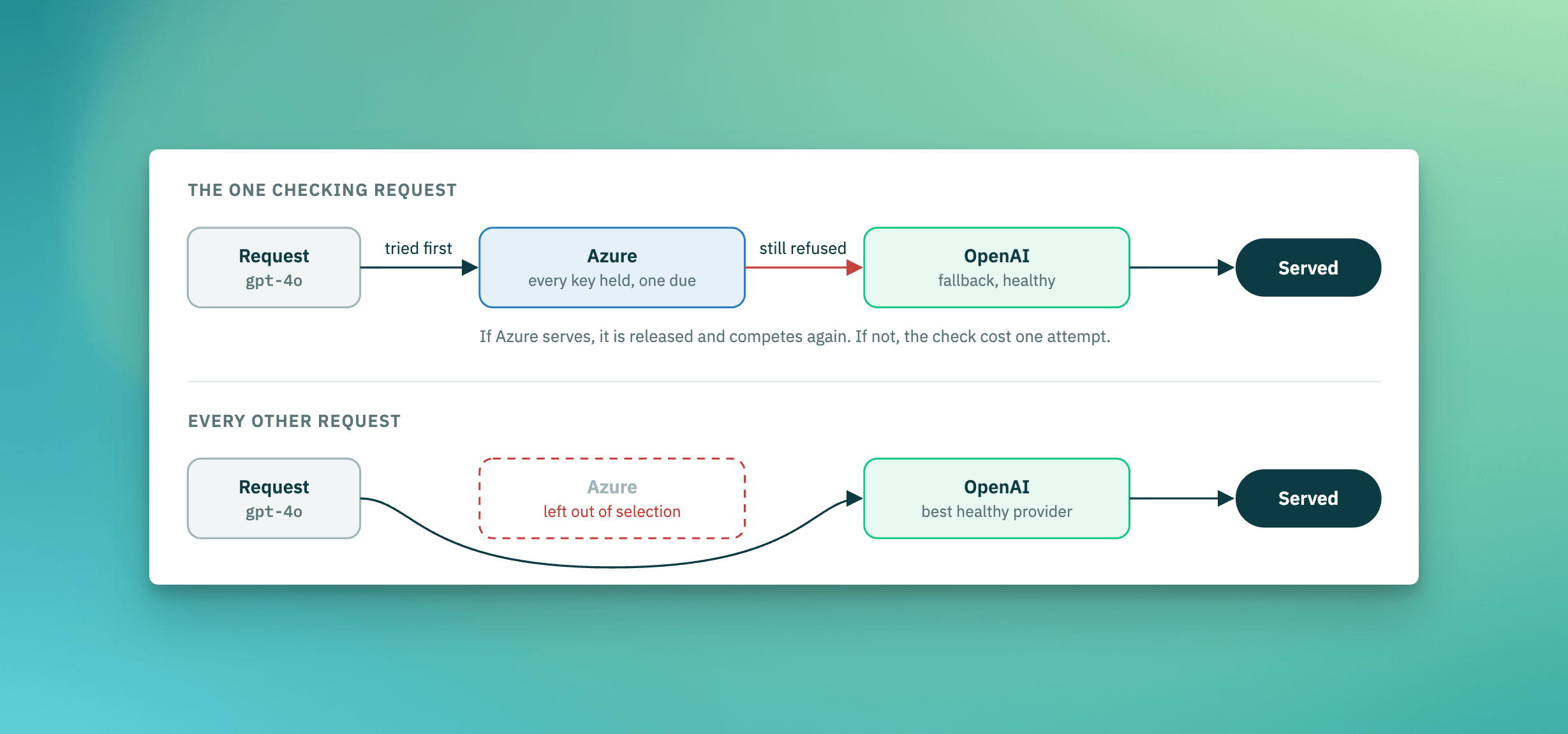
- A provider held on every key is left out of selection. When one of its keys is due, one request is sent to that provider first, with the healthy providers as its fallbacks, so a key that is still refused costs one attempt and the request is served by the fallback. A request pinned to a provider is used as the check only when Re-route failed providers is on.
Releasing held keys
Besides a check that succeeds, a hold is released when:- An operator releases it, from the dashboard or the API below. The key goes to Recovering and starts again from the bottom of the ladder if the provider refuses it again.
- The key is edited, or the vault rotates it. Every hold on the key is released on every node, for every model, since the provider’s answers applied to the key as it was. A request that was already in flight with the old key cannot hold the edited one.
- The key or its provider is deleted. Its holds and its load balancing metrics are removed on every node.
The response lists the holds the release dropped and how many. Each hold counts once: a hold on the whole key is named by its key id, however many models it covered, and a hold on one model by its route:
count of 0 means nothing named was held, for example because the hold lapsed before the release reached it. The release is sent to every other node, which release the same holds.
Across the cluster
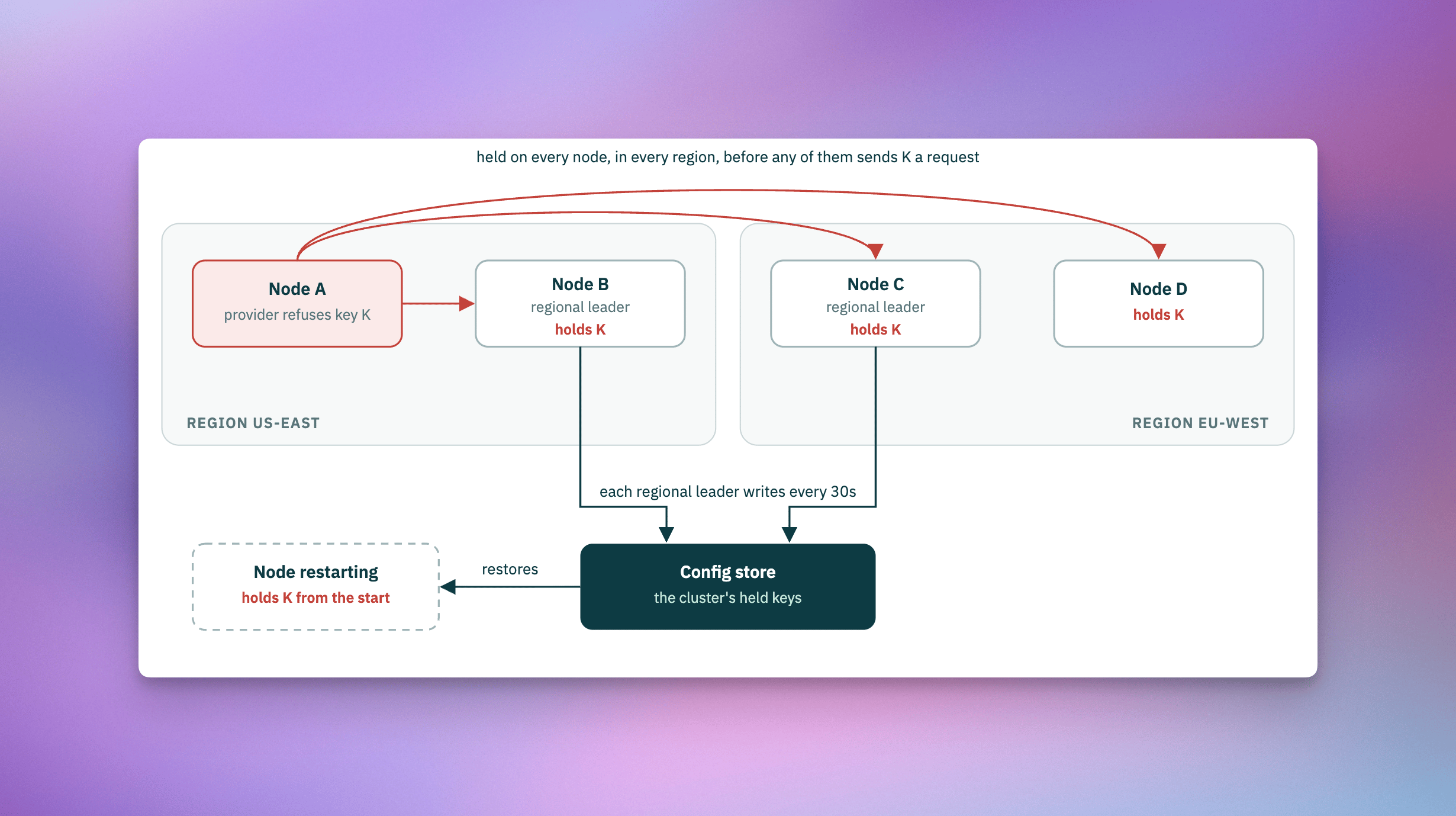
- Every node holds a key another node saw refused, in every region, before it sends that key a request of its own. A provider almost always refuses a key the same way from every region, so unlike metrics, holds are not kept per region.
- A region block can differ between regions. When the provider blocks the gateway’s own address (OpenAI checks only that), nodes in different regions can get different answers, but the hold is still shared: the key is held on every node until its next check. A check from a node the provider accepts releases it everywhere, and the next refusal from a blocked region holds it again.
- Each node lets its own one request through when a key is due. A failed check on one node moves the key up the ladder on every node, and a release on any node, by a check or an operator, releases it everywhere.
- Holds survive restarts. Each regional leader writes the cluster’s held keys to the config store every 30 seconds, and a node that starts restores them, so a restarted fleet does not send every refused key a new request to find out again.
In the request logs
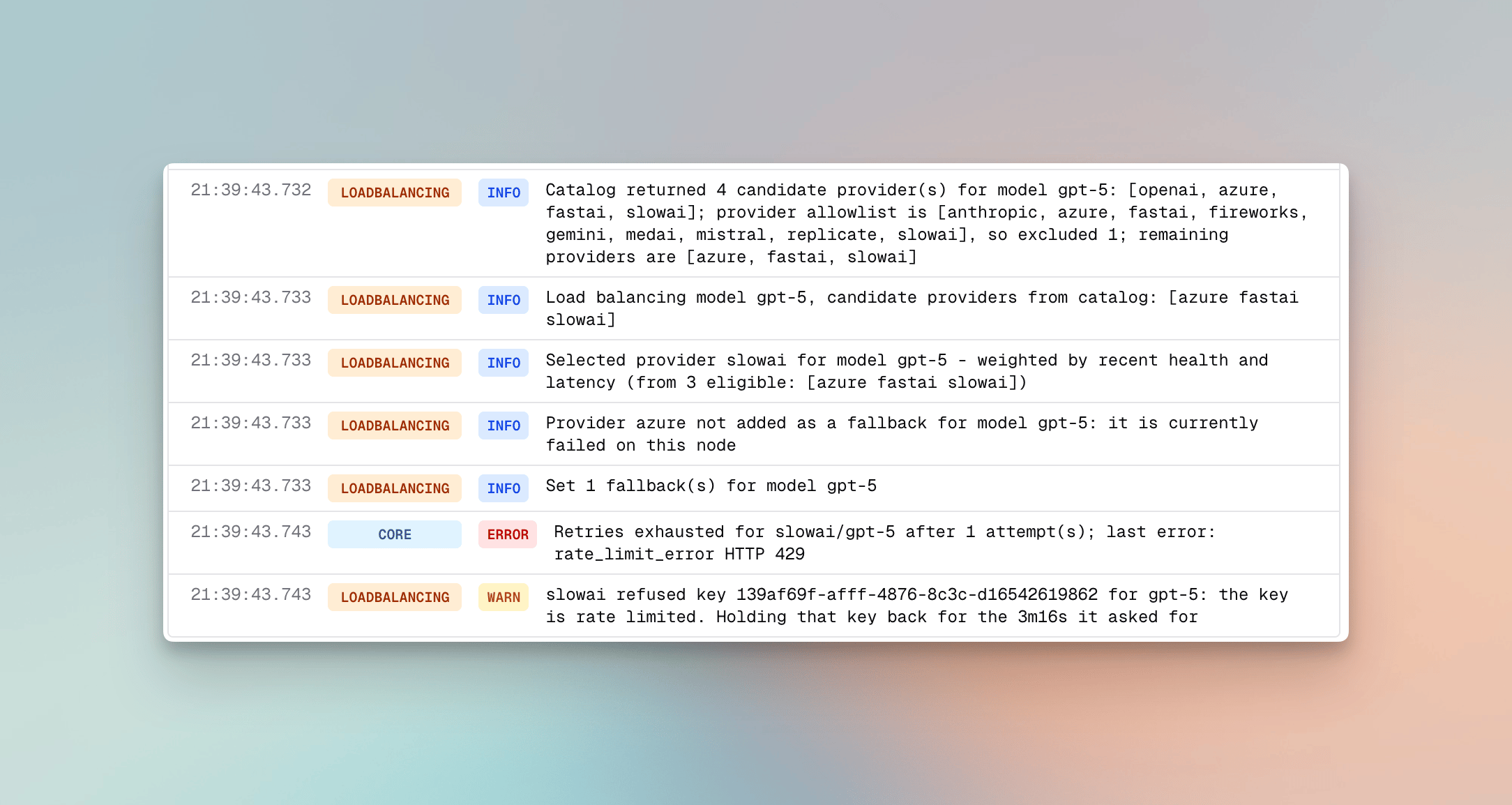
Every hold, check and release is written to the request’s routing engine logs, so a request that skipped a key says why:It asked for 1s; holding that key back for 10s, which is the shortest hold the load balancer applies.
Incidents
The Incidents page lists every problem adaptive routing saw on a provider, model or key in the selected time window, combined across nodes. Open it from Adaptive Routing > Incidents in the sidebar. You need View on theAdaptiveRouter resource, same as the dashboard.
Four figures at the top cover the incidents that match your filters:
Each table row shows when the incident opened, how long it lasted, its status, where it happened and its cause. Click a row for details, then use Previous and Next to move through the list.
Status is one of Needs attention, Recovering, Mitigated, Waiting for traffic, Resolved or No longer observed. Waiting for traffic means no requests have reached the route since it recovered, so recovery is unconfirmed. No longer observed means history lost track of the incident before it closed.
The sidebar filters by status, provider, model, reason, worst state, scope, region and node. Each value shows how many incidents it matches. Scope is a key on a model, a provider and model, or a key across all models. Search matches provider, model or key. You can sort by needs attention, newest, oldest, longest or shortest.
The page shares the dashboard’s time window, Live mode and filters, so switching between them keeps your view. The same list is available through the API.
Listing incidents through the API
GET /api/adaptive-routing/history/issues returns the issues in a time window. With no limit or offset it returns all of them, which is what the dashboard uses. With either one it returns a filtered, sorted page, which is what the Incidents page uses.
statuses takes attention, recovering, mitigated, resolved, unobserved or waiting. unobserved means the issue is resolved but history lost sight of its nodes. waiting means it was recovering when requests stopped arriving. Neither counts toward median time to resolve, since neither is confirmed recovered.
A paged response adds these fields:
Configuration
Adaptive load balancing ships pre-tuned - the scoring weights, thresholds, recovery timings, and the waits for held keys are not user-configurable by design. The operator controls are five switches, plus releasing held keys:
The two selection switches default on; the three pinned/failed-direction behaviors are opt-in. All five take effect live (no restart) and propagate across the cluster.
All five switches can be changed from the dashboard, via the API, or in
config.json.
- Web UI
- API
- config.json
The load balancer settings page exposes the five switches; changes apply immediately across the cluster.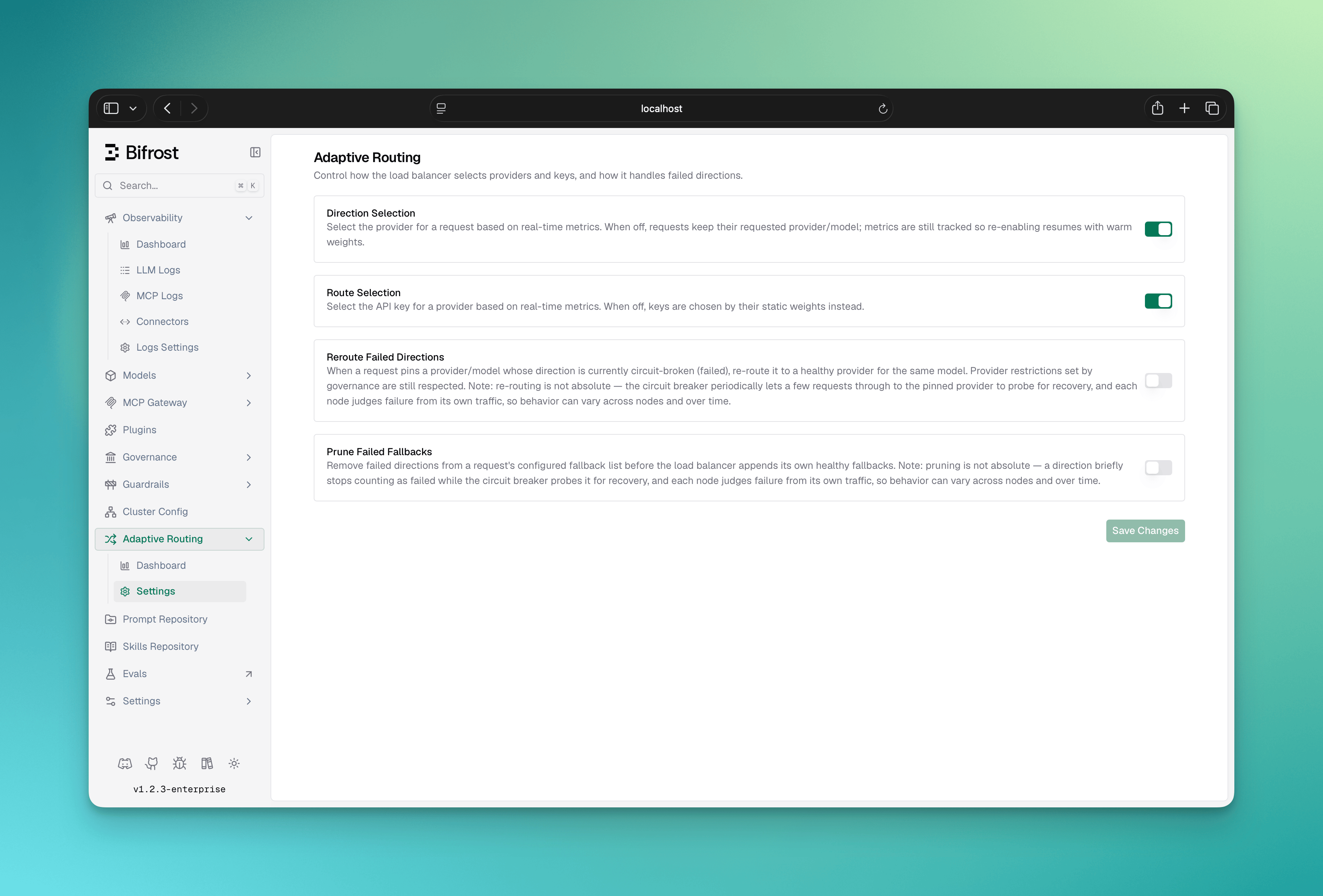
Scope & Limitations
- Pinned requests can still get fallbacks: With provider selection on and the append-fallbacks-to-pinned switch enabled, a request that pins a provider — even one that configures no fallbacks of its own — receives the healthy providers eligible for its model as a fallback chain, so a failing primary fails over instead of failing fast. With the switch off (its default), a pinned request’s provider and fallback list are left untouched, unless Re-route failed providers is on and the pinned provider is circuit-broken.
- A caller’s own key goes wherever the request is first routed: When direct keys are allowed and a request brings its own provider key (
x-bf-direct-key), Bifrost uses that key on the first provider the request is routed to, whichever provider that is. Re-routing a failed pinned provider, the provider picked for a request that names none, and a circuit breaker redirect to another provider can therefore send the caller’s key to a provider it was not issued for. Fallbacks never carry it: every fallback attempt, appended or configured, runs on that provider’s own registered keys. For traffic that brings its own keys, pin the provider and keep re-routing and cross-provider circuit breaker policies off. - Per-node weights: Each node load-balances on its own observed metrics. The metric signal shared across nodes is a rate-limit (TPM) backoff, and only within the same region - there is no global weight consensus or cross-region coordination. This is deliberate: latency and error profiles differ per region, so importing another region’s metrics would pollute a node’s view of route health. Held keys are the exception: a provider refuses a key the same way from every region, so a hold is shared with every node.
- ~5-second adaptation: Weight and state changes lag live traffic by up to one recompute cycle. Immediate per-request resilience (key rotation and fallback failover) is handled separately and is not subject to this delay.
- Optimistic cold start: A brand-new key or provider enters at full weight and competes at roughly fair share before it has been measured, then self-corrects within a cycle or two.
- Relative, not absolute: Routes are ranked against their peers, not against a fixed latency or cost target. The system is not cost- or org-aware, and does not accept manual per-key weights for the adaptive path - those concerns are handled by governance routing. It is not session-aware either: Session Affinity runs after it and keeps a session on its provider and key only while the load balancer still offers them and has not marked them as failed, and the circuit breaker is not holding that key back.
Next Steps
- Provider Routing - How adaptive load balancing composes with governance rules and the Model Catalog
- Circuit Breaker - Header-signal-driven failover to a backup provider when a primary endpoint degrades
- Retries and Fallbacks - How each failure is classified, which decides whether it holds a key
- Clustering - Multi-node deployments and the gossip layer behind cross-node load balancer signals