> ## Documentation Index
> Fetch the complete documentation index at: https://bifrost-dev.mintlify.site/llms.txt
> Use this file to discover all available pages before exploring further.
# AWS Bedrock
> AWS Bedrock API conversion guide - model families, parameter mapping, message handling, reasoning/thinking, tool conversion, and AWS authentication
## Overview
AWS Bedrock supports multiple model families (Claude, Nova, Mistral, Llama, Cohere, Titan) with significant structural differences from OpenAI's format. Bifrost performs extensive conversion including:
* **Model family detection** - Automatic routing based on model ID to handle family-specific parameters
* **Parameter renaming** - e.g., `max_completion_tokens` → `maxTokens`, `stop` → `stopSequences`
* **Reasoning transformation** - `reasoning` parameters mapped to model-specific thinking/reasoning structures (Anthropic, Nova)
* **Tool restructuring** - Function definitions converted to Bedrock's ToolConfig format
* **Message conversion** - System message extraction, tool message grouping, image format adaptation (base64 only)
* **AWS authentication** - Automatic SigV4 request signing with credential chain support
* **Structured output** - `response_format` converted to specialized tool definitions
* **Service tier & guardrails** - Support for Bedrock-specific performance and safety configurations
### Model Family Support
| Family | Chat | Responses | Text | Embeddings | Image Generation | Image Edit | Image Variation |
| ---------------------- | ---- | --------- | ---- | ---------- | ---------------- | ---------- | --------------- |
| **Claude (Anthropic)** | ✅ | ✅ | ✅ | ❌ | ❌ | ❌ | ❌ |
| **Nova (Anthropic)** | ✅ | ✅ | ❌ | ❌ | ✅ | ✅ | ✅ |
| **Mistral** | ✅ | ✅ | ✅ | ❌ | ❌ | ❌ | ❌ |
| **Llama** | ✅ | ✅ | ❌ | ❌ | ❌ | ❌ | ❌ |
| **Cohere** | ✅ | ✅ | ❌ | ✅ | ❌ | ❌ | ❌ |
| **Titan** | ✅ | ✅ | ❌ | ✅ | ✅ | ✅ | ✅ |
| **Stability AI** | ❌ | ❌ | ❌ | ❌ | ✅ | ✅ | ❌ |
### Supported Operations
| Operation | Non-Streaming | Streaming | Endpoint |
| -------------------- | ------------- | --------- | ---------------------- |
| Chat Completions | ✅ | ✅ | `converse` |
| Responses API | ✅ | ✅ | `converse` |
| Text Completions | ✅ | ❌ | `invoke` |
| Embeddings | ✅ | - | `invoke` |
| Files | ✅ | - | S3 (via SDK) |
| Batch | ✅ | - | `batch` |
| List Models | ✅ | - | `listFoundationModels` |
| Image Generation | ✅ | ❌ | `invoke` |
| Image Edit | ✅ | ❌ | `invoke` |
| Image Variation | ✅ | ❌ | `invoke` |
| Count Tokens | ✅ | - | `count-tokens` |
| Speech (TTS) | ❌ | ❌ | - |
| Transcriptions (STT) | ❌ | ❌ | - |
**Unsupported Operations** (❌): Speech (TTS) and Transcriptions (STT) are not supported by the upstream AWS Bedrock API. These return `UnsupportedOperationError`.
**Limitations**: Images must be in base64 or data URI format (remote URLs not supported). Text completion streaming is not supported.
***
## Setup & Configuration
Bedrock supports both SigV4-based authentication and direct API-key authentication. Four authentication flows are supported - choose the one that matches your deployment environment.
The `aliases` field (mapping model names to inference profile IDs, ARNs, or
deployment identifiers) requires **v1.5.0-prerelease2 or later**. On v1.4.x,
use `deployments` inside `bedrock_key_config` instead - see the [v1.5.0
Migration
Guide](/migration-guides/v1.5.0#breaking-change-9-provider-deployments-removed-migrate-to-aliases)
for details.
### 1. Explicit Credentials
Provide `access_key` and `secret_key` directly. Optionally include `session_token` for temporary credentials.
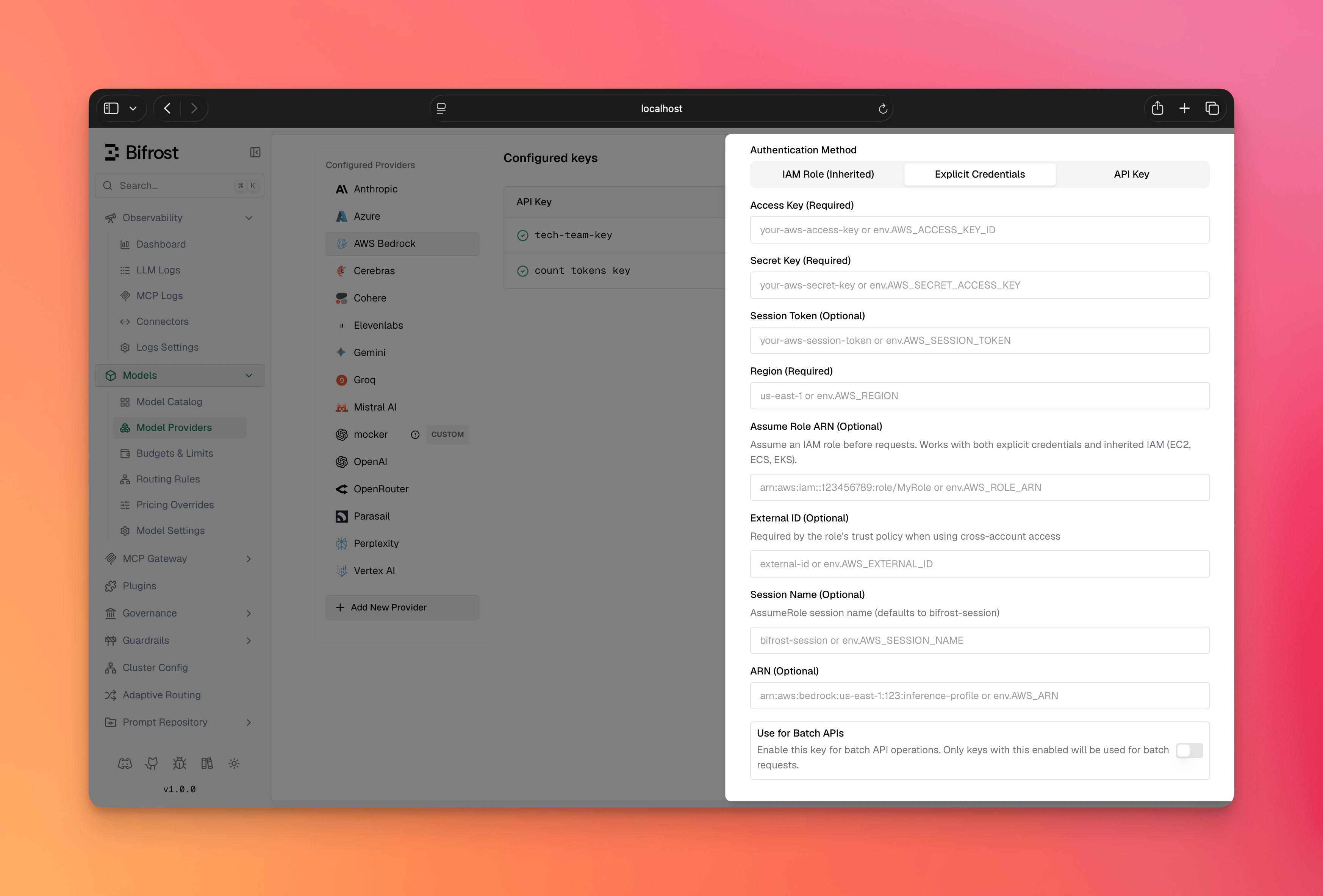 1. Navigate to **"Model Providers"** → **"Configurations"** → **"AWS Bedrock"**
2. Click **"Add Key"** (or edit an existing key)
3. Under **Authentication Method**, select **"Explicit Credentials"**
4. Set **Access Key**: Your AWS access key ID
5. Set **Secret Key**: Your AWS secret access key
6. Set **Session Token** (Optional): For temporary/assumed credentials
7. Set **Region**: e.g., `us-east-1`
8. Configure **Aliases**: Map model names to inference profile IDs - see [Inference Profiles & ARN Configuration](#inference-profiles--arn-configuration) when using inference profiles
9. Save
```bash theme={null}
# Step 1: Create the provider
curl -X POST http://localhost:8080/api/providers \
-H "Content-Type: application/json" \
-d '{"provider": "bedrock"}'
# Step 2: Create a key (Explicit Credentials)
curl -X POST http://localhost:8080/api/providers/bedrock/keys \
-H "Content-Type: application/json" \
-d '{
"name": "bedrock-key",
"models": ["*"],
"weight": 1.0,
"aliases": {
"claude-3-5-sonnet": "us.anthropic.claude-3-5-sonnet-20241022-v2:0"
},
"bedrock_key_config": {
"access_key": "env.AWS_ACCESS_KEY_ID",
"secret_key": "env.AWS_SECRET_ACCESS_KEY",
"session_token": "env.AWS_SESSION_TOKEN",
"region": "us-east-1"
}
}'
```
**On v1.4.x**, two differences apply:
* Pass `keys` directly in the `POST /api/providers` body - there is no separate `/api/providers/{provider}/keys` endpoint.
* Replace the top-level `aliases` with `"deployments"` inside `bedrock_key_config`:
```json theme={null}
"bedrock_key_config": {
"access_key": "env.AWS_ACCESS_KEY_ID",
"secret_key": "env.AWS_SECRET_ACCESS_KEY",
"region": "us-east-1",
"deployments": {
"claude-3-5-sonnet": "arn:aws:bedrock:us-east-1::foundation-model/..."
}
}
```
```json theme={null}
{
"providers": {
"bedrock": {
"keys": [
{
"name": "bedrock-key",
"models": ["*"],
"weight": 1.0,
"aliases": {
"claude-3-5-sonnet": "us.anthropic.claude-3-5-sonnet-20241022-v2:0"
},
"bedrock_key_config": {
"access_key": "env.AWS_ACCESS_KEY_ID",
"secret_key": "env.AWS_SECRET_ACCESS_KEY",
"session_token": "env.AWS_SESSION_TOKEN",
"region": "us-east-1"
}
}
]
}
}
}
```
On **v1.4.x**, use `deployments` inside `bedrock_key_config` instead of the
top-level `aliases` field.
```go theme={null}
func (a *MyAccount) GetKeysForProvider(ctx *context.Context, provider schemas.ModelProvider) ([]schemas.Key, error) {
switch provider {
case schemas.Bedrock:
return []schemas.Key{
{
Models: []string{"*"},
Weight: 1.0,
Aliases: schemas.KeyAliases{
"claude-3-5-sonnet": "us.anthropic.claude-3-5-sonnet-20241022-v2:0",
},
BedrockKeyConfig: &schemas.BedrockKeyConfig{
AccessKey: *schemas.NewSecretVar("env.AWS_ACCESS_KEY_ID"),
SecretKey: *schemas.NewSecretVar("env.AWS_SECRET_ACCESS_KEY"),
SessionToken: schemas.NewSecretVar("env.AWS_SESSION_TOKEN"),
Region: schemas.NewSecretVar("us-east-1"),
},
},
}, nil
}
return nil, fmt.Errorf("provider %s not supported", provider)
}
```
### 2. Inherited AWS Credentials / IAM Role
Uses AWS's default credential chain when static credentials are not configured. That includes IAM roles (IRSA in EKS, ECS task role, EC2 instance profile), environment variables (`AWS_ACCESS_KEY_ID`/`AWS_SECRET_ACCESS_KEY`), and shared credential files.
1. Navigate to **"Model Providers"** → **"Configurations"** → **"AWS Bedrock"**
2. Click **"Add Key"** (or edit an existing key)
3. Under **Authentication Method**, select **"Explicit Credentials"**
4. Set **Access Key**: Your AWS access key ID
5. Set **Secret Key**: Your AWS secret access key
6. Set **Session Token** (Optional): For temporary/assumed credentials
7. Set **Region**: e.g., `us-east-1`
8. Configure **Aliases**: Map model names to inference profile IDs - see [Inference Profiles & ARN Configuration](#inference-profiles--arn-configuration) when using inference profiles
9. Save
```bash theme={null}
# Step 1: Create the provider
curl -X POST http://localhost:8080/api/providers \
-H "Content-Type: application/json" \
-d '{"provider": "bedrock"}'
# Step 2: Create a key (Explicit Credentials)
curl -X POST http://localhost:8080/api/providers/bedrock/keys \
-H "Content-Type: application/json" \
-d '{
"name": "bedrock-key",
"models": ["*"],
"weight": 1.0,
"aliases": {
"claude-3-5-sonnet": "us.anthropic.claude-3-5-sonnet-20241022-v2:0"
},
"bedrock_key_config": {
"access_key": "env.AWS_ACCESS_KEY_ID",
"secret_key": "env.AWS_SECRET_ACCESS_KEY",
"session_token": "env.AWS_SESSION_TOKEN",
"region": "us-east-1"
}
}'
```
**On v1.4.x**, two differences apply:
* Pass `keys` directly in the `POST /api/providers` body - there is no separate `/api/providers/{provider}/keys` endpoint.
* Replace the top-level `aliases` with `"deployments"` inside `bedrock_key_config`:
```json theme={null}
"bedrock_key_config": {
"access_key": "env.AWS_ACCESS_KEY_ID",
"secret_key": "env.AWS_SECRET_ACCESS_KEY",
"region": "us-east-1",
"deployments": {
"claude-3-5-sonnet": "arn:aws:bedrock:us-east-1::foundation-model/..."
}
}
```
```json theme={null}
{
"providers": {
"bedrock": {
"keys": [
{
"name": "bedrock-key",
"models": ["*"],
"weight": 1.0,
"aliases": {
"claude-3-5-sonnet": "us.anthropic.claude-3-5-sonnet-20241022-v2:0"
},
"bedrock_key_config": {
"access_key": "env.AWS_ACCESS_KEY_ID",
"secret_key": "env.AWS_SECRET_ACCESS_KEY",
"session_token": "env.AWS_SESSION_TOKEN",
"region": "us-east-1"
}
}
]
}
}
}
```
On **v1.4.x**, use `deployments` inside `bedrock_key_config` instead of the
top-level `aliases` field.
```go theme={null}
func (a *MyAccount) GetKeysForProvider(ctx *context.Context, provider schemas.ModelProvider) ([]schemas.Key, error) {
switch provider {
case schemas.Bedrock:
return []schemas.Key{
{
Models: []string{"*"},
Weight: 1.0,
Aliases: schemas.KeyAliases{
"claude-3-5-sonnet": "us.anthropic.claude-3-5-sonnet-20241022-v2:0",
},
BedrockKeyConfig: &schemas.BedrockKeyConfig{
AccessKey: *schemas.NewSecretVar("env.AWS_ACCESS_KEY_ID"),
SecretKey: *schemas.NewSecretVar("env.AWS_SECRET_ACCESS_KEY"),
SessionToken: schemas.NewSecretVar("env.AWS_SESSION_TOKEN"),
Region: schemas.NewSecretVar("us-east-1"),
},
},
}, nil
}
return nil, fmt.Errorf("provider %s not supported", provider)
}
```
### 2. Inherited AWS Credentials / IAM Role
Uses AWS's default credential chain when static credentials are not configured. That includes IAM roles (IRSA in EKS, ECS task role, EC2 instance profile), environment variables (`AWS_ACCESS_KEY_ID`/`AWS_SECRET_ACCESS_KEY`), and shared credential files.
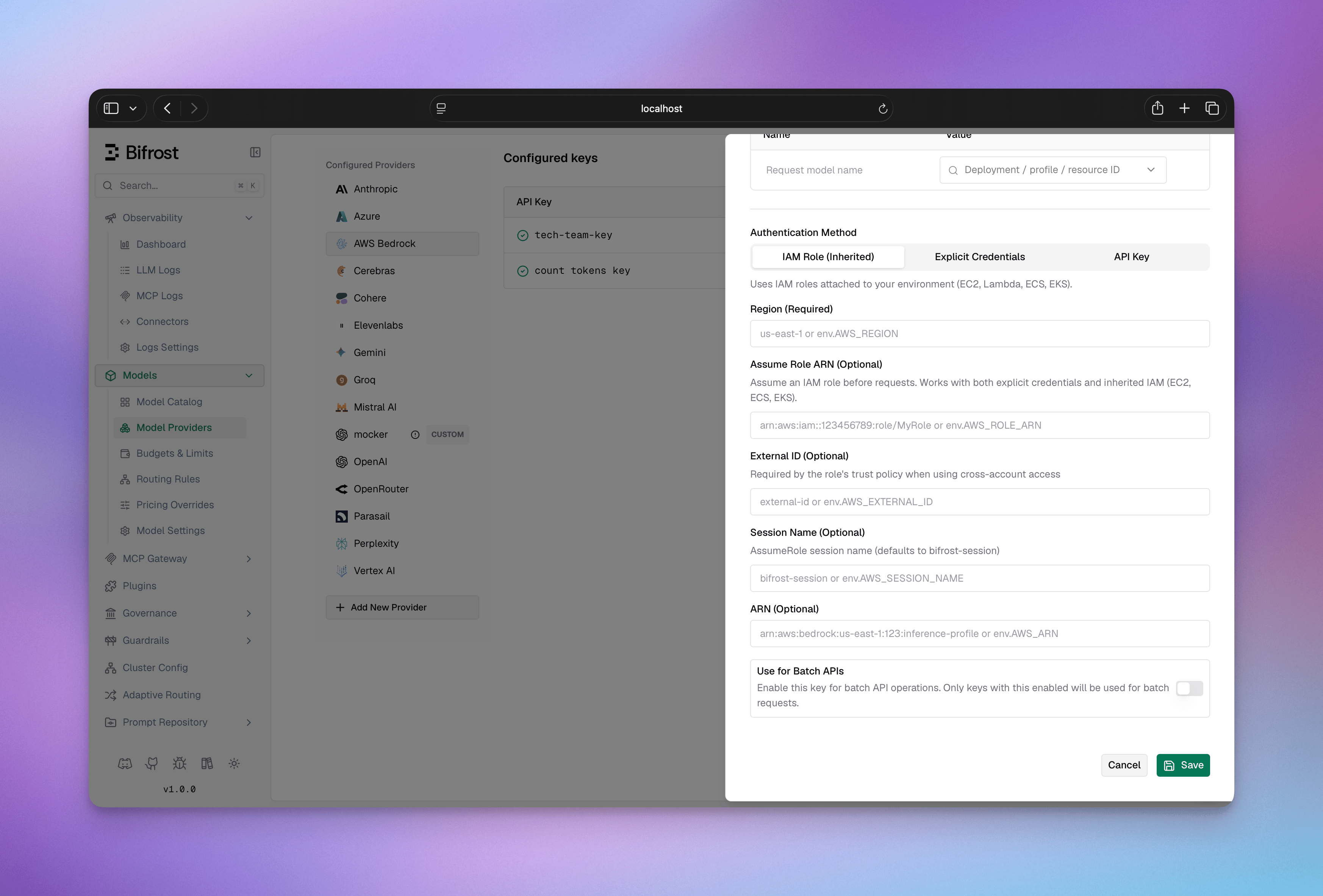 1. Navigate to **"Model Providers"** → **"Configurations"** → **"AWS Bedrock"**
2. Click **"Add Key"** (or edit an existing key)
3. Under **Authentication Method**, select **"IAM Role (Inherited)"**
4. Set **Region**: e.g., `us-east-1`
5. Configure **Aliases** if needed - see [Inference Profiles & ARN Configuration](#inference-profiles--arn-configuration) when using inference profiles
6. *(Optional)* Set **Assume Role ARN**: to assume an IAM role before signing (e.g., `arn:aws:iam::123456789012:role/BedrockRole`)
7. *(Optional)* Set **External ID**: required when the role's trust policy demands it
8. *(Optional)* Set **Session Name**: identifies the session in CloudTrail (default: `bifrost-session`)
9. Save
For system identity, leave steps 6–8 blank. Ensure your workload has an IAM role with Bedrock permissions attached (via IRSA, ECS task role, or EC2 instance profile), or that `AWS_ACCESS_KEY_ID`/`AWS_SECRET_ACCESS_KEY` are set in the environment.
```bash theme={null}
# Step 1: Create the provider
curl -X POST http://localhost:8080/api/providers \
-H "Content-Type: application/json" \
-d '{"provider": "bedrock"}'
# Step 2a: System identity - leave credentials empty
curl -X POST http://localhost:8080/api/providers/bedrock/keys \
-H "Content-Type: application/json" \
-d '{
"name": "bedrock-iam",
"models": ["*"],
"weight": 1.0,
"aliases": {
"claude-3-5-sonnet": "us.anthropic.claude-3-5-sonnet-20241022-v2:0"
},
"bedrock_key_config": {
"region": "us-east-1"
}
}'
# Step 2b: AssumeRole - add role_arn on top
curl -X POST http://localhost:8080/api/providers/bedrock/keys \
-H "Content-Type: application/json" \
-d '{
"name": "bedrock-assume-role",
"models": ["*"],
"weight": 1.0,
"bedrock_key_config": {
"region": "us-east-1",
"role_arn": "env.AWS_ROLE_ARN",
"external_id": "env.AWS_EXTERNAL_ID",
"session_name": "bifrost-session"
}
}'
```
**On v1.4.x**, two differences apply: - Pass `keys` directly in the `POST
/api/providers` body - there is no separate `/api/providers/{provider}/keys`
endpoint. - Replace the top-level `aliases` with `"deployments"` inside
`bedrock_key_config`.
```json theme={null}
{
"providers": {
"bedrock": {
"keys": [
{
"name": "bedrock-iam",
"models": ["*"],
"weight": 1.0,
"aliases": {
"claude-3-5-sonnet": "us.anthropic.claude-3-5-sonnet-20241022-v2:0"
},
"bedrock_key_config": {
"region": "us-east-1",
"role_arn": "env.AWS_ROLE_ARN",
"external_id": "env.AWS_EXTERNAL_ID",
"session_name": "bifrost-session"
}
}
]
}
}
}
```
Omit `role_arn`, `external_id`, and `session_name` for plain system identity
with no role assumption.
```go theme={null}
func (a *MyAccount) GetKeysForProvider(ctx *context.Context, provider schemas.ModelProvider) ([]schemas.Key, error) {
switch provider {
case schemas.Bedrock:
return []schemas.Key{
{
Models: []string{"*"},
Weight: 1.0,
Aliases: schemas.KeyAliases{
"claude-3-5-sonnet": "us.anthropic.claude-3-5-sonnet-20241022-v2:0",
},
BedrockKeyConfig: &schemas.BedrockKeyConfig{
// Leave AccessKey and SecretKey empty - resolved from IRSA/instance profile/env vars
Region: schemas.NewSecretVar("us-east-1"),
RoleARN: schemas.NewSecretVar("env.AWS_ROLE_ARN"), // optional
ExternalID: schemas.NewSecretVar("env.AWS_EXTERNAL_ID"), // optional
RoleSessionName: schemas.NewSecretVar("bifrost-session"), // optional
},
},
}, nil
}
return nil, fmt.Errorf("provider %s not supported", provider)
}
```
### 3. API Key
Set `value` to a Bearer token for direct API key authentication. This method uses a Bearer token instead of SigV4 signing and does not support STS AssumeRole.
1. Navigate to **"Model Providers"** → **"Configurations"** → **"AWS Bedrock"**
2. Click **"Add Key"** (or edit an existing key)
3. Under **Authentication Method**, select **"IAM Role (Inherited)"**
4. Set **Region**: e.g., `us-east-1`
5. Configure **Aliases** if needed - see [Inference Profiles & ARN Configuration](#inference-profiles--arn-configuration) when using inference profiles
6. *(Optional)* Set **Assume Role ARN**: to assume an IAM role before signing (e.g., `arn:aws:iam::123456789012:role/BedrockRole`)
7. *(Optional)* Set **External ID**: required when the role's trust policy demands it
8. *(Optional)* Set **Session Name**: identifies the session in CloudTrail (default: `bifrost-session`)
9. Save
For system identity, leave steps 6–8 blank. Ensure your workload has an IAM role with Bedrock permissions attached (via IRSA, ECS task role, or EC2 instance profile), or that `AWS_ACCESS_KEY_ID`/`AWS_SECRET_ACCESS_KEY` are set in the environment.
```bash theme={null}
# Step 1: Create the provider
curl -X POST http://localhost:8080/api/providers \
-H "Content-Type: application/json" \
-d '{"provider": "bedrock"}'
# Step 2a: System identity - leave credentials empty
curl -X POST http://localhost:8080/api/providers/bedrock/keys \
-H "Content-Type: application/json" \
-d '{
"name": "bedrock-iam",
"models": ["*"],
"weight": 1.0,
"aliases": {
"claude-3-5-sonnet": "us.anthropic.claude-3-5-sonnet-20241022-v2:0"
},
"bedrock_key_config": {
"region": "us-east-1"
}
}'
# Step 2b: AssumeRole - add role_arn on top
curl -X POST http://localhost:8080/api/providers/bedrock/keys \
-H "Content-Type: application/json" \
-d '{
"name": "bedrock-assume-role",
"models": ["*"],
"weight": 1.0,
"bedrock_key_config": {
"region": "us-east-1",
"role_arn": "env.AWS_ROLE_ARN",
"external_id": "env.AWS_EXTERNAL_ID",
"session_name": "bifrost-session"
}
}'
```
**On v1.4.x**, two differences apply: - Pass `keys` directly in the `POST
/api/providers` body - there is no separate `/api/providers/{provider}/keys`
endpoint. - Replace the top-level `aliases` with `"deployments"` inside
`bedrock_key_config`.
```json theme={null}
{
"providers": {
"bedrock": {
"keys": [
{
"name": "bedrock-iam",
"models": ["*"],
"weight": 1.0,
"aliases": {
"claude-3-5-sonnet": "us.anthropic.claude-3-5-sonnet-20241022-v2:0"
},
"bedrock_key_config": {
"region": "us-east-1",
"role_arn": "env.AWS_ROLE_ARN",
"external_id": "env.AWS_EXTERNAL_ID",
"session_name": "bifrost-session"
}
}
]
}
}
}
```
Omit `role_arn`, `external_id`, and `session_name` for plain system identity
with no role assumption.
```go theme={null}
func (a *MyAccount) GetKeysForProvider(ctx *context.Context, provider schemas.ModelProvider) ([]schemas.Key, error) {
switch provider {
case schemas.Bedrock:
return []schemas.Key{
{
Models: []string{"*"},
Weight: 1.0,
Aliases: schemas.KeyAliases{
"claude-3-5-sonnet": "us.anthropic.claude-3-5-sonnet-20241022-v2:0",
},
BedrockKeyConfig: &schemas.BedrockKeyConfig{
// Leave AccessKey and SecretKey empty - resolved from IRSA/instance profile/env vars
Region: schemas.NewSecretVar("us-east-1"),
RoleARN: schemas.NewSecretVar("env.AWS_ROLE_ARN"), // optional
ExternalID: schemas.NewSecretVar("env.AWS_EXTERNAL_ID"), // optional
RoleSessionName: schemas.NewSecretVar("bifrost-session"), // optional
},
},
}, nil
}
return nil, fmt.Errorf("provider %s not supported", provider)
}
```
### 3. API Key
Set `value` to a Bearer token for direct API key authentication. This method uses a Bearer token instead of SigV4 signing and does not support STS AssumeRole.
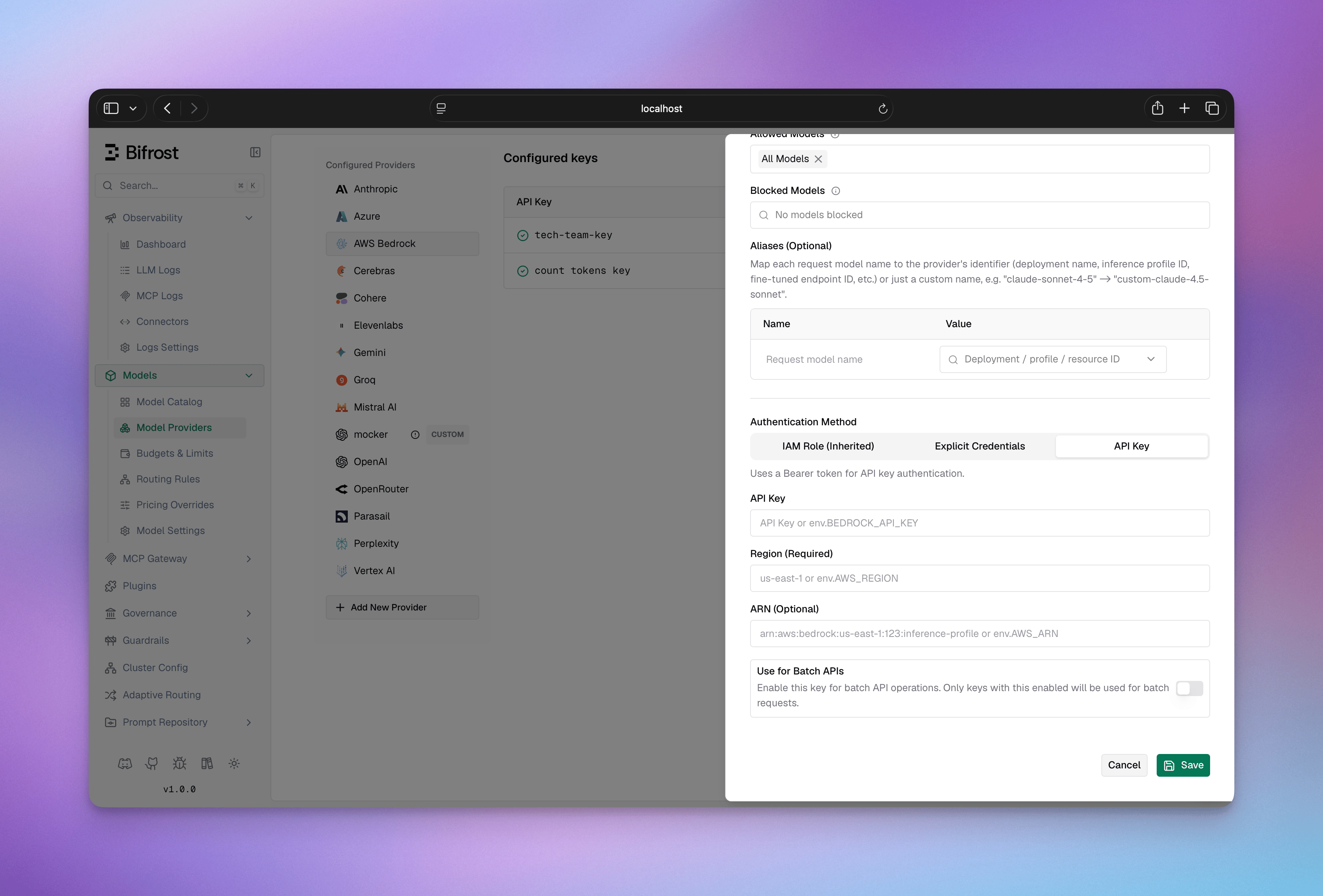 1. Navigate to **"Model Providers"** → **"Configurations"** → **"AWS Bedrock"**
2. Click **"Add Key"** (or edit an existing key)
3. Under **Authentication Method**, select **"API Key"**
4. Set **API Key**: Your Bedrock API key (Bearer token)
5. Set **Region**: e.g., `us-east-1`
6. Configure **Aliases** if needed - see [Inference Profiles & ARN Configuration](#inference-profiles--arn-configuration) when using inference profiles
7. Save
```bash theme={null}
# Step 1: Create the provider
curl -X POST http://localhost:8080/api/providers \
-H "Content-Type: application/json" \
-d '{"provider": "bedrock"}'
# Step 2: Create a key (API Key / Bearer token)
curl -X POST http://localhost:8080/api/providers/bedrock/keys \
-H "Content-Type: application/json" \
-d '{
"name": "bedrock-api-key",
"value": "env.BEDROCK_API_KEY",
"models": ["*"],
"weight": 1.0,
"bedrock_key_config": {
"region": "us-east-1"
}
}'
```
```json theme={null}
{
"providers": {
"bedrock": {
"keys": [
{
"name": "bedrock-api-key",
"value": "env.BEDROCK_API_KEY",
"models": ["*"],
"weight": 1.0,
"bedrock_key_config": {
"region": "us-east-1"
}
}
]
}
}
}
```
```go theme={null}
func (a *MyAccount) GetKeysForProvider(ctx *context.Context, provider schemas.ModelProvider) ([]schemas.Key, error) {
switch provider {
case schemas.Bedrock:
return []schemas.Key{
{
Value: *schemas.NewSecretVar("env.BEDROCK_API_KEY"),
Models: []string{"*"},
Weight: 1.0,
BedrockKeyConfig: &schemas.BedrockKeyConfig{
Region: schemas.NewSecretVar("us-east-1"),
},
},
}, nil
}
return nil, fmt.Errorf("provider %s not supported", provider)
}
```
**`bedrock_key_config` fields:**
| Field | Required | Default | Description |
| --------------- | -------- | ----------------- | --------------------------------------------------------------------------------------------------------------------------------------------------------------- |
| `region` | Yes | - | AWS region (e.g., `us-east-1`) |
| `access_key` | No | - | AWS access key ID |
| `secret_key` | No | - | AWS secret access key |
| `session_token` | No | - | AWS session token (for temporary credentials) |
| `arn` | No | - | Default inference profile ARN prefix for every model on this key; overridable per deployment (see [Inference Profiles](#inference-profiles--arn-configuration)) |
| `role_arn` | No | - | IAM role ARN for STS AssumeRole |
| `external_id` | No | - | External ID for AssumeRole (when required by trust policy) |
| `session_name` | No | `bifrost-session` | Session name for AssumeRole CloudTrail logs |
**Key-level fields:**
| Field | Required | Description |
| --------------------------------- | -------- | -------------------------------------------------------------------------------------------------------------------------------- |
| `aliases` | No | Map model names to inference profile IDs or Bedrock model IDs (v1.5.0-prerelease2+) |
| `aliases.*.inference_profile_arn` | No | Per-deployment ARN prefix; overrides `bedrock_key_config.arn` (see [Inference Profiles](#inference-profiles--arn-configuration)) |
| `models` | Yes | Models this key can serve; use `["*"]` to allow all |
***
## Beta Headers
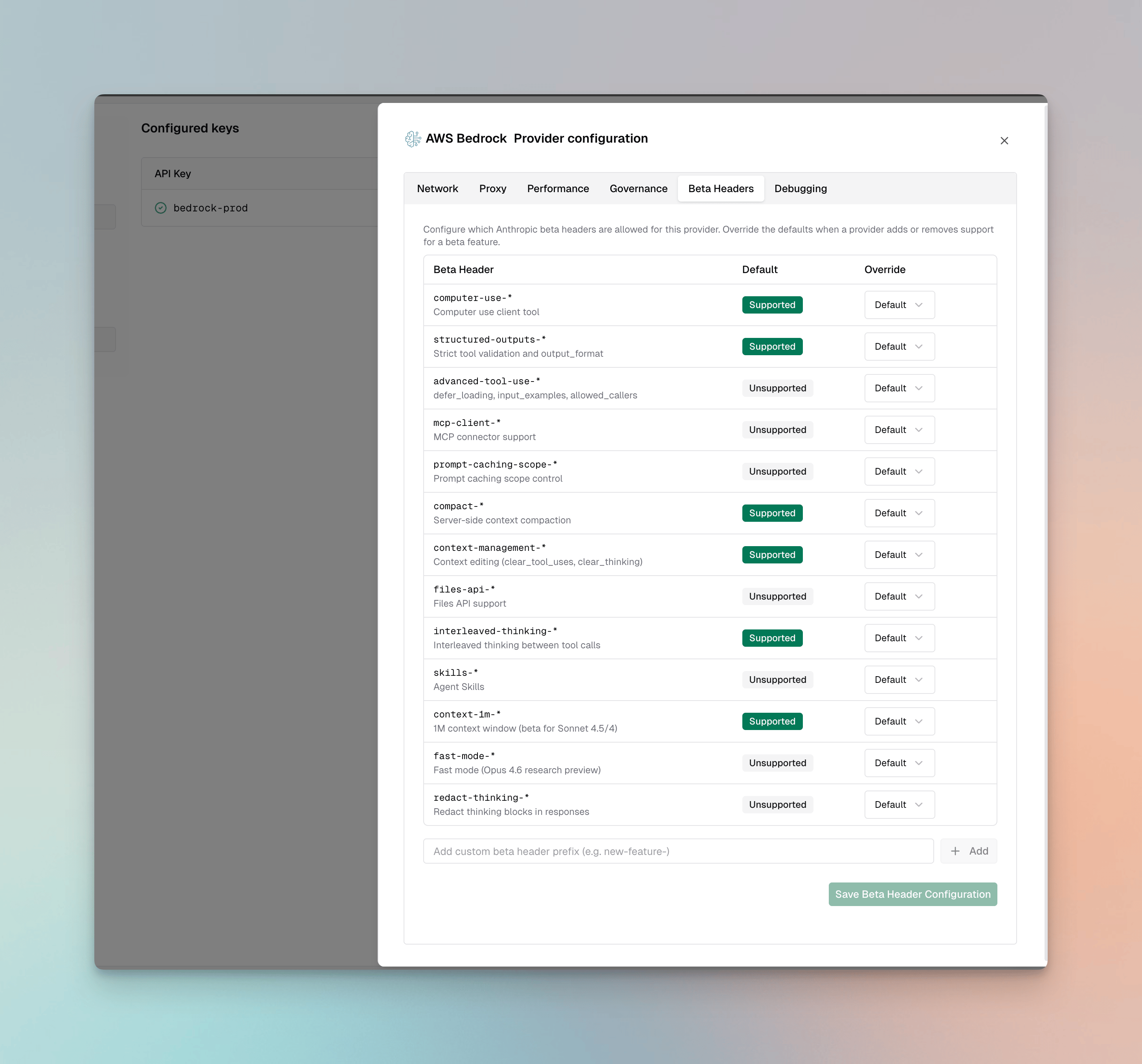
For Claude models on Bedrock, Bifrost validates `anthropic-beta` headers and drops unsupported headers from the request.
**Supported**: `computer-use-*`, `structured-outputs-*`, `compact-*`, `context-management-*`, `interleaved-thinking-*`, `context-1m-*`
**Not supported**: `advanced-tool-use-*`, `mcp-client-*`, `prompt-caching-scope-*`, `files-api-*`, `skills-*`, `fast-mode-*`, `redact-thinking-*`
You can override these defaults per provider via the **Beta Headers** tab in provider configuration or via [`beta_header_overrides`](/quickstart/gateway/provider-configuration#beta-header-overrides). See the full support matrix in the [Anthropic provider docs](/providers/supported-providers/anthropic#beta-headers).
1. Navigate to **"Model Providers"** → **"Configurations"** → **"AWS Bedrock"**
2. Click **"Add Key"** (or edit an existing key)
3. Under **Authentication Method**, select **"API Key"**
4. Set **API Key**: Your Bedrock API key (Bearer token)
5. Set **Region**: e.g., `us-east-1`
6. Configure **Aliases** if needed - see [Inference Profiles & ARN Configuration](#inference-profiles--arn-configuration) when using inference profiles
7. Save
```bash theme={null}
# Step 1: Create the provider
curl -X POST http://localhost:8080/api/providers \
-H "Content-Type: application/json" \
-d '{"provider": "bedrock"}'
# Step 2: Create a key (API Key / Bearer token)
curl -X POST http://localhost:8080/api/providers/bedrock/keys \
-H "Content-Type: application/json" \
-d '{
"name": "bedrock-api-key",
"value": "env.BEDROCK_API_KEY",
"models": ["*"],
"weight": 1.0,
"bedrock_key_config": {
"region": "us-east-1"
}
}'
```
```json theme={null}
{
"providers": {
"bedrock": {
"keys": [
{
"name": "bedrock-api-key",
"value": "env.BEDROCK_API_KEY",
"models": ["*"],
"weight": 1.0,
"bedrock_key_config": {
"region": "us-east-1"
}
}
]
}
}
}
```
```go theme={null}
func (a *MyAccount) GetKeysForProvider(ctx *context.Context, provider schemas.ModelProvider) ([]schemas.Key, error) {
switch provider {
case schemas.Bedrock:
return []schemas.Key{
{
Value: *schemas.NewSecretVar("env.BEDROCK_API_KEY"),
Models: []string{"*"},
Weight: 1.0,
BedrockKeyConfig: &schemas.BedrockKeyConfig{
Region: schemas.NewSecretVar("us-east-1"),
},
},
}, nil
}
return nil, fmt.Errorf("provider %s not supported", provider)
}
```
**`bedrock_key_config` fields:**
| Field | Required | Default | Description |
| --------------- | -------- | ----------------- | --------------------------------------------------------------------------------------------------------------------------------------------------------------- |
| `region` | Yes | - | AWS region (e.g., `us-east-1`) |
| `access_key` | No | - | AWS access key ID |
| `secret_key` | No | - | AWS secret access key |
| `session_token` | No | - | AWS session token (for temporary credentials) |
| `arn` | No | - | Default inference profile ARN prefix for every model on this key; overridable per deployment (see [Inference Profiles](#inference-profiles--arn-configuration)) |
| `role_arn` | No | - | IAM role ARN for STS AssumeRole |
| `external_id` | No | - | External ID for AssumeRole (when required by trust policy) |
| `session_name` | No | `bifrost-session` | Session name for AssumeRole CloudTrail logs |
**Key-level fields:**
| Field | Required | Description |
| --------------------------------- | -------- | -------------------------------------------------------------------------------------------------------------------------------- |
| `aliases` | No | Map model names to inference profile IDs or Bedrock model IDs (v1.5.0-prerelease2+) |
| `aliases.*.inference_profile_arn` | No | Per-deployment ARN prefix; overrides `bedrock_key_config.arn` (see [Inference Profiles](#inference-profiles--arn-configuration)) |
| `models` | Yes | Models this key can serve; use `["*"]` to allow all |
***
## Beta Headers
For Claude models on Bedrock, Bifrost validates `anthropic-beta` headers and drops unsupported headers from the request.
**Supported**: `computer-use-*`, `structured-outputs-*`, `compact-*`, `context-management-*`, `interleaved-thinking-*`, `context-1m-*`
**Not supported**: `advanced-tool-use-*`, `mcp-client-*`, `prompt-caching-scope-*`, `files-api-*`, `skills-*`, `fast-mode-*`, `redact-thinking-*`
You can override these defaults per provider via the **Beta Headers** tab in provider configuration or via [`beta_header_overrides`](/quickstart/gateway/provider-configuration#beta-header-overrides). See the full support matrix in the [Anthropic provider docs](/providers/supported-providers/anthropic#beta-headers).
 ***
# 1. Chat Completions
## Request Parameters
### Parameter Mapping
| Parameter | Transformation | Notes |
| ----------------------- | --------------------------------------------------------------------------------- | -------------------------- |
| `max_completion_tokens` | → `inferenceConfig.maxTokens` | Required field in Bedrock |
| `temperature`, `top_p` | Direct pass-through to `inferenceConfig` | |
| `stop` | → `inferenceConfig.stopSequences` | Array of strings |
| `response_format` | → Structured output tool (see [Structured Output](#structured-output)) | Creates `bf_so_*` tool |
| `tools` | Schema restructured (see [Tool Conversion](#tool-conversion)) | |
| `tool_choice` | Type mapped (see [Tool Conversion](#tool-conversion)) | |
| `reasoning` | Model-specific thinking config (see [Reasoning / Thinking](#reasoning--thinking)) | |
| `user` | → `metadata.userID` (if provided) | Bedrock-specific metadata |
| `service_tier` | → `serviceModelTier` (if provided) | Performance tier selection |
| `top_k` | Via `extra_params` (model-specific) | Bedrock-specific sampling |
### Dropped Parameters
The following parameters are silently ignored: `frequency_penalty`, `presence_penalty`, `logit_bias`, `logprobs`, `top_logprobs`, `seed`, `parallel_tool_calls`
### Extra Parameters
Use `extra_params` (SDK) or pass directly in request body (Gateway) for Bedrock-specific fields:
```bash theme={null}
curl -X POST http://localhost:8080/v1/chat/completions \
-H "Content-Type: application/json" \
-d '{
"model": "bedrock/anthropic.claude-3-5-sonnet-20241022-v2:0",
"messages": [{"role": "user", "content": "Hello"}],
"guardrailConfig": {
"guardrailIdentifier": "guardrail-id",
"guardrailVersion": "1",
"trace": "enabled"
},
"performanceConfig": {
"latency": "optimized"
}
}'
```
```go theme={null}
resp, err := client.ChatCompletionRequest(schemas.NewBifrostContext(ctx, schemas.NoDeadline), &schemas.BifrostChatRequest{
Provider: schemas.Bedrock,
Model: "anthropic.claude-3-5-sonnet-20241022-v2:0",
Input: messages,
Params: &schemas.ChatParameters{
ExtraParams: map[string]interface{}{
"guardrailConfig": map[string]interface{}{
"guardrailIdentifier": "guardrail-id",
"guardrailVersion": "1",
"trace": "enabled",
},
"performanceConfig": map[string]interface{}{
"latency": "optimized",
},
},
},
})
```
**Available Extra Parameters:**
* `guardrailConfig` - Bedrock guardrail configuration with `guardrailIdentifier`, `guardrailVersion`, `trace`
* `performanceConfig` - Performance optimization with `latency` ("optimized" or "standard")
* `additionalModelRequestFieldPaths` - Pass-through for model-specific fields not in standard schema
* `promptVariables` - Variables for prompt templates (if using prompt caching)
* `requestMetadata` - Custom metadata for request tracking
### Cache Control
Prompt caching is supported via cache control directives:
```bash theme={null}
curl -X POST http://localhost:8080/v1/chat/completions \
-H "Content-Type: application/json" \
-d '{
"model": "bedrock/anthropic.claude-3-5-sonnet-20241022-v2:0",
"messages": [
{
"role": "user",
"content": [
{
"type": "text",
"text": "This context will be cached",
"cache_control": {"type": "ephemeral"}
}
]
}
],
"system": [
{
"type": "text",
"text": "You are a helpful assistant",
"cache_control": {"type": "ephemeral"}
}
]
}'
```
```go theme={null}
resp, err := client.ChatCompletionRequest(schemas.NewBifrostContext(ctx, schemas.NoDeadline), &schemas.BifrostChatRequest{
Provider: schemas.Bedrock,
Model: "anthropic.claude-3-5-sonnet-20241022-v2:0",
Input: []schemas.ChatMessage{
{
Role: schemas.ChatMessageRoleUser,
Content: &schemas.ChatMessageContent{
ContentBlocks: []schemas.ChatContentBlock{
{
Text: schemas.Ptr("This context will be cached"),
CacheControl: &schemas.CacheControl{
Type: schemas.Ptr("ephemeral"),
},
},
},
},
},
},
SystemMessages: []schemas.ChatMessage{
{
Role: schemas.ChatMessageRoleSystem,
Content: &schemas.ChatMessageContent{
ContentBlocks: []schemas.ChatContentBlock{
{
Text: schemas.Ptr("You are a helpful assistant"),
CacheControl: &schemas.CacheControl{
Type: schemas.Ptr("ephemeral"),
},
},
},
},
},
},
})
```
## Reasoning / Thinking
**Documentation**: See [Bifrost Reasoning Reference](/providers/reasoning)
Reasoning/thinking support varies by model family:
### Anthropic Claude Models
**Parameter Mapping:**
* `reasoning.effort` → `thinkingConfig.type = "enabled"` (always enabled when reasoning present)
* `reasoning.max_tokens` → `thinkingConfig.budgetTokens` (token budget for thinking)
**Critical Constraints:**
* **Minimum budget**: 1024 tokens required; requests below this **fail with error**
* **Dynamic budget**: `-1` is converted to `1024` automatically
```json theme={null}
// Request
{"reasoning": {"effort": "high", "max_tokens": 2048}}
// Bedrock conversion
{"thinkingConfig": {"type": "enabled", "budgetTokens": 2048}}
```
### Anthropic Nova Models
**Parameter Mapping:**
* `reasoning.effort` → `reasoningConfig.thinkingLevel` ("low" → `low`, "high" → `high`)
* `reasoning.max_tokens` → Max reasoning tokens (affects inference configuration)
```json theme={null}
// Request
{"reasoning": {"effort": "high", "max_tokens": 10000}}
// Bedrock conversion
{"reasoningConfig": {"type": "enabled", "thinkingLevel": "high"}}
```
## Message Conversion
### Critical Caveats
* **System message extraction**: System messages are **removed from messages array** and placed in separate `system` field
* **Tool message grouping**: Consecutive tool messages are **merged into single user message** with tool result content blocks
* **Image format**: **Only base64/data URI supported**; remote image URLs are **not supported** by Bedrock Converse API
* **Document support**: Bifrost's Bedrock conversion path currently supports PDF, CSV, DOC, DOCX, XLS, XLSX, HTML, TXT, MD formats
### Supported Chat Content Blocks
The Chat Completions request format is OpenAI-compatible for standard blocks (`type: "text"`, `type: "image_url"`, `type: "file"`). Bifrost converts these blocks to Bedrock Converse blocks internally. Bedrock-specific extensions (for example, standalone `cachePoint`) are also accepted when using the Bedrock provider.
| Block Type | Request Shape (Bifrost/OpenAI) | Bedrock Handling | Support |
| ---------------------- | ---------------------------------------------------------------------- | ----------------------------------------------------------- | ------------------------------ |
| Text | `{"type":"text","text":"..."}` | Converted to Bedrock `text` block | ✅ |
| Image | `{"type":"image_url","image_url":{"url":"data:image/png;base64,..."}}` | Converted to Bedrock `image.source.bytes` | ✅ (base64/data URI only) |
| File | `{"type":"file","file":{...}}` | Converted to Bedrock `document` block | ✅ |
| Input audio | `{"type":"input_audio",...}` | Returns `audio input not supported in Bedrock Converse API` | ❌ |
| Standalone cache point | `{"cachePoint":{"type":"default"}}` (no outer `type` field) | Converted to Bedrock `cachePoint` marker | ✅ (Bedrock-specific extension) |
### Image Conversion
* **Request shape (client → Bifrost)**: `type: "image_url"` with `image_url.url` set to a data URI/base64 image
* **Internal Bedrock shape (Bifrost → Bedrock)**: Converted to `image: { format, source: { bytes } }`
* **URL images**: ❌ **Not supported** - Will fail if attempted
* **Documents**: Converted to document content blocks with MIME types
### Image Block Example (`image_url`)
```bash theme={null}
curl -X POST http://localhost:8080/v1/chat/completions \
-H "Content-Type: application/json" \
-d '{
"model": "bedrock/anthropic.claude-3-5-sonnet-20241022-v2:0",
"messages": [
{
"role": "user",
"content": [
{"type": "text", "text": "What is in this image?"},
{
"type": "image_url",
"image_url": {
"url": "data:image/png;base64,iVBORw0KGgoAAAANSUhEUgAA..."
}
}
]
}
]
}'
```
```go theme={null}
// Note: In the Go SDK, ChatContentBlockTypeImage maps to the OpenAI-compatible "image_url" block.
resp, err := client.ChatCompletionRequest(schemas.NewBifrostContext(ctx, schemas.NoDeadline), &schemas.BifrostChatRequest{
Provider: schemas.Bedrock,
Model: "anthropic.claude-3-5-sonnet-20241022-v2:0",
Input: []schemas.ChatMessage{
{
Role: schemas.ChatMessageRoleUser,
Content: &schemas.ChatMessageContent{
ContentBlocks: []schemas.ChatContentBlock{
{
Type: schemas.ChatContentBlockTypeText,
Text: schemas.Ptr("What is in this image?"),
},
{
Type: schemas.ChatContentBlockTypeImage,
ImageURLStruct: &schemas.ChatInputImage{
URL: "data:image/png;base64,iVBORw0KGgoAAAANSUhEUgAA...",
},
},
},
},
},
},
})
```
### File Block Example (`file` → Bedrock `document`)
```bash theme={null}
curl -X POST http://localhost:8080/v1/chat/completions \
-H "Content-Type: application/json" \
-d '{
"model": "bedrock/anthropic.claude-3-5-sonnet-20241022-v2:0",
"messages": [
{
"role": "user",
"content": [
{"type": "text", "text": "Summarize this document."},
{
"type": "file",
"file": {
"file_data": "JVBERi0xLjQKJcfs...",
"filename": "report.pdf",
"file_type": "application/pdf"
}
}
]
}
]
}'
```
```go theme={null}
resp, err := client.ChatCompletionRequest(schemas.NewBifrostContext(ctx, schemas.NoDeadline), &schemas.BifrostChatRequest{
Provider: schemas.Bedrock,
Model: "anthropic.claude-3-5-sonnet-20241022-v2:0",
Input: []schemas.ChatMessage{
{
Role: schemas.ChatMessageRoleUser,
Content: &schemas.ChatMessageContent{
ContentBlocks: []schemas.ChatContentBlock{
{
Type: schemas.ChatContentBlockTypeText,
Text: schemas.Ptr("Summarize this document."),
},
{
Type: schemas.ChatContentBlockTypeFile,
File: &schemas.ChatInputFile{
FileData: schemas.Ptr("JVBERi0xLjQKJcfs..."),
Filename: schemas.Ptr("report.pdf"),
FileType: schemas.Ptr("application/pdf"),
},
},
},
},
},
},
})
```
Note: `file_data` is raw base64-encoded content (no `data:` URI prefix, unlike `image_url`).
Formats currently supported by Bifrost's Bedrock document conversion path: `pdf`, `txt`, `md`, `html`, `csv`, `doc`, `docx`, `xls`, `xlsx`.
### Standalone Cache Point Example (Bedrock-specific)
```json theme={null}
{
"role": "system",
"content": [
{ "type": "text", "text": "Long context to cache" },
{ "cachePoint": { "type": "default" } }
]
}
```
This standalone `cachePoint` block is a Bifrost/Bedrock extension (not OpenAI-standard) and should be used only with the Bedrock provider.
### Unsupported Block Notes
* `input_audio` blocks are not supported by Bedrock Converse and return an error.
* For chat content conversion, use `file.file_data` for document payloads. `file_url` and `file_id` are not the documented Bedrock chat-content path here.
### Cache Control Locations
Cache directives supported on:
* System content blocks (entire system message)
* User message content blocks (specific parts)
* Tool definitions within tool configuration
## Tool Conversion
Tool definitions are restructured:
* `function.name` → `name` (preserved)
* `function.parameters` → `inputSchema` (Schema format)
* `function.strict` → Dropped (not supported by Bedrock)
### Tool Choice Mapping
| OpenAI | Bedrock |
| ------------- | ---------------------------------- |
| `"auto"` | `auto` (default) |
| `"none"` | Omitted (not explicitly supported) |
| `"required"` | `any` |
| Specific tool | `{type: "tool", name: "X"}` |
### Tool Call Handling
Tool calls are converted between formats:
* **Bifrost → Bedrock**: Tool call arguments converted from JSON object to `input` field
* **Bedrock → Bifrost**: Tool use results with `toolUseId`, converted back to Bifrost format
* **Tool results**: Merged consecutive tool messages into single user message
## Structured Output
Structured output uses a special tool-based approach:
```json theme={null}
// Request with structured output
{
"response_format": {
"type": "json_schema",
"json_schema": {
"name": "response",
"schema": {
"type": "object",
"properties": {
"name": {"type": "string"},
"age": {"type": "number"}
}
}
}
}
}
// Bedrock conversion (internal)
{
"tools": [{
"name": "bf_so_response",
"description": "Structured output tool",
"inputSchema": {
"type": "object",
"properties": {...}
}
}],
"toolChoice": {"type": "tool", "name": "bf_so_response"}
}
// Response extraction
// Tool use input is extracted and returned as contentStr
```
## Response Conversion
### Field Mapping
* `stopReason` → `finish_reason`: `endTurn`/`stopSequence` → `stop`, `maxTokens` → `length`, `toolUse` → `tool_calls`
* `usage.inputTokens + usage.cacheReadInputTokens + usage.cacheWriteInputTokens` → `prompt_tokens` (all cache counts rolled into the total)
* Cache token breakdown surfaced in `prompt_tokens_details`:
* `usage.cacheReadInputTokens` → `prompt_tokens_details.cached_read_tokens`
* `usage.cacheWriteInputTokens` → `prompt_tokens_details.cached_write_tokens`
* `usage.outputTokens` → `completion_tokens`
* `reasoning`/`thinking` blocks → `reasoning_details` with index, type, text, and signature
* Tool call `input` (object) → `arguments` (JSON string)
### Structured Output Response
When structured output is detected:
* Tool call with name `bf_so_*` is treated as structured output
* `input` object is extracted and returned as `contentStr`
* Removed from `toolCalls` array
## Streaming
### Chat Completions Streaming
Event sequence from Bedrock Converse Stream API:
1. **Initial message role**: `contentBlockIndex` and role information
2. **Content block starts**: `toolUse` blocks with `toolUseId`, `name`
3. **Content block deltas**:
* Text delta: Incremental text content
* Tool use delta: Accumulated tool call arguments (JSON)
* Reasoning delta: Reasoning text and optional signature
4. **Message completion**: `stopReason` and final token counts
5. **Usage metrics**: Token counts, cached tokens, performance metrics
**Streaming event conversion**:
* Each Bedrock streaming event → Multiple Bifrost chunks as needed
* Tool arguments accumulated across deltas and emitted on block end
* Reasoning content emitted with signature if present
### Text Completion Streaming
❌ **Not supported** - AWS Bedrock's text completion API does not support streaming.
### Responses API Streaming
Streaming responses use OpenAI-compatible lifecycle events:
* `response.created`
* `response.in_progress`
* `content_part.start`
* `content_part.delta`
* `content_part.done`
* `function_call_arguments.delta`
* `function_call_arguments.done`
* `output_item.done`
Special handling:
* Tool arguments accumulated across deltas
* Content block indices mapped to output indices
* Synthetic events emitted for text/reasoning content
***
# 2. Responses API
The Responses API uses the same underlying `converse` endpoint but converts between OpenAI's Responses format and Bedrock's Messages format.
## Request Parameters
### Parameter Mapping
| Parameter | Transformation |
| ---------------------- | -------------------------------------------------------------------------------------- |
| `max_output_tokens` | Renamed to `maxTokens` (via `inferenceConfig`) |
| `temperature`, `top_p` | Direct pass-through |
| `instructions` | Becomes system message |
| `tools` | Schema restructured (see [Chat Completions](#1-chat-completions)) |
| `tool_choice` | Type mapped (see [Chat Completions](#1-chat-completions)) |
| `reasoning` | Mapped to thinking/reasoning config (see [Reasoning / Thinking](#reasoning--thinking)) |
| `text` | Converted to `output_format` (Bedrock-specific) |
| `include` | Via `extra_params` (Bedrock-specific) |
| `stop` | Via `extra_params`, renamed to `stopSequences` |
| `truncation` | Auto-set to `"auto"` for computer tools |
### Extra Parameters
Use `extra_params` (SDK) or pass directly in request body (Gateway):
```bash theme={null}
curl -X POST http://localhost:8080/v1/responses \
-H "Content-Type: application/json" \
-d '{
"model": "bedrock/anthropic.claude-3-5-sonnet-20241022-v2:0",
"input": "Hello, how are you?",
"stop": ["###"]
}'
```
```go theme={null}
resp, err := client.ResponsesRequest(schemas.NewBifrostContext(ctx, schemas.NoDeadline), &schemas.BifrostResponsesRequest{
Provider: schemas.Bedrock,
Model: "anthropic.claude-3-5-sonnet-20241022-v2:0",
Input: messages,
Params: &schemas.ResponsesParameters{
ExtraParams: map[string]interface{}{
"stop": []string{"###"},
},
},
})
```
## Input & Instructions
* **Input**: String wrapped as user message or array converted to messages
* **Instructions**: Becomes system message (same extraction as [Chat Completions](#1-chat-completions))
* **Cache control**: Supported on instructions (system) and input messages
## Response Conversion
* `stopReason` → `status`: `endTurn`/`stopSequence` → `completed`, `maxTokens` → `incomplete`
* `usage.inputTokens` is aggregated into `input_tokens` (same semantics as [Chat](#1-chat-completions): Bedrock's `inputTokens` + `cacheReadInputTokens` + `cacheWriteInputTokens` rolled up into `input_tokens`); `usage.outputTokens` → `output_tokens` (preserved as-is)
* Cache tokens: `cacheReadInputTokens` → `input_tokens_details.cached_read_tokens` | `cacheWriteInputTokens` → `input_tokens_details.cached_write_tokens`
* Output items: `text` → `message` | `toolUse` → `function_call` | `thinking` → `reasoning`
## Streaming
Event sequence: `response.created` → `response.in_progress` → `content_part.start` → `content_part.delta` → `content_part.done` → `output_item.done`
***
# 3. Text Completions (Legacy)
Legacy API using `invoke` endpoint. Streaming not supported. Only Claude
(Anthropic) and Mistral models supported.
**Request conversion**:
* **Claude models**: Uses Anthropic's `/v1/complete` format with prompt wrapping
* `prompt` auto-wrapped with `\n\nHuman: {prompt}\n\nAssistant:`
* `max_tokens` → `max_tokens_to_sample`
* `temperature`, `top_p` direct pass-through
* `top_k`, `stop` via `extra_params`
* **Mistral models**: Uses standard format
* `max_tokens` → `max_tokens`
* `temperature`, `top_p` direct pass-through
* `stop` → `stop`
**Response conversion**:
* **Claude**: `completion` → `choices[0].text`
* **Mistral**: `outputs[].text` → `choices[]` (supports multiple)
* `stopReason` → `finish_reason`
***
# 4. Embeddings
Supported embedding models: **Titan**, **Cohere**
## Request Parameters
### Parameter Mapping
| Parameter | Transformation | Notes |
| ----------------- | ------------------- | ------------------------------------ |
| `input` | Direct pass-through | Text or array of texts |
| `dimensions` | ⚠️ Not supported | Titan has fixed dimensions per model |
| `encoding_format` | Via `extra_params` | "base64" or "float" |
**Titan-specific**:
* No dimension customization
* Fixed output size per model version
**Cohere-specific**:
* Reuses Cohere format conversion
* Similar parameter mapping to standard Cohere
## Response Conversion
* **Titan**: `embedding` → single embedding vector
* **Cohere**: Reuses Cohere response format with `embeddings` array
* `usage.inputTokens` → `usage.prompt_tokens`
***
# 5. Image Generation
Supported image generation models: **Titan Image Generator v1**, **Titan Image Generator v2**, **Nova Canvas v1**
## Request Conversion
| Parameter(Bifrost) | Transformation (Bedrock) |
| ------------------ | ------------------------------------------------------------------------- |
| `prompt` | `textToImageParams.text` |
| `n` | `imageGenerationConfig.numberOfImages` |
| `negativePrompt` | `textToImageParams.negativeText` |
| `seed` | `imageGenerationConfig.seed` |
| `quality` | `imageGenerationConfig.quality` (see [Quality Mapping](#quality-mapping)) |
| `style` | `textToImageParams.style` |
| `size` | `imageGenerationConfig.width` & `imageGenerationConfig.height` |
### Quality Mapping
The `quality` parameter is automatically mapped to Bedrock's expected format:
| Input Value | Bedrock Value | Notes |
| ----------- | ------------- | --------------------------------- |
| `"low"` | `"standard"` | Mapped automatically |
| `"medium"` | `"standard"` | Mapped automatically |
| `"high"` | `"premium"` | Mapped automatically |
| `"default"` | `"standard"` | Passed through (case-insensitive) |
| `"premium"` | `"premium"` | Passed through (case-insensitive) |
## Response Conversion
| Parameter(Bedrock) | Transformation (Bifrost) |
| ------------------ | ------------------------ |
| `images` | `data.b64_json` |
### Example Request
```bash theme={null}
curl -X POST http://localhost:8080/v1/images/generations \
-H "Content-Type: application/json" \
-d '{
"model": "bedrock/amazon.nova-canvas-v1:0",
"prompt": "A futuristic cityscape with a flying car",
"size": "1024x1024",
"seed": 123,
"negative_prompt": "bikes",
"n": 2
}'
```
```go theme={null}
resp, err := client.ImageGenerationRequest(schemas.NewBifrostContext(ctx, schemas.NoDeadline), &schemas.BifrostImageGenerationRequest{
Provider: schemas.Bedrock,
Model: "amazon.nova-canvas-v1:0",
Input: &schemas.ImageGenerationInput{
Prompt: "A futuristic cityscape with a flying car",
},
Params: &schemas.ImageGenerationParameters{
N: schemas.Ptr(2),
Seed: schemas.Ptr(123),
NegativePrompt: schemas.Ptr("bikes"),
Quality: schemas.Ptr("auto"),
Style: schemas.Ptr("natural"),
Size: schemas.Ptr("1024x1024"),
},
})
```
## Stability AI models
Supported generation models: **`stability.stable-image-core-v1:1`**, **`stability.stable-image-ultra-v1:1`**
These models use a flat JSON body (not the nested Bedrock `taskType` structure). Bifrost detects them automatically - any model ID containing `"stability."` is converted via `ToStabilityAIImageGenerationRequest`.
**Request Parameters**
| Parameter | Type | Required | Notes |
| ----------------- | ------ | -------- | -------------------------------------------------------------------------------------------- |
| `prompt` | string | ✅ | Text description of the image |
| `negative_prompt` | string | ❌ | What to exclude |
| `seed` | int | ❌ | Reproducibility seed |
| `aspect_ratio` | string | ❌ | e.g. `"16:9"`, `"1:1"`, `"21:9"` - via `aspect_ratio` param or `ExtraParams["aspect_ratio"]` |
| `output_format` | string | ❌ | `"png"`, `"jpeg"`, `"webp"` - via `output_format` param |
### Example Request
```bash theme={null}
curl -X POST http://localhost:8080/v1/images/generations \
-H "Content-Type: application/json" \
-d '{
"model": "bedrock/us.stability.stable-image-ultra-v1:1",
"prompt": "A majestic mountain range at golden hour",
"negative_prompt": "blurry, low quality",
"aspect_ratio": "16:9",
"output_format": "png",
"seed": 42
}'
```
```go theme={null}
resp, err := client.ImageGenerationRequest(schemas.NewBifrostContext(ctx, schemas.NoDeadline), &schemas.BifrostImageGenerationRequest{
Provider: schemas.Bedrock,
Model: "us.stability.stable-image-ultra-v1:1",
Input: &schemas.ImageGenerationInput{
Prompt: "A majestic mountain range at golden hour",
},
Params: &schemas.ImageGenerationParameters{
NegativePrompt: schemas.Ptr("blurry, low quality"),
AspectRatio: schemas.Ptr("16:9"),
OutputFormat: schemas.Ptr("png"),
Seed: schemas.Ptr(42),
},
})
```
***
# 6. Image Edit
Requests use **multipart/form-data**, not JSON.
Supported image edit models: **Titan Image Generator v1**, **Titan Image Generator v2**, **Nova Canvas v1**
Bedrock supports three image edit task types: **INPAINTING**, **OUTPAINTING**, and **BACKGROUND\_REMOVAL**. The `type` field is required and must be one of these values.
**Request Parameters**
| Parameter | Type | Required | Notes |
| ------------------ | ------ | -------- | -------------------------------------------------------------------------------------------------------------- |
| `model` | string | ✅ | Model identifier (must be Titan or Nova Canvas model) |
| `type` | string | ✅ | Edit type: `"inpainting"`, `"outpainting"`, or `"background_removal"` |
| `prompt` | string | ❌ | Text description of the edit (required for inpainting/outpainting) |
| `image[]` | binary | ✅ | Image file(s) to edit (only first image used) |
| `mask` | binary | ❌ | Mask image file (for inpainting/outpainting) |
| `n` | int | ❌ | Number of images to generate (1-10, for inpainting/outpainting only) |
| `size` | string | ❌ | Image size: `"WxH"` format (e.g., `"1024x1024"`, for inpainting/outpainting only) |
| `quality` | string | ❌ | Image quality (for inpainting/outpainting only). See [Quality Mapping](#quality-mapping) for supported values. |
| `cfgScale` | float | ❌ | CFG scale (via `ExtraParams["cfgScale"]`, for inpainting/outpainting only) |
| `negative_text` | string | ❌ | Negative prompt (via `ExtraParams["negative_text"]`, for inpainting/outpainting only) |
| `mask_prompt` | string | ❌ | Mask prompt (via `ExtraParams["mask_prompt"]`, for inpainting/outpainting only) |
| `return_mask` | bool | ❌ | Return mask in response (via `ExtraParams["return_mask"]`, for inpainting/outpainting only) |
| `outpainting_mode` | string | ❌ | Outpainting mode (via `ExtraParams["outpainting_mode"]`, outpainting only): `"DEFAULT"` or `"PRECISE"` |
***
**Request Conversion**
* **Task Type Mapping**: `Params.Type` is mapped to `taskType`:
* `"inpainting"` → `"INPAINTING"`
* `"outpainting"` → `"OUTPAINTING"`
* `"background_removal"` → `"BACKGROUND_REMOVAL"`
* Any other value returns an error: `"unsupported type for Bedrock"`
* **Image Conversion**: First image in `Input.Images` is converted to base64: `image.Image` → base64 string
* **Task-Specific Parameters**:
* **INPAINTING**: Uses `inPaintingParams`:
* `prompt` → `inPaintingParams.text`
* `image` (base64) → `inPaintingParams.image`
* `mask` (if present) → `inPaintingParams.maskImage` (base64)
* `negative_text` (via `ExtraParams`) → `inPaintingParams.negativeText`
* `mask_prompt` (via `ExtraParams`) → `inPaintingParams.maskPrompt`
* `return_mask` (via `ExtraParams`) → `inPaintingParams.returnMask`
* **OUTPAINTING**: Uses `outPaintingParams`:
* `prompt` → `outPaintingParams.text`
* `image` (base64) → `outPaintingParams.image`
* `mask` (if present) → `outPaintingParams.maskImage` (base64)
* `negative_text` (via `ExtraParams`) → `outPaintingParams.negativeText`
* `mask_prompt` (via `ExtraParams`) → `outPaintingParams.maskPrompt`
* `return_mask` (via `ExtraParams`) → `outPaintingParams.returnMask`
* `outpainting_mode` (via `ExtraParams`, validated to `"DEFAULT"` or `"PRECISE"`) → `outPaintingParams.outPaintingMode`
* **BACKGROUND\_REMOVAL**: Uses `backgroundRemovalParams`:
* `image` (base64) → `backgroundRemovalParams.image`
* No other parameters supported
* **Image Generation Config** (for INPAINTING and OUTPAINTING only):
* `n` → `imageGenerationConfig.numberOfImages`
* `size` → `imageGenerationConfig.width` and `imageGenerationConfig.height` (parsed from `"WxH"` format)
* `quality` → `imageGenerationConfig.quality` (see [Quality Mapping](#quality-mapping))
* `cfgScale` (via `ExtraParams["cfgScale"]`) → `imageGenerationConfig.cfgScale`
**Response Conversion**
* Uses the same response structure as image generation: `BedrockImageGenerationResponse` → `BifrostImageGenerationResponse`
* Response includes:
* `images[]`: Array of base64-encoded images
* `maskImage`: Base64-encoded mask image (if `return_mask` was true)
* `error`: Error message (if present)
**Endpoint**: Same as image generation: `invoke` endpoint
**Streaming**: Image edit streaming is not supported by Bedrock.
***
## Stability AI models
Requests use **multipart/form-data**, not JSON.
Stability AI edit models are automatically detected by their model ID (contains `"stability."`). The **task type is inferred from the model name** by default, but you can also set the `type` field explicitly - useful when using deployment aliases. See [Type values for explicit task selection](#type-values-for-explicit-task-selection) below.
### Supported models
| Model ID | Task | Images required | Prompt |
| ----------------------------------------------- | -------------------- | ----------------- | ------ |
| `stability.stable-image-inpaint-v1:0` | inpaint | 1 + mask | ✅ |
| `stability.stable-outpaint-v1:0` | outpaint | 1 (optional mask) | ✅ |
| `stability.stable-image-search-recolor-v1:0` | recolor | 1 | ✅ |
| `stability.stable-image-search-replace-v1:0` | search-replace | 1 | ✅ |
| `stability.stable-image-erase-object-v1:0` | erase-object | 1 + mask | ❌ |
| `stability.stable-image-remove-background-v1:0` | remove-bg | 1 | ❌ |
| `stability.stable-image-control-sketch-v1:0` | control-sketch | 1 | ✅ |
| `stability.stable-image-control-structure-v1:0` | control-structure | 1 | ✅ |
| `stability.stable-image-style-guide-v1:0` | style-guide | 1 | ✅ |
| `stability.stable-style-transfer-v1:0` | style-transfer | **2 required** | ✅ |
| `stability.stable-creative-upscale-v1:0` | upscale-creative | 1 | ✅ |
| `stability.stable-conservative-upscale-v1:0` | upscale-conservative | 1 | ✅ |
| `stability.stable-fast-upscale-v1:0` | upscale-fast | 1 | ❌ |
### Common parameters
| Parameter | Type | Required | Notes |
| ----------------- | ------ | -------------- | ----------------------------------------------------------------------------------------------------------------------------------------------------------------------------------------------------------------------------------- |
| `model` | string | ✅ | Stability AI model ID (see table above) |
| `image[]` | binary | ✅ | Input image(s). `style-transfer` requires exactly 2. |
| `prompt` | string | task-dependent | Required for all tasks except `remove-bg`, `upscale-fast`, and `erase-object`. For these no-prompt operations, set `type` to `remove_background`, `upscale_fast`, or `erase_object` to skip prompt validation at the gateway level. |
| `negative_prompt` | string | ❌ | Not applied for: `remove-bg`, `upscale-fast`, `erase-object` |
| `seed` | int | ❌ | Not applied for: `remove-bg`, `upscale-fast` |
| `mask` | binary | task-dependent | Required for: `inpaint`, `erase-object`; ignored for others |
### Task-specific extra parameters
Pass these via `extra_params` (Go SDK) or as top-level form fields (Gateway).
| Extra parameter | Type | Task(s) |
| ----------------------------- | ------ | ------------------------------------------------------------------------------------------------------------ |
| `output_format` | string | All - `"png"`, `"jpeg"`, `"webp"` |
| `style_preset` | string | inpaint, outpaint, recolor, search-replace, control-sketch, control-structure, style-guide, upscale-creative |
| `grow_mask` | int | inpaint, recolor, search-replace, erase-object |
| `left`, `right`, `up`, `down` | int | outpaint - pixels to expand in each direction |
| `creativity` | float | upscale-creative, upscale-conservative, outpaint |
| `select_prompt` | string | recolor - which region to recolor |
| `search_prompt` | string | search-replace - what object to find and replace |
| `control_strength` | float | control-sketch, control-structure - 0.0–1.0 |
| `aspect_ratio` | string | style-guide - output aspect ratio |
| `fidelity` | float | style-guide - 0.0–1.0 |
| `style_strength` | float | style-transfer - 0.0–1.0 |
| `composition_fidelity` | float | style-transfer - 0.0–1.0 |
| `change_strength` | float | style-transfer - 0.0–1.0 |
**Style-transfer image order matters.** The first image (`image[0]`) becomes
`init_image` (the content to transform) and the second (`image[1]`) becomes
`style_image` (the artistic reference). Both images must be non-empty.
### Type values for explicit task selection
You can set the `type` field to override model-name inference. This is especially useful with deployment aliases where the alias name may not contain the Stability AI model pattern.
| `type` value | Stability AI task |
| ---------------------------------------------------------- | -------------------- |
| `inpainting` or `inpaint` | inpaint |
| `outpainting` or `outpaint` | outpaint |
| `background_removal` or `remove_background` or `remove_bg` | remove-bg |
| `erase_object` | erase-object |
| `upscale_fast` | upscale-fast |
| `upscale_creative` | upscale-creative |
| `upscale_conservative` | upscale-conservative |
| `recolor` | recolor |
| `search_replace` | search-replace |
| `control_sketch` | control-sketch |
| `control_structure` | control-structure |
| `style_guide` | style-guide |
| `style_transfer` | style-transfer |
### Example requests
```bash theme={null}
curl -X POST http://localhost:8080/v1/images/edits \
-F "model=bedrock/us.stability.stable-image-inpaint-v1:0" \
-F "image[]=@photo.png;type=image/png" \
-F "mask=@mask.png;type=image/png" \
-F "prompt=A beautiful garden replacing the masked area" \
-F "negative_prompt=ugly, blurry" \
-F "output_format=png"
```
```bash theme={null}
curl -X POST http://localhost:8080/v1/images/edits \
-F "model=bedrock/us.stability.stable-style-transfer-v1:0" \
-F "image[]=@content.png;type=image/png" \
-F "image[]=@style.png;type=image/png" \
-F "prompt=Apply the artistic style to the content image" \
-F "style_strength=0.8" \
-F "composition_fidelity=0.5" \
-F "change_strength=0.4" \
-F "output_format=png"
```
```bash theme={null}
curl -X POST http://localhost:8080/v1/images/edits \
-F "model=bedrock/us.stability.stable-outpaint-v1:0" \
-F "image[]=@photo.png;type=image/png" \
-F "prompt=Extend the scene naturally" \
-F "left=200" \
-F "right=200" \
-F "output_format=png"
```
```bash theme={null}
curl -X POST http://localhost:8080/v1/images/edits \
-F "model=bedrock/us.stability.stable-image-remove-background-v1:0" \
-F "image[]=@photo.png;type=image/png" \
-F "output_format=png"
```
No prompt required. Set `type=erase_object` to skip gateway prompt validation.
```bash theme={null}
curl -X POST http://localhost:8080/v1/images/edits \
-F "model=bedrock/us.stability.stable-image-erase-object-v1:0" \
-F "image[]=@photo.png;type=image/png" \
-F "mask=@mask.png;type=image/png" \
-F "type=erase_object" \
-F "output_format=png"
```
No prompt required. Set `type=upscale_fast` to skip gateway prompt validation.
```bash theme={null}
curl -X POST http://localhost:8080/v1/images/edits \
-F "model=bedrock/us.stability.stable-fast-upscale-v1:0" \
-F "image[]=@photo.png;type=image/png" \
-F "type=upscale_fast" \
-F "output_format=png"
```
**Endpoint**: `invoke` endpoint (same as all other Bedrock image operations)
**Streaming**: Not supported.
***
# 7. Image Variation
Requests use **multipart/form-data**, not JSON.
Supported image variation models: **Titan Image Generator v1**, **Titan Image Generator v2**, **Nova Canvas v1**
**Request Parameters**
| Parameter | Type | Required | Notes |
| -------------------- | ------ | -------- | ------------------------------------------------------------------------------- |
| `model` | string | ✅ | Model identifier (must be Titan or Nova Canvas model) |
| `image` | binary | ✅ | Image file to create variations from (supports multiple images via `image[]`) |
| `n` | int | ❌ | Number of images to generate (1-10) |
| `size` | string | ❌ | Image size: `"WxH"` format (e.g., `"1024x1024"`) |
| `quality` | string | ❌ | Image quality. See [Quality Mapping](#quality-mapping) for supported values. |
| `cfgScale` | float | ❌ | CFG scale (via `ExtraParams["cfgScale"]`) |
| `prompt` | string | ❌ | Prompt/text for variation (via `ExtraParams["prompt"]`) |
| `negativeText` | string | ❌ | Negative prompt (via `ExtraParams["negativeText"]`) |
| `similarityStrength` | float | ❌ | Similarity strength (via `ExtraParams["similarityStrength"]`): Range 0.2 to 1.0 |
***
**Request Conversion**
* **Task Type**: `taskType` is set to `"IMAGE_VARIATION"`
* **Image Conversion**: All images are converted to base64 strings:
* Primary image: `Input.Image.Image` → base64 string → `imageVariationParams.images[0]`
* Additional images: `ExtraParams["images"]` (stored as `[][]byte` by HTTP handler) → base64 strings → appended to `imageVariationParams.images[]`
* **Image Variation Parameters**:
* `prompt` (via `ExtraParams["prompt"]`) → `imageVariationParams.text`
* `negativeText` (via `ExtraParams["negativeText"]`) → `imageVariationParams.negativeText`
* `similarityStrength` (via `ExtraParams["similarityStrength"]`) → `imageVariationParams.similarityStrength` (validated to range \[0.2, 1.0])
* **Image Generation Config**:
* `n` → `imageGenerationConfig.numberOfImages`
* `size` → `imageGenerationConfig.width` and `imageGenerationConfig.height` (parsed from `"WxH"` format)
* `quality` (via `ExtraParams["quality"]`) → `imageGenerationConfig.quality` (see [Quality Mapping](#quality-mapping))
* `cfgScale` (via `ExtraParams["cfgScale"]`) → `imageGenerationConfig.cfgScale`
**Response Conversion**
* Uses the same response structure as image generation: `BedrockImageGenerationResponse` → `BifrostImageGenerationResponse`
* Response includes:
* `images[]`: Array of base64-encoded image variations
* `error`: Error message (if present)
**Endpoint**: Same as image generation: `invoke` endpoint
**Streaming**: Image variation streaming is not supported by Bedrock.
***
# 8. Batch API
**Request formats**: `requests` array (CustomID + Params) or `input_file_id`
**Pagination**: Cursor-based with `afterId`, `beforeId`, `limit`
**Endpoints**:
* POST `/batch` - Create batch
* GET `/batch` - List batches
* GET `/batch/{batch_id}` - Retrieve batch
* POST `/batch/{batch_id}/cancel` - Cancel batch
**Response**: JSONL format with `{recordId, modelOutput: {...}}` or `{recordId, error: {...}}`
**Status mapping**:
| Bedrock Status | Bifrost Mapping |
| ------------------------------ | --------------- |
| `Submitted`, `Validating` | `Validating` |
| `InProgress` | `InProgress` |
| `Completed` | `Completed` |
| `Failed`, `PartiallyCompleted` | `Failed` |
| `Stopping` | `Cancelling` |
| `Stopped` | `Cancelled` |
| `Expired` | `Expired` |
**Note**: RFC3339Nano timestamps converted to Unix timestamps, multi-key retry supported
***
# 9. Files API
S3-backed file operations. Files are stored in S3 buckets integrated with
Bedrock.
**Upload**: Multipart/form-data with `file` (required) and `filename` (optional)
**Field mapping**:
* `id` (file ID)
* `filename`
* `size_bytes` (from S3 object size)
* `created_at` (Unix timestamp from S3 LastModified)
* `mime_type` (derived from content or explicitly set)
**Endpoints**:
* POST `/v1/files` - Upload
* GET `/v1/files` - List (cursor pagination)
* GET `/v1/files/{file_id}` - Retrieve metadata
* DELETE `/v1/files/{file_id}` - Delete
* GET `/v1/files/{file_id}/content` - Download content
**Note**: File purpose always `"batch"`, status always `"processed"`
***
# 10. List Models
**Request**: GET `/v1/models` (no body)
**Field mapping**:
* `id` (model name with deployment prefix if applicable)
* `display_name` → `name`
* `created_at` (Unix timestamp)
**Pagination**: Token-based with `NextPageToken`, `FirstID`, `LastID`
**Filtering**:
* Region-based model filtering
* Deployment mapping from configuration
* Model allowlist support (`allowed_models` config)
**Multi-key support**: Results aggregated from all keys, filtered by the key-level `models` allowlist if configured
***
# 11. AWS Authentication & Configuration
Bifrost signs every Bedrock request with AWS Signature Version 4 (SigV4). Credentials are resolved in the following priority order, and STS AssumeRole can be layered on top of any of them.
## Authentication Methods
### 1. Explicit Credentials
Provide `access_key` and `secret_key` directly in `bedrock_key_config`. Optionally include a `session_token` for pre-obtained temporary credentials.
```json theme={null}
{
"bedrock_key_config": {
"access_key": "your-aws-access-key",
"secret_key": "your-aws-secret-key",
"session_token": "optional-session-token",
"region": "us-east-1"
}
}
```
### 2. Default Credential Chain (IAM Role / Instance Profile)
Leave `access_key` and `secret_key` empty (or omit them). Bifrost calls AWS `LoadDefaultConfig` which automatically resolves credentials from the environment in this order:
* Environment variables (`AWS_ACCESS_KEY_ID`, `AWS_SECRET_ACCESS_KEY`, `AWS_SESSION_TOKEN`)
* EKS IRSA (`AWS_WEB_IDENTITY_TOKEN_FILE` + `AWS_ROLE_ARN`)
* ECS task role
* EC2 instance profile (IMDS)
* `~/.aws/credentials` default profile
```json theme={null}
{
"bedrock_key_config": {
"region": "us-east-1"
}
}
```
### 3. STS AssumeRole
Set `role_arn` to assume an IAM role before signing requests. AssumeRole requires a valid source identity - it works when credentials are available either via explicit `access_key`/`secret_key` in key config, or via the default credential chain (environment variables, EC2 instance profile, ECS task role, EKS IRSA, etc.). **If no credentials are available from either source, AssumeRole will fail.**
```json theme={null}
{
"bedrock_key_config": {
"role_arn": "arn:aws:iam::123456789012:role/BedrockRole",
"external_id": "optional-external-id",
"session_name": "my-session",
"region": "us-east-1"
}
}
```
| Field | Required | Default | Notes |
| -------------- | ------------- | ----------------- | ------------------------------------------------ |
| `role_arn` | Yes (for STS) | - | IAM role ARN to assume |
| `external_id` | No | - | Required when the role's trust policy demands it |
| `session_name` | No | `bifrost-session` | Identifies the session in CloudTrail logs |
## Inference Profiles & ARN Configuration
Bedrock inference profiles come in two forms, and Bifrost builds the request path differently for each:
| What you have | `aliases` value (model ID) | ARN field |
| ----------------------------------------------- | ---------------------------------------------- | ----------------------------------------------------------------------------- |
| Cross-region (system-defined) inference profile | `us.anthropic.claude-3-5-sonnet-20241022-v2:0` | Optional - `arn:aws:bedrock:{region}:{account}:inference-profile` |
| Application inference profile | The profile's resource ID, e.g. `abc12xyz` | Required - `arn:aws:bedrock:{region}:{account}:application-inference-profile` |
When an ARN is set, Bifrost builds the runtime path as `{arn}/{model_id}`, URL-encodes it, and appends the operation - `bedrock-runtime.{region}.amazonaws.com/model/{arn}%2F{model_id}/converse`. When no ARN is set, the path is just `{model_id}` - enough for a plain model ID or a cross-region profile ID, which Bedrock resolves on its own. An application inference profile's resource ID carries no such context, so it only resolves when paired with the ARN prefix.
The prefix must match the resource type of the ID it is paired with - an `inference-profile` prefix paired with an application profile's resource ID does not resolve, and neither does an `application-inference-profile` prefix paired with a `us.`-prefixed profile ID.
### Where to put the ARN: key level vs deployment level
| Level | Field | Applies to |
| ------------------ | ------------------------------------------------------------------------------------------------------------- | ------------------------------------------------- |
| Key | `bedrock_key_config.arn` (Web UI: **ARN (Optional)** on the key form) | Every model served by that key |
| Deployment / alias | `inference_profile_arn` (Web UI: expand a deployment row → **Bedrock overrides** → **Inference profile ARN**) | That deployment only; overrides the key-level ARN |
Resolution order is **deployment ARN → key ARN → none**. A blank deployment ARN falls through to the key-level value.
Pick the level by what the key holds:
* **Every model on the key is an application inference profile** - set `arn` once at the key level and list only resource IDs in `aliases`. No per-deployment configuration needed.
* **The key mixes profile types** - some foundation models or cross-region profiles alongside application inference profiles - leave the key-level `arn` blank and set **Inference profile ARN** on only the deployments that need it. The rest keep sending the bare model ID.
### The ARN must not include the resource ID
The ARN field is a prefix; Bifrost appends the model ID from `aliases` to it.
| | Value |
| --------- | ------------------------------------------------------------------------------- |
| ✅ Correct | `arn:aws:bedrock:us-east-1:123456789012:application-inference-profile` |
| ❌ Wrong | `arn:aws:bedrock:us-east-1:123456789012:application-inference-profile/abc12xyz` |
Keeping the trailing `/{resource-id}` doubles it in the path
(`.../application-inference-profile/abc12xyz/abc12xyz/converse`) and the
request fails. The mirror mistake fails the same way: put the resource ID in
`aliases`, never the full ARN.
The ARN's region must match the region Bifrost signs with - the deployment-level **Region** when set, otherwise the key-level **Region**.
### IAM permissions for application inference profiles
The profile is a resource in its own right, so a policy that grants only foundation-model access produces:
```
403 User: arn:aws:iam::123456789012:user/my-bedrock-user is not authorized to perform:
bedrock:InvokeModelWithResponseStream on resource:
arn:aws:bedrock:us-east-1:123456789012:application-inference-profile/abc12xyz
because no identity-based policy allows the bedrock:InvokeModelWithResponseStream action
```
Grant the profile to the IAM user or role Bifrost signs with:
```json theme={null}
{
"Version": "2012-10-17",
"Statement": [
{
"Sid": "InvokeApplicationInferenceProfile",
"Effect": "Allow",
"Action": ["bedrock:InvokeModel", "bedrock:InvokeModelWithResponseStream"],
"Resource": "arn:aws:bedrock:us-east-1:123456789012:application-inference-profile/*"
}
]
}
```
* `bedrock:InvokeModelWithResponseStream` is a separate action from `bedrock:InvokeModel` - streaming requests fail without it even when non-streaming requests succeed.
* The role also needs `bedrock:InvokeModel*` on the underlying foundation model in every region the profile is associated with. Roles that already invoke Bedrock models have this; a fresh role does not.
* The 403 names the exact action and resource it wanted. Grant that pair.
### Example: application inference profile alongside a cross-region profile
An application inference profile for Claude Opus 4.8 (resource ID `abc12xyz`, `us-east-1`) served as `claude-opus-4-8-alias`, on the same key as a plain cross-region profile.
***
# 1. Chat Completions
## Request Parameters
### Parameter Mapping
| Parameter | Transformation | Notes |
| ----------------------- | --------------------------------------------------------------------------------- | -------------------------- |
| `max_completion_tokens` | → `inferenceConfig.maxTokens` | Required field in Bedrock |
| `temperature`, `top_p` | Direct pass-through to `inferenceConfig` | |
| `stop` | → `inferenceConfig.stopSequences` | Array of strings |
| `response_format` | → Structured output tool (see [Structured Output](#structured-output)) | Creates `bf_so_*` tool |
| `tools` | Schema restructured (see [Tool Conversion](#tool-conversion)) | |
| `tool_choice` | Type mapped (see [Tool Conversion](#tool-conversion)) | |
| `reasoning` | Model-specific thinking config (see [Reasoning / Thinking](#reasoning--thinking)) | |
| `user` | → `metadata.userID` (if provided) | Bedrock-specific metadata |
| `service_tier` | → `serviceModelTier` (if provided) | Performance tier selection |
| `top_k` | Via `extra_params` (model-specific) | Bedrock-specific sampling |
### Dropped Parameters
The following parameters are silently ignored: `frequency_penalty`, `presence_penalty`, `logit_bias`, `logprobs`, `top_logprobs`, `seed`, `parallel_tool_calls`
### Extra Parameters
Use `extra_params` (SDK) or pass directly in request body (Gateway) for Bedrock-specific fields:
```bash theme={null}
curl -X POST http://localhost:8080/v1/chat/completions \
-H "Content-Type: application/json" \
-d '{
"model": "bedrock/anthropic.claude-3-5-sonnet-20241022-v2:0",
"messages": [{"role": "user", "content": "Hello"}],
"guardrailConfig": {
"guardrailIdentifier": "guardrail-id",
"guardrailVersion": "1",
"trace": "enabled"
},
"performanceConfig": {
"latency": "optimized"
}
}'
```
```go theme={null}
resp, err := client.ChatCompletionRequest(schemas.NewBifrostContext(ctx, schemas.NoDeadline), &schemas.BifrostChatRequest{
Provider: schemas.Bedrock,
Model: "anthropic.claude-3-5-sonnet-20241022-v2:0",
Input: messages,
Params: &schemas.ChatParameters{
ExtraParams: map[string]interface{}{
"guardrailConfig": map[string]interface{}{
"guardrailIdentifier": "guardrail-id",
"guardrailVersion": "1",
"trace": "enabled",
},
"performanceConfig": map[string]interface{}{
"latency": "optimized",
},
},
},
})
```
**Available Extra Parameters:**
* `guardrailConfig` - Bedrock guardrail configuration with `guardrailIdentifier`, `guardrailVersion`, `trace`
* `performanceConfig` - Performance optimization with `latency` ("optimized" or "standard")
* `additionalModelRequestFieldPaths` - Pass-through for model-specific fields not in standard schema
* `promptVariables` - Variables for prompt templates (if using prompt caching)
* `requestMetadata` - Custom metadata for request tracking
### Cache Control
Prompt caching is supported via cache control directives:
```bash theme={null}
curl -X POST http://localhost:8080/v1/chat/completions \
-H "Content-Type: application/json" \
-d '{
"model": "bedrock/anthropic.claude-3-5-sonnet-20241022-v2:0",
"messages": [
{
"role": "user",
"content": [
{
"type": "text",
"text": "This context will be cached",
"cache_control": {"type": "ephemeral"}
}
]
}
],
"system": [
{
"type": "text",
"text": "You are a helpful assistant",
"cache_control": {"type": "ephemeral"}
}
]
}'
```
```go theme={null}
resp, err := client.ChatCompletionRequest(schemas.NewBifrostContext(ctx, schemas.NoDeadline), &schemas.BifrostChatRequest{
Provider: schemas.Bedrock,
Model: "anthropic.claude-3-5-sonnet-20241022-v2:0",
Input: []schemas.ChatMessage{
{
Role: schemas.ChatMessageRoleUser,
Content: &schemas.ChatMessageContent{
ContentBlocks: []schemas.ChatContentBlock{
{
Text: schemas.Ptr("This context will be cached"),
CacheControl: &schemas.CacheControl{
Type: schemas.Ptr("ephemeral"),
},
},
},
},
},
},
SystemMessages: []schemas.ChatMessage{
{
Role: schemas.ChatMessageRoleSystem,
Content: &schemas.ChatMessageContent{
ContentBlocks: []schemas.ChatContentBlock{
{
Text: schemas.Ptr("You are a helpful assistant"),
CacheControl: &schemas.CacheControl{
Type: schemas.Ptr("ephemeral"),
},
},
},
},
},
},
})
```
## Reasoning / Thinking
**Documentation**: See [Bifrost Reasoning Reference](/providers/reasoning)
Reasoning/thinking support varies by model family:
### Anthropic Claude Models
**Parameter Mapping:**
* `reasoning.effort` → `thinkingConfig.type = "enabled"` (always enabled when reasoning present)
* `reasoning.max_tokens` → `thinkingConfig.budgetTokens` (token budget for thinking)
**Critical Constraints:**
* **Minimum budget**: 1024 tokens required; requests below this **fail with error**
* **Dynamic budget**: `-1` is converted to `1024` automatically
```json theme={null}
// Request
{"reasoning": {"effort": "high", "max_tokens": 2048}}
// Bedrock conversion
{"thinkingConfig": {"type": "enabled", "budgetTokens": 2048}}
```
### Anthropic Nova Models
**Parameter Mapping:**
* `reasoning.effort` → `reasoningConfig.thinkingLevel` ("low" → `low`, "high" → `high`)
* `reasoning.max_tokens` → Max reasoning tokens (affects inference configuration)
```json theme={null}
// Request
{"reasoning": {"effort": "high", "max_tokens": 10000}}
// Bedrock conversion
{"reasoningConfig": {"type": "enabled", "thinkingLevel": "high"}}
```
## Message Conversion
### Critical Caveats
* **System message extraction**: System messages are **removed from messages array** and placed in separate `system` field
* **Tool message grouping**: Consecutive tool messages are **merged into single user message** with tool result content blocks
* **Image format**: **Only base64/data URI supported**; remote image URLs are **not supported** by Bedrock Converse API
* **Document support**: Bifrost's Bedrock conversion path currently supports PDF, CSV, DOC, DOCX, XLS, XLSX, HTML, TXT, MD formats
### Supported Chat Content Blocks
The Chat Completions request format is OpenAI-compatible for standard blocks (`type: "text"`, `type: "image_url"`, `type: "file"`). Bifrost converts these blocks to Bedrock Converse blocks internally. Bedrock-specific extensions (for example, standalone `cachePoint`) are also accepted when using the Bedrock provider.
| Block Type | Request Shape (Bifrost/OpenAI) | Bedrock Handling | Support |
| ---------------------- | ---------------------------------------------------------------------- | ----------------------------------------------------------- | ------------------------------ |
| Text | `{"type":"text","text":"..."}` | Converted to Bedrock `text` block | ✅ |
| Image | `{"type":"image_url","image_url":{"url":"data:image/png;base64,..."}}` | Converted to Bedrock `image.source.bytes` | ✅ (base64/data URI only) |
| File | `{"type":"file","file":{...}}` | Converted to Bedrock `document` block | ✅ |
| Input audio | `{"type":"input_audio",...}` | Returns `audio input not supported in Bedrock Converse API` | ❌ |
| Standalone cache point | `{"cachePoint":{"type":"default"}}` (no outer `type` field) | Converted to Bedrock `cachePoint` marker | ✅ (Bedrock-specific extension) |
### Image Conversion
* **Request shape (client → Bifrost)**: `type: "image_url"` with `image_url.url` set to a data URI/base64 image
* **Internal Bedrock shape (Bifrost → Bedrock)**: Converted to `image: { format, source: { bytes } }`
* **URL images**: ❌ **Not supported** - Will fail if attempted
* **Documents**: Converted to document content blocks with MIME types
### Image Block Example (`image_url`)
```bash theme={null}
curl -X POST http://localhost:8080/v1/chat/completions \
-H "Content-Type: application/json" \
-d '{
"model": "bedrock/anthropic.claude-3-5-sonnet-20241022-v2:0",
"messages": [
{
"role": "user",
"content": [
{"type": "text", "text": "What is in this image?"},
{
"type": "image_url",
"image_url": {
"url": "data:image/png;base64,iVBORw0KGgoAAAANSUhEUgAA..."
}
}
]
}
]
}'
```
```go theme={null}
// Note: In the Go SDK, ChatContentBlockTypeImage maps to the OpenAI-compatible "image_url" block.
resp, err := client.ChatCompletionRequest(schemas.NewBifrostContext(ctx, schemas.NoDeadline), &schemas.BifrostChatRequest{
Provider: schemas.Bedrock,
Model: "anthropic.claude-3-5-sonnet-20241022-v2:0",
Input: []schemas.ChatMessage{
{
Role: schemas.ChatMessageRoleUser,
Content: &schemas.ChatMessageContent{
ContentBlocks: []schemas.ChatContentBlock{
{
Type: schemas.ChatContentBlockTypeText,
Text: schemas.Ptr("What is in this image?"),
},
{
Type: schemas.ChatContentBlockTypeImage,
ImageURLStruct: &schemas.ChatInputImage{
URL: "data:image/png;base64,iVBORw0KGgoAAAANSUhEUgAA...",
},
},
},
},
},
},
})
```
### File Block Example (`file` → Bedrock `document`)
```bash theme={null}
curl -X POST http://localhost:8080/v1/chat/completions \
-H "Content-Type: application/json" \
-d '{
"model": "bedrock/anthropic.claude-3-5-sonnet-20241022-v2:0",
"messages": [
{
"role": "user",
"content": [
{"type": "text", "text": "Summarize this document."},
{
"type": "file",
"file": {
"file_data": "JVBERi0xLjQKJcfs...",
"filename": "report.pdf",
"file_type": "application/pdf"
}
}
]
}
]
}'
```
```go theme={null}
resp, err := client.ChatCompletionRequest(schemas.NewBifrostContext(ctx, schemas.NoDeadline), &schemas.BifrostChatRequest{
Provider: schemas.Bedrock,
Model: "anthropic.claude-3-5-sonnet-20241022-v2:0",
Input: []schemas.ChatMessage{
{
Role: schemas.ChatMessageRoleUser,
Content: &schemas.ChatMessageContent{
ContentBlocks: []schemas.ChatContentBlock{
{
Type: schemas.ChatContentBlockTypeText,
Text: schemas.Ptr("Summarize this document."),
},
{
Type: schemas.ChatContentBlockTypeFile,
File: &schemas.ChatInputFile{
FileData: schemas.Ptr("JVBERi0xLjQKJcfs..."),
Filename: schemas.Ptr("report.pdf"),
FileType: schemas.Ptr("application/pdf"),
},
},
},
},
},
},
})
```
Note: `file_data` is raw base64-encoded content (no `data:` URI prefix, unlike `image_url`).
Formats currently supported by Bifrost's Bedrock document conversion path: `pdf`, `txt`, `md`, `html`, `csv`, `doc`, `docx`, `xls`, `xlsx`.
### Standalone Cache Point Example (Bedrock-specific)
```json theme={null}
{
"role": "system",
"content": [
{ "type": "text", "text": "Long context to cache" },
{ "cachePoint": { "type": "default" } }
]
}
```
This standalone `cachePoint` block is a Bifrost/Bedrock extension (not OpenAI-standard) and should be used only with the Bedrock provider.
### Unsupported Block Notes
* `input_audio` blocks are not supported by Bedrock Converse and return an error.
* For chat content conversion, use `file.file_data` for document payloads. `file_url` and `file_id` are not the documented Bedrock chat-content path here.
### Cache Control Locations
Cache directives supported on:
* System content blocks (entire system message)
* User message content blocks (specific parts)
* Tool definitions within tool configuration
## Tool Conversion
Tool definitions are restructured:
* `function.name` → `name` (preserved)
* `function.parameters` → `inputSchema` (Schema format)
* `function.strict` → Dropped (not supported by Bedrock)
### Tool Choice Mapping
| OpenAI | Bedrock |
| ------------- | ---------------------------------- |
| `"auto"` | `auto` (default) |
| `"none"` | Omitted (not explicitly supported) |
| `"required"` | `any` |
| Specific tool | `{type: "tool", name: "X"}` |
### Tool Call Handling
Tool calls are converted between formats:
* **Bifrost → Bedrock**: Tool call arguments converted from JSON object to `input` field
* **Bedrock → Bifrost**: Tool use results with `toolUseId`, converted back to Bifrost format
* **Tool results**: Merged consecutive tool messages into single user message
## Structured Output
Structured output uses a special tool-based approach:
```json theme={null}
// Request with structured output
{
"response_format": {
"type": "json_schema",
"json_schema": {
"name": "response",
"schema": {
"type": "object",
"properties": {
"name": {"type": "string"},
"age": {"type": "number"}
}
}
}
}
}
// Bedrock conversion (internal)
{
"tools": [{
"name": "bf_so_response",
"description": "Structured output tool",
"inputSchema": {
"type": "object",
"properties": {...}
}
}],
"toolChoice": {"type": "tool", "name": "bf_so_response"}
}
// Response extraction
// Tool use input is extracted and returned as contentStr
```
## Response Conversion
### Field Mapping
* `stopReason` → `finish_reason`: `endTurn`/`stopSequence` → `stop`, `maxTokens` → `length`, `toolUse` → `tool_calls`
* `usage.inputTokens + usage.cacheReadInputTokens + usage.cacheWriteInputTokens` → `prompt_tokens` (all cache counts rolled into the total)
* Cache token breakdown surfaced in `prompt_tokens_details`:
* `usage.cacheReadInputTokens` → `prompt_tokens_details.cached_read_tokens`
* `usage.cacheWriteInputTokens` → `prompt_tokens_details.cached_write_tokens`
* `usage.outputTokens` → `completion_tokens`
* `reasoning`/`thinking` blocks → `reasoning_details` with index, type, text, and signature
* Tool call `input` (object) → `arguments` (JSON string)
### Structured Output Response
When structured output is detected:
* Tool call with name `bf_so_*` is treated as structured output
* `input` object is extracted and returned as `contentStr`
* Removed from `toolCalls` array
## Streaming
### Chat Completions Streaming
Event sequence from Bedrock Converse Stream API:
1. **Initial message role**: `contentBlockIndex` and role information
2. **Content block starts**: `toolUse` blocks with `toolUseId`, `name`
3. **Content block deltas**:
* Text delta: Incremental text content
* Tool use delta: Accumulated tool call arguments (JSON)
* Reasoning delta: Reasoning text and optional signature
4. **Message completion**: `stopReason` and final token counts
5. **Usage metrics**: Token counts, cached tokens, performance metrics
**Streaming event conversion**:
* Each Bedrock streaming event → Multiple Bifrost chunks as needed
* Tool arguments accumulated across deltas and emitted on block end
* Reasoning content emitted with signature if present
### Text Completion Streaming
❌ **Not supported** - AWS Bedrock's text completion API does not support streaming.
### Responses API Streaming
Streaming responses use OpenAI-compatible lifecycle events:
* `response.created`
* `response.in_progress`
* `content_part.start`
* `content_part.delta`
* `content_part.done`
* `function_call_arguments.delta`
* `function_call_arguments.done`
* `output_item.done`
Special handling:
* Tool arguments accumulated across deltas
* Content block indices mapped to output indices
* Synthetic events emitted for text/reasoning content
***
# 2. Responses API
The Responses API uses the same underlying `converse` endpoint but converts between OpenAI's Responses format and Bedrock's Messages format.
## Request Parameters
### Parameter Mapping
| Parameter | Transformation |
| ---------------------- | -------------------------------------------------------------------------------------- |
| `max_output_tokens` | Renamed to `maxTokens` (via `inferenceConfig`) |
| `temperature`, `top_p` | Direct pass-through |
| `instructions` | Becomes system message |
| `tools` | Schema restructured (see [Chat Completions](#1-chat-completions)) |
| `tool_choice` | Type mapped (see [Chat Completions](#1-chat-completions)) |
| `reasoning` | Mapped to thinking/reasoning config (see [Reasoning / Thinking](#reasoning--thinking)) |
| `text` | Converted to `output_format` (Bedrock-specific) |
| `include` | Via `extra_params` (Bedrock-specific) |
| `stop` | Via `extra_params`, renamed to `stopSequences` |
| `truncation` | Auto-set to `"auto"` for computer tools |
### Extra Parameters
Use `extra_params` (SDK) or pass directly in request body (Gateway):
```bash theme={null}
curl -X POST http://localhost:8080/v1/responses \
-H "Content-Type: application/json" \
-d '{
"model": "bedrock/anthropic.claude-3-5-sonnet-20241022-v2:0",
"input": "Hello, how are you?",
"stop": ["###"]
}'
```
```go theme={null}
resp, err := client.ResponsesRequest(schemas.NewBifrostContext(ctx, schemas.NoDeadline), &schemas.BifrostResponsesRequest{
Provider: schemas.Bedrock,
Model: "anthropic.claude-3-5-sonnet-20241022-v2:0",
Input: messages,
Params: &schemas.ResponsesParameters{
ExtraParams: map[string]interface{}{
"stop": []string{"###"},
},
},
})
```
## Input & Instructions
* **Input**: String wrapped as user message or array converted to messages
* **Instructions**: Becomes system message (same extraction as [Chat Completions](#1-chat-completions))
* **Cache control**: Supported on instructions (system) and input messages
## Response Conversion
* `stopReason` → `status`: `endTurn`/`stopSequence` → `completed`, `maxTokens` → `incomplete`
* `usage.inputTokens` is aggregated into `input_tokens` (same semantics as [Chat](#1-chat-completions): Bedrock's `inputTokens` + `cacheReadInputTokens` + `cacheWriteInputTokens` rolled up into `input_tokens`); `usage.outputTokens` → `output_tokens` (preserved as-is)
* Cache tokens: `cacheReadInputTokens` → `input_tokens_details.cached_read_tokens` | `cacheWriteInputTokens` → `input_tokens_details.cached_write_tokens`
* Output items: `text` → `message` | `toolUse` → `function_call` | `thinking` → `reasoning`
## Streaming
Event sequence: `response.created` → `response.in_progress` → `content_part.start` → `content_part.delta` → `content_part.done` → `output_item.done`
***
# 3. Text Completions (Legacy)
Legacy API using `invoke` endpoint. Streaming not supported. Only Claude
(Anthropic) and Mistral models supported.
**Request conversion**:
* **Claude models**: Uses Anthropic's `/v1/complete` format with prompt wrapping
* `prompt` auto-wrapped with `\n\nHuman: {prompt}\n\nAssistant:`
* `max_tokens` → `max_tokens_to_sample`
* `temperature`, `top_p` direct pass-through
* `top_k`, `stop` via `extra_params`
* **Mistral models**: Uses standard format
* `max_tokens` → `max_tokens`
* `temperature`, `top_p` direct pass-through
* `stop` → `stop`
**Response conversion**:
* **Claude**: `completion` → `choices[0].text`
* **Mistral**: `outputs[].text` → `choices[]` (supports multiple)
* `stopReason` → `finish_reason`
***
# 4. Embeddings
Supported embedding models: **Titan**, **Cohere**
## Request Parameters
### Parameter Mapping
| Parameter | Transformation | Notes |
| ----------------- | ------------------- | ------------------------------------ |
| `input` | Direct pass-through | Text or array of texts |
| `dimensions` | ⚠️ Not supported | Titan has fixed dimensions per model |
| `encoding_format` | Via `extra_params` | "base64" or "float" |
**Titan-specific**:
* No dimension customization
* Fixed output size per model version
**Cohere-specific**:
* Reuses Cohere format conversion
* Similar parameter mapping to standard Cohere
## Response Conversion
* **Titan**: `embedding` → single embedding vector
* **Cohere**: Reuses Cohere response format with `embeddings` array
* `usage.inputTokens` → `usage.prompt_tokens`
***
# 5. Image Generation
Supported image generation models: **Titan Image Generator v1**, **Titan Image Generator v2**, **Nova Canvas v1**
## Request Conversion
| Parameter(Bifrost) | Transformation (Bedrock) |
| ------------------ | ------------------------------------------------------------------------- |
| `prompt` | `textToImageParams.text` |
| `n` | `imageGenerationConfig.numberOfImages` |
| `negativePrompt` | `textToImageParams.negativeText` |
| `seed` | `imageGenerationConfig.seed` |
| `quality` | `imageGenerationConfig.quality` (see [Quality Mapping](#quality-mapping)) |
| `style` | `textToImageParams.style` |
| `size` | `imageGenerationConfig.width` & `imageGenerationConfig.height` |
### Quality Mapping
The `quality` parameter is automatically mapped to Bedrock's expected format:
| Input Value | Bedrock Value | Notes |
| ----------- | ------------- | --------------------------------- |
| `"low"` | `"standard"` | Mapped automatically |
| `"medium"` | `"standard"` | Mapped automatically |
| `"high"` | `"premium"` | Mapped automatically |
| `"default"` | `"standard"` | Passed through (case-insensitive) |
| `"premium"` | `"premium"` | Passed through (case-insensitive) |
## Response Conversion
| Parameter(Bedrock) | Transformation (Bifrost) |
| ------------------ | ------------------------ |
| `images` | `data.b64_json` |
### Example Request
```bash theme={null}
curl -X POST http://localhost:8080/v1/images/generations \
-H "Content-Type: application/json" \
-d '{
"model": "bedrock/amazon.nova-canvas-v1:0",
"prompt": "A futuristic cityscape with a flying car",
"size": "1024x1024",
"seed": 123,
"negative_prompt": "bikes",
"n": 2
}'
```
```go theme={null}
resp, err := client.ImageGenerationRequest(schemas.NewBifrostContext(ctx, schemas.NoDeadline), &schemas.BifrostImageGenerationRequest{
Provider: schemas.Bedrock,
Model: "amazon.nova-canvas-v1:0",
Input: &schemas.ImageGenerationInput{
Prompt: "A futuristic cityscape with a flying car",
},
Params: &schemas.ImageGenerationParameters{
N: schemas.Ptr(2),
Seed: schemas.Ptr(123),
NegativePrompt: schemas.Ptr("bikes"),
Quality: schemas.Ptr("auto"),
Style: schemas.Ptr("natural"),
Size: schemas.Ptr("1024x1024"),
},
})
```
## Stability AI models
Supported generation models: **`stability.stable-image-core-v1:1`**, **`stability.stable-image-ultra-v1:1`**
These models use a flat JSON body (not the nested Bedrock `taskType` structure). Bifrost detects them automatically - any model ID containing `"stability."` is converted via `ToStabilityAIImageGenerationRequest`.
**Request Parameters**
| Parameter | Type | Required | Notes |
| ----------------- | ------ | -------- | -------------------------------------------------------------------------------------------- |
| `prompt` | string | ✅ | Text description of the image |
| `negative_prompt` | string | ❌ | What to exclude |
| `seed` | int | ❌ | Reproducibility seed |
| `aspect_ratio` | string | ❌ | e.g. `"16:9"`, `"1:1"`, `"21:9"` - via `aspect_ratio` param or `ExtraParams["aspect_ratio"]` |
| `output_format` | string | ❌ | `"png"`, `"jpeg"`, `"webp"` - via `output_format` param |
### Example Request
```bash theme={null}
curl -X POST http://localhost:8080/v1/images/generations \
-H "Content-Type: application/json" \
-d '{
"model": "bedrock/us.stability.stable-image-ultra-v1:1",
"prompt": "A majestic mountain range at golden hour",
"negative_prompt": "blurry, low quality",
"aspect_ratio": "16:9",
"output_format": "png",
"seed": 42
}'
```
```go theme={null}
resp, err := client.ImageGenerationRequest(schemas.NewBifrostContext(ctx, schemas.NoDeadline), &schemas.BifrostImageGenerationRequest{
Provider: schemas.Bedrock,
Model: "us.stability.stable-image-ultra-v1:1",
Input: &schemas.ImageGenerationInput{
Prompt: "A majestic mountain range at golden hour",
},
Params: &schemas.ImageGenerationParameters{
NegativePrompt: schemas.Ptr("blurry, low quality"),
AspectRatio: schemas.Ptr("16:9"),
OutputFormat: schemas.Ptr("png"),
Seed: schemas.Ptr(42),
},
})
```
***
# 6. Image Edit
Requests use **multipart/form-data**, not JSON.
Supported image edit models: **Titan Image Generator v1**, **Titan Image Generator v2**, **Nova Canvas v1**
Bedrock supports three image edit task types: **INPAINTING**, **OUTPAINTING**, and **BACKGROUND\_REMOVAL**. The `type` field is required and must be one of these values.
**Request Parameters**
| Parameter | Type | Required | Notes |
| ------------------ | ------ | -------- | -------------------------------------------------------------------------------------------------------------- |
| `model` | string | ✅ | Model identifier (must be Titan or Nova Canvas model) |
| `type` | string | ✅ | Edit type: `"inpainting"`, `"outpainting"`, or `"background_removal"` |
| `prompt` | string | ❌ | Text description of the edit (required for inpainting/outpainting) |
| `image[]` | binary | ✅ | Image file(s) to edit (only first image used) |
| `mask` | binary | ❌ | Mask image file (for inpainting/outpainting) |
| `n` | int | ❌ | Number of images to generate (1-10, for inpainting/outpainting only) |
| `size` | string | ❌ | Image size: `"WxH"` format (e.g., `"1024x1024"`, for inpainting/outpainting only) |
| `quality` | string | ❌ | Image quality (for inpainting/outpainting only). See [Quality Mapping](#quality-mapping) for supported values. |
| `cfgScale` | float | ❌ | CFG scale (via `ExtraParams["cfgScale"]`, for inpainting/outpainting only) |
| `negative_text` | string | ❌ | Negative prompt (via `ExtraParams["negative_text"]`, for inpainting/outpainting only) |
| `mask_prompt` | string | ❌ | Mask prompt (via `ExtraParams["mask_prompt"]`, for inpainting/outpainting only) |
| `return_mask` | bool | ❌ | Return mask in response (via `ExtraParams["return_mask"]`, for inpainting/outpainting only) |
| `outpainting_mode` | string | ❌ | Outpainting mode (via `ExtraParams["outpainting_mode"]`, outpainting only): `"DEFAULT"` or `"PRECISE"` |
***
**Request Conversion**
* **Task Type Mapping**: `Params.Type` is mapped to `taskType`:
* `"inpainting"` → `"INPAINTING"`
* `"outpainting"` → `"OUTPAINTING"`
* `"background_removal"` → `"BACKGROUND_REMOVAL"`
* Any other value returns an error: `"unsupported type for Bedrock"`
* **Image Conversion**: First image in `Input.Images` is converted to base64: `image.Image` → base64 string
* **Task-Specific Parameters**:
* **INPAINTING**: Uses `inPaintingParams`:
* `prompt` → `inPaintingParams.text`
* `image` (base64) → `inPaintingParams.image`
* `mask` (if present) → `inPaintingParams.maskImage` (base64)
* `negative_text` (via `ExtraParams`) → `inPaintingParams.negativeText`
* `mask_prompt` (via `ExtraParams`) → `inPaintingParams.maskPrompt`
* `return_mask` (via `ExtraParams`) → `inPaintingParams.returnMask`
* **OUTPAINTING**: Uses `outPaintingParams`:
* `prompt` → `outPaintingParams.text`
* `image` (base64) → `outPaintingParams.image`
* `mask` (if present) → `outPaintingParams.maskImage` (base64)
* `negative_text` (via `ExtraParams`) → `outPaintingParams.negativeText`
* `mask_prompt` (via `ExtraParams`) → `outPaintingParams.maskPrompt`
* `return_mask` (via `ExtraParams`) → `outPaintingParams.returnMask`
* `outpainting_mode` (via `ExtraParams`, validated to `"DEFAULT"` or `"PRECISE"`) → `outPaintingParams.outPaintingMode`
* **BACKGROUND\_REMOVAL**: Uses `backgroundRemovalParams`:
* `image` (base64) → `backgroundRemovalParams.image`
* No other parameters supported
* **Image Generation Config** (for INPAINTING and OUTPAINTING only):
* `n` → `imageGenerationConfig.numberOfImages`
* `size` → `imageGenerationConfig.width` and `imageGenerationConfig.height` (parsed from `"WxH"` format)
* `quality` → `imageGenerationConfig.quality` (see [Quality Mapping](#quality-mapping))
* `cfgScale` (via `ExtraParams["cfgScale"]`) → `imageGenerationConfig.cfgScale`
**Response Conversion**
* Uses the same response structure as image generation: `BedrockImageGenerationResponse` → `BifrostImageGenerationResponse`
* Response includes:
* `images[]`: Array of base64-encoded images
* `maskImage`: Base64-encoded mask image (if `return_mask` was true)
* `error`: Error message (if present)
**Endpoint**: Same as image generation: `invoke` endpoint
**Streaming**: Image edit streaming is not supported by Bedrock.
***
## Stability AI models
Requests use **multipart/form-data**, not JSON.
Stability AI edit models are automatically detected by their model ID (contains `"stability."`). The **task type is inferred from the model name** by default, but you can also set the `type` field explicitly - useful when using deployment aliases. See [Type values for explicit task selection](#type-values-for-explicit-task-selection) below.
### Supported models
| Model ID | Task | Images required | Prompt |
| ----------------------------------------------- | -------------------- | ----------------- | ------ |
| `stability.stable-image-inpaint-v1:0` | inpaint | 1 + mask | ✅ |
| `stability.stable-outpaint-v1:0` | outpaint | 1 (optional mask) | ✅ |
| `stability.stable-image-search-recolor-v1:0` | recolor | 1 | ✅ |
| `stability.stable-image-search-replace-v1:0` | search-replace | 1 | ✅ |
| `stability.stable-image-erase-object-v1:0` | erase-object | 1 + mask | ❌ |
| `stability.stable-image-remove-background-v1:0` | remove-bg | 1 | ❌ |
| `stability.stable-image-control-sketch-v1:0` | control-sketch | 1 | ✅ |
| `stability.stable-image-control-structure-v1:0` | control-structure | 1 | ✅ |
| `stability.stable-image-style-guide-v1:0` | style-guide | 1 | ✅ |
| `stability.stable-style-transfer-v1:0` | style-transfer | **2 required** | ✅ |
| `stability.stable-creative-upscale-v1:0` | upscale-creative | 1 | ✅ |
| `stability.stable-conservative-upscale-v1:0` | upscale-conservative | 1 | ✅ |
| `stability.stable-fast-upscale-v1:0` | upscale-fast | 1 | ❌ |
### Common parameters
| Parameter | Type | Required | Notes |
| ----------------- | ------ | -------------- | ----------------------------------------------------------------------------------------------------------------------------------------------------------------------------------------------------------------------------------- |
| `model` | string | ✅ | Stability AI model ID (see table above) |
| `image[]` | binary | ✅ | Input image(s). `style-transfer` requires exactly 2. |
| `prompt` | string | task-dependent | Required for all tasks except `remove-bg`, `upscale-fast`, and `erase-object`. For these no-prompt operations, set `type` to `remove_background`, `upscale_fast`, or `erase_object` to skip prompt validation at the gateway level. |
| `negative_prompt` | string | ❌ | Not applied for: `remove-bg`, `upscale-fast`, `erase-object` |
| `seed` | int | ❌ | Not applied for: `remove-bg`, `upscale-fast` |
| `mask` | binary | task-dependent | Required for: `inpaint`, `erase-object`; ignored for others |
### Task-specific extra parameters
Pass these via `extra_params` (Go SDK) or as top-level form fields (Gateway).
| Extra parameter | Type | Task(s) |
| ----------------------------- | ------ | ------------------------------------------------------------------------------------------------------------ |
| `output_format` | string | All - `"png"`, `"jpeg"`, `"webp"` |
| `style_preset` | string | inpaint, outpaint, recolor, search-replace, control-sketch, control-structure, style-guide, upscale-creative |
| `grow_mask` | int | inpaint, recolor, search-replace, erase-object |
| `left`, `right`, `up`, `down` | int | outpaint - pixels to expand in each direction |
| `creativity` | float | upscale-creative, upscale-conservative, outpaint |
| `select_prompt` | string | recolor - which region to recolor |
| `search_prompt` | string | search-replace - what object to find and replace |
| `control_strength` | float | control-sketch, control-structure - 0.0–1.0 |
| `aspect_ratio` | string | style-guide - output aspect ratio |
| `fidelity` | float | style-guide - 0.0–1.0 |
| `style_strength` | float | style-transfer - 0.0–1.0 |
| `composition_fidelity` | float | style-transfer - 0.0–1.0 |
| `change_strength` | float | style-transfer - 0.0–1.0 |
**Style-transfer image order matters.** The first image (`image[0]`) becomes
`init_image` (the content to transform) and the second (`image[1]`) becomes
`style_image` (the artistic reference). Both images must be non-empty.
### Type values for explicit task selection
You can set the `type` field to override model-name inference. This is especially useful with deployment aliases where the alias name may not contain the Stability AI model pattern.
| `type` value | Stability AI task |
| ---------------------------------------------------------- | -------------------- |
| `inpainting` or `inpaint` | inpaint |
| `outpainting` or `outpaint` | outpaint |
| `background_removal` or `remove_background` or `remove_bg` | remove-bg |
| `erase_object` | erase-object |
| `upscale_fast` | upscale-fast |
| `upscale_creative` | upscale-creative |
| `upscale_conservative` | upscale-conservative |
| `recolor` | recolor |
| `search_replace` | search-replace |
| `control_sketch` | control-sketch |
| `control_structure` | control-structure |
| `style_guide` | style-guide |
| `style_transfer` | style-transfer |
### Example requests
```bash theme={null}
curl -X POST http://localhost:8080/v1/images/edits \
-F "model=bedrock/us.stability.stable-image-inpaint-v1:0" \
-F "image[]=@photo.png;type=image/png" \
-F "mask=@mask.png;type=image/png" \
-F "prompt=A beautiful garden replacing the masked area" \
-F "negative_prompt=ugly, blurry" \
-F "output_format=png"
```
```bash theme={null}
curl -X POST http://localhost:8080/v1/images/edits \
-F "model=bedrock/us.stability.stable-style-transfer-v1:0" \
-F "image[]=@content.png;type=image/png" \
-F "image[]=@style.png;type=image/png" \
-F "prompt=Apply the artistic style to the content image" \
-F "style_strength=0.8" \
-F "composition_fidelity=0.5" \
-F "change_strength=0.4" \
-F "output_format=png"
```
```bash theme={null}
curl -X POST http://localhost:8080/v1/images/edits \
-F "model=bedrock/us.stability.stable-outpaint-v1:0" \
-F "image[]=@photo.png;type=image/png" \
-F "prompt=Extend the scene naturally" \
-F "left=200" \
-F "right=200" \
-F "output_format=png"
```
```bash theme={null}
curl -X POST http://localhost:8080/v1/images/edits \
-F "model=bedrock/us.stability.stable-image-remove-background-v1:0" \
-F "image[]=@photo.png;type=image/png" \
-F "output_format=png"
```
No prompt required. Set `type=erase_object` to skip gateway prompt validation.
```bash theme={null}
curl -X POST http://localhost:8080/v1/images/edits \
-F "model=bedrock/us.stability.stable-image-erase-object-v1:0" \
-F "image[]=@photo.png;type=image/png" \
-F "mask=@mask.png;type=image/png" \
-F "type=erase_object" \
-F "output_format=png"
```
No prompt required. Set `type=upscale_fast` to skip gateway prompt validation.
```bash theme={null}
curl -X POST http://localhost:8080/v1/images/edits \
-F "model=bedrock/us.stability.stable-fast-upscale-v1:0" \
-F "image[]=@photo.png;type=image/png" \
-F "type=upscale_fast" \
-F "output_format=png"
```
**Endpoint**: `invoke` endpoint (same as all other Bedrock image operations)
**Streaming**: Not supported.
***
# 7. Image Variation
Requests use **multipart/form-data**, not JSON.
Supported image variation models: **Titan Image Generator v1**, **Titan Image Generator v2**, **Nova Canvas v1**
**Request Parameters**
| Parameter | Type | Required | Notes |
| -------------------- | ------ | -------- | ------------------------------------------------------------------------------- |
| `model` | string | ✅ | Model identifier (must be Titan or Nova Canvas model) |
| `image` | binary | ✅ | Image file to create variations from (supports multiple images via `image[]`) |
| `n` | int | ❌ | Number of images to generate (1-10) |
| `size` | string | ❌ | Image size: `"WxH"` format (e.g., `"1024x1024"`) |
| `quality` | string | ❌ | Image quality. See [Quality Mapping](#quality-mapping) for supported values. |
| `cfgScale` | float | ❌ | CFG scale (via `ExtraParams["cfgScale"]`) |
| `prompt` | string | ❌ | Prompt/text for variation (via `ExtraParams["prompt"]`) |
| `negativeText` | string | ❌ | Negative prompt (via `ExtraParams["negativeText"]`) |
| `similarityStrength` | float | ❌ | Similarity strength (via `ExtraParams["similarityStrength"]`): Range 0.2 to 1.0 |
***
**Request Conversion**
* **Task Type**: `taskType` is set to `"IMAGE_VARIATION"`
* **Image Conversion**: All images are converted to base64 strings:
* Primary image: `Input.Image.Image` → base64 string → `imageVariationParams.images[0]`
* Additional images: `ExtraParams["images"]` (stored as `[][]byte` by HTTP handler) → base64 strings → appended to `imageVariationParams.images[]`
* **Image Variation Parameters**:
* `prompt` (via `ExtraParams["prompt"]`) → `imageVariationParams.text`
* `negativeText` (via `ExtraParams["negativeText"]`) → `imageVariationParams.negativeText`
* `similarityStrength` (via `ExtraParams["similarityStrength"]`) → `imageVariationParams.similarityStrength` (validated to range \[0.2, 1.0])
* **Image Generation Config**:
* `n` → `imageGenerationConfig.numberOfImages`
* `size` → `imageGenerationConfig.width` and `imageGenerationConfig.height` (parsed from `"WxH"` format)
* `quality` (via `ExtraParams["quality"]`) → `imageGenerationConfig.quality` (see [Quality Mapping](#quality-mapping))
* `cfgScale` (via `ExtraParams["cfgScale"]`) → `imageGenerationConfig.cfgScale`
**Response Conversion**
* Uses the same response structure as image generation: `BedrockImageGenerationResponse` → `BifrostImageGenerationResponse`
* Response includes:
* `images[]`: Array of base64-encoded image variations
* `error`: Error message (if present)
**Endpoint**: Same as image generation: `invoke` endpoint
**Streaming**: Image variation streaming is not supported by Bedrock.
***
# 8. Batch API
**Request formats**: `requests` array (CustomID + Params) or `input_file_id`
**Pagination**: Cursor-based with `afterId`, `beforeId`, `limit`
**Endpoints**:
* POST `/batch` - Create batch
* GET `/batch` - List batches
* GET `/batch/{batch_id}` - Retrieve batch
* POST `/batch/{batch_id}/cancel` - Cancel batch
**Response**: JSONL format with `{recordId, modelOutput: {...}}` or `{recordId, error: {...}}`
**Status mapping**:
| Bedrock Status | Bifrost Mapping |
| ------------------------------ | --------------- |
| `Submitted`, `Validating` | `Validating` |
| `InProgress` | `InProgress` |
| `Completed` | `Completed` |
| `Failed`, `PartiallyCompleted` | `Failed` |
| `Stopping` | `Cancelling` |
| `Stopped` | `Cancelled` |
| `Expired` | `Expired` |
**Note**: RFC3339Nano timestamps converted to Unix timestamps, multi-key retry supported
***
# 9. Files API
S3-backed file operations. Files are stored in S3 buckets integrated with
Bedrock.
**Upload**: Multipart/form-data with `file` (required) and `filename` (optional)
**Field mapping**:
* `id` (file ID)
* `filename`
* `size_bytes` (from S3 object size)
* `created_at` (Unix timestamp from S3 LastModified)
* `mime_type` (derived from content or explicitly set)
**Endpoints**:
* POST `/v1/files` - Upload
* GET `/v1/files` - List (cursor pagination)
* GET `/v1/files/{file_id}` - Retrieve metadata
* DELETE `/v1/files/{file_id}` - Delete
* GET `/v1/files/{file_id}/content` - Download content
**Note**: File purpose always `"batch"`, status always `"processed"`
***
# 10. List Models
**Request**: GET `/v1/models` (no body)
**Field mapping**:
* `id` (model name with deployment prefix if applicable)
* `display_name` → `name`
* `created_at` (Unix timestamp)
**Pagination**: Token-based with `NextPageToken`, `FirstID`, `LastID`
**Filtering**:
* Region-based model filtering
* Deployment mapping from configuration
* Model allowlist support (`allowed_models` config)
**Multi-key support**: Results aggregated from all keys, filtered by the key-level `models` allowlist if configured
***
# 11. AWS Authentication & Configuration
Bifrost signs every Bedrock request with AWS Signature Version 4 (SigV4). Credentials are resolved in the following priority order, and STS AssumeRole can be layered on top of any of them.
## Authentication Methods
### 1. Explicit Credentials
Provide `access_key` and `secret_key` directly in `bedrock_key_config`. Optionally include a `session_token` for pre-obtained temporary credentials.
```json theme={null}
{
"bedrock_key_config": {
"access_key": "your-aws-access-key",
"secret_key": "your-aws-secret-key",
"session_token": "optional-session-token",
"region": "us-east-1"
}
}
```
### 2. Default Credential Chain (IAM Role / Instance Profile)
Leave `access_key` and `secret_key` empty (or omit them). Bifrost calls AWS `LoadDefaultConfig` which automatically resolves credentials from the environment in this order:
* Environment variables (`AWS_ACCESS_KEY_ID`, `AWS_SECRET_ACCESS_KEY`, `AWS_SESSION_TOKEN`)
* EKS IRSA (`AWS_WEB_IDENTITY_TOKEN_FILE` + `AWS_ROLE_ARN`)
* ECS task role
* EC2 instance profile (IMDS)
* `~/.aws/credentials` default profile
```json theme={null}
{
"bedrock_key_config": {
"region": "us-east-1"
}
}
```
### 3. STS AssumeRole
Set `role_arn` to assume an IAM role before signing requests. AssumeRole requires a valid source identity - it works when credentials are available either via explicit `access_key`/`secret_key` in key config, or via the default credential chain (environment variables, EC2 instance profile, ECS task role, EKS IRSA, etc.). **If no credentials are available from either source, AssumeRole will fail.**
```json theme={null}
{
"bedrock_key_config": {
"role_arn": "arn:aws:iam::123456789012:role/BedrockRole",
"external_id": "optional-external-id",
"session_name": "my-session",
"region": "us-east-1"
}
}
```
| Field | Required | Default | Notes |
| -------------- | ------------- | ----------------- | ------------------------------------------------ |
| `role_arn` | Yes (for STS) | - | IAM role ARN to assume |
| `external_id` | No | - | Required when the role's trust policy demands it |
| `session_name` | No | `bifrost-session` | Identifies the session in CloudTrail logs |
## Inference Profiles & ARN Configuration
Bedrock inference profiles come in two forms, and Bifrost builds the request path differently for each:
| What you have | `aliases` value (model ID) | ARN field |
| ----------------------------------------------- | ---------------------------------------------- | ----------------------------------------------------------------------------- |
| Cross-region (system-defined) inference profile | `us.anthropic.claude-3-5-sonnet-20241022-v2:0` | Optional - `arn:aws:bedrock:{region}:{account}:inference-profile` |
| Application inference profile | The profile's resource ID, e.g. `abc12xyz` | Required - `arn:aws:bedrock:{region}:{account}:application-inference-profile` |
When an ARN is set, Bifrost builds the runtime path as `{arn}/{model_id}`, URL-encodes it, and appends the operation - `bedrock-runtime.{region}.amazonaws.com/model/{arn}%2F{model_id}/converse`. When no ARN is set, the path is just `{model_id}` - enough for a plain model ID or a cross-region profile ID, which Bedrock resolves on its own. An application inference profile's resource ID carries no such context, so it only resolves when paired with the ARN prefix.
The prefix must match the resource type of the ID it is paired with - an `inference-profile` prefix paired with an application profile's resource ID does not resolve, and neither does an `application-inference-profile` prefix paired with a `us.`-prefixed profile ID.
### Where to put the ARN: key level vs deployment level
| Level | Field | Applies to |
| ------------------ | ------------------------------------------------------------------------------------------------------------- | ------------------------------------------------- |
| Key | `bedrock_key_config.arn` (Web UI: **ARN (Optional)** on the key form) | Every model served by that key |
| Deployment / alias | `inference_profile_arn` (Web UI: expand a deployment row → **Bedrock overrides** → **Inference profile ARN**) | That deployment only; overrides the key-level ARN |
Resolution order is **deployment ARN → key ARN → none**. A blank deployment ARN falls through to the key-level value.
Pick the level by what the key holds:
* **Every model on the key is an application inference profile** - set `arn` once at the key level and list only resource IDs in `aliases`. No per-deployment configuration needed.
* **The key mixes profile types** - some foundation models or cross-region profiles alongside application inference profiles - leave the key-level `arn` blank and set **Inference profile ARN** on only the deployments that need it. The rest keep sending the bare model ID.
### The ARN must not include the resource ID
The ARN field is a prefix; Bifrost appends the model ID from `aliases` to it.
| | Value |
| --------- | ------------------------------------------------------------------------------- |
| ✅ Correct | `arn:aws:bedrock:us-east-1:123456789012:application-inference-profile` |
| ❌ Wrong | `arn:aws:bedrock:us-east-1:123456789012:application-inference-profile/abc12xyz` |
Keeping the trailing `/{resource-id}` doubles it in the path
(`.../application-inference-profile/abc12xyz/abc12xyz/converse`) and the
request fails. The mirror mistake fails the same way: put the resource ID in
`aliases`, never the full ARN.
The ARN's region must match the region Bifrost signs with - the deployment-level **Region** when set, otherwise the key-level **Region**.
### IAM permissions for application inference profiles
The profile is a resource in its own right, so a policy that grants only foundation-model access produces:
```
403 User: arn:aws:iam::123456789012:user/my-bedrock-user is not authorized to perform:
bedrock:InvokeModelWithResponseStream on resource:
arn:aws:bedrock:us-east-1:123456789012:application-inference-profile/abc12xyz
because no identity-based policy allows the bedrock:InvokeModelWithResponseStream action
```
Grant the profile to the IAM user or role Bifrost signs with:
```json theme={null}
{
"Version": "2012-10-17",
"Statement": [
{
"Sid": "InvokeApplicationInferenceProfile",
"Effect": "Allow",
"Action": ["bedrock:InvokeModel", "bedrock:InvokeModelWithResponseStream"],
"Resource": "arn:aws:bedrock:us-east-1:123456789012:application-inference-profile/*"
}
]
}
```
* `bedrock:InvokeModelWithResponseStream` is a separate action from `bedrock:InvokeModel` - streaming requests fail without it even when non-streaming requests succeed.
* The role also needs `bedrock:InvokeModel*` on the underlying foundation model in every region the profile is associated with. Roles that already invoke Bedrock models have this; a fresh role does not.
* The 403 names the exact action and resource it wanted. Grant that pair.
### Example: application inference profile alongside a cross-region profile
An application inference profile for Claude Opus 4.8 (resource ID `abc12xyz`, `us-east-1`) served as `claude-opus-4-8-alias`, on the same key as a plain cross-region profile.
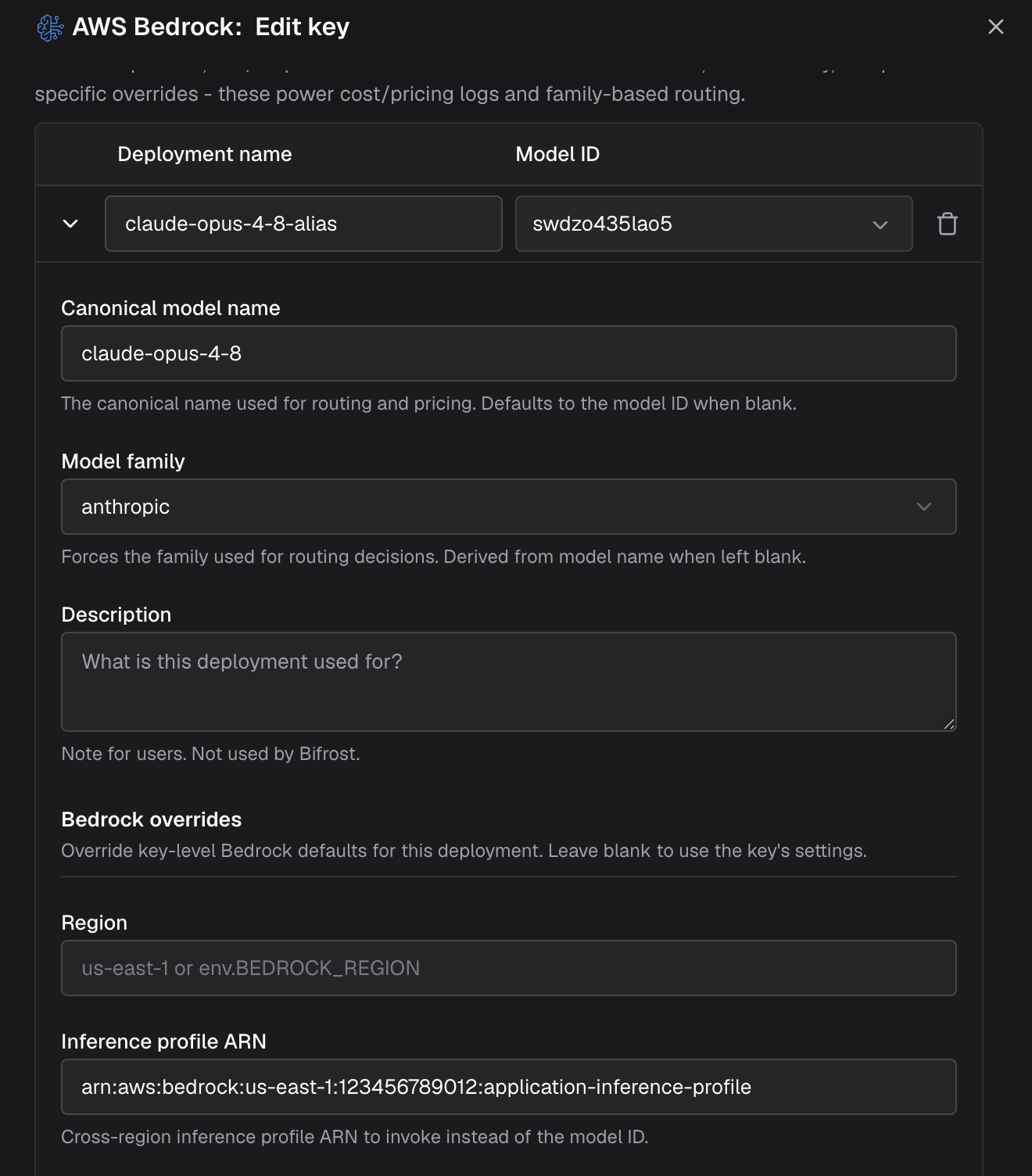 1. Navigate to **"Model Providers"** → **"Configurations"** → **"AWS Bedrock"** and edit your key
2. Add a deployment row - **Deployment name**: `claude-opus-4-8-alias`, **Model ID**: `abc12xyz`
3. Expand the row and set:
* **Canonical model name**: `claude-opus-4-8` - a profile resource ID carries no pricing information, so cost logs stay empty without this
* **Model family**: `anthropic` - a profile resource ID is not parseable into a family either
* **Inference profile ARN**: `arn:aws:bedrock:us-east-1:123456789012:application-inference-profile`
* **Region**: only when this deployment lives in a different region than the key
4. Save, then call the model as `bedrock/claude-opus-4-8-alias`
```json theme={null}
{
"providers": {
"bedrock": {
"keys": [
{
"name": "bedrock-mixed",
"models": ["*"],
"weight": 1.0,
"aliases": {
"claude-opus-4-8-alias": {
"model_id": "abc12xyz",
"model_name": "claude-opus-4-8",
"model_family": "anthropic",
"inference_profile_arn": "arn:aws:bedrock:us-east-1:123456789012:application-inference-profile"
},
"claude-sonnet-4-5": "us.anthropic.claude-sonnet-4-5-20250929-v1:0"
},
"bedrock_key_config": {
"access_key": "env.AWS_ACCESS_KEY_ID",
"secret_key": "env.AWS_SECRET_ACCESS_KEY",
"region": "us-east-1"
}
}
]
}
}
}
```
When every model on the key is an application inference profile, drop the per-alias override and set the ARN once:
```json theme={null}
{
"aliases": {
"claude-opus-4-8": "abc12xyz",
"claude-sonnet-4-5": "jkl78mno"
},
"bedrock_key_config": {
"access_key": "env.AWS_ACCESS_KEY_ID",
"secret_key": "env.AWS_SECRET_ACCESS_KEY",
"region": "us-east-1",
"arn": "arn:aws:bedrock:us-east-1:123456789012:application-inference-profile"
}
}
```
```bash theme={null}
curl -X POST http://localhost:8080/api/providers/bedrock/keys \
-H "Content-Type: application/json" \
-d '{
"name": "bedrock-mixed",
"models": ["*"],
"weight": 1.0,
"aliases": {
"claude-opus-4-8-alias": {
"model_id": "abc12xyz",
"model_name": "claude-opus-4-8",
"model_family": "anthropic",
"inference_profile_arn": "arn:aws:bedrock:us-east-1:123456789012:application-inference-profile"
},
"claude-sonnet-4-5": "us.anthropic.claude-sonnet-4-5-20250929-v1:0"
},
"bedrock_key_config": {
"access_key": "env.AWS_ACCESS_KEY_ID",
"secret_key": "env.AWS_SECRET_ACCESS_KEY",
"region": "us-east-1"
}
}'
```
These examples use `"models": ["*"]`. With a restricted list, the entries must
be the **alias names** (`claude-opus-4-8-alias`), not the profile resource IDs
* key selection matches the requested model name before aliases are resolved.
The same applies to `blacklisted_models`. See [Aliasing
Models](/providers/aliasing-models).
Verify the deployment resolves end to end:
```bash theme={null}
curl -X POST http://localhost:8080/v1/chat/completions \
-H "Content-Type: application/json" \
-d '{
"model": "bedrock/claude-opus-4-8-alias",
"messages": [{"role": "user", "content": "Hello"}]
}'
```
### Endpoints
* **Runtime API**: `bedrock-runtime.{region}.amazonaws.com/model/{path}`
* **Control Plane**: `bedrock.{region}.amazonaws.com` (list models)
* **Batch API**: Via bedrock-runtime
***
# 12. Error Handling
**HTTP Status Mapping**:
| Status | Bifrost Error Type | Notes |
| ------ | ------------------------- | ------------------------------- |
| 400 | `invalid_request_error` | Bad request parameters |
| 401 | `authentication_error` | Invalid/expired credentials |
| 403 | `permission_denied_error` | Access denied to model/resource |
| 404 | `not_found_error` | Model or resource not found |
| 429 | `rate_limit_error` | Rate limit exceeded |
| 500 | `api_error` | Server error |
| 529 | `overloaded_error` | Service overloaded |
**Error Response Structure**:
```go theme={null}
type BifrostError struct {
IsBifrostError bool
StatusCode *int
Error: {
Type: string // Error classification
Message: string // Human-readable message
Error: error // Underlying error
}
}
```
**Special Cases**:
* Context cancellation → `RequestCancelled`
* Request timeout → `ErrProviderRequestTimedOut`
* Streaming errors → Sent via channel with stream end indicator
* Response unmarshalling → `ErrProviderResponseUnmarshal`
***
## Caveats
**Severity**: High **Behavior**: Only base64/data URI images supported; remote
URLs not supported **Impact**: Requests with URL-based images fail **Code**:
`chat.go:image handling`
**Severity**: High
**Behavior**: `reasoning.max_tokens` must be >= 1024
**Impact**: Requests with lower values fail with error
**Code**: `chat.go:reasoning validation`
**Severity**: High **Behavior**: System messages removed from array, placed in
separate `system` field **Impact**: Message array structure differs from input
**Code**: `chat.go:message conversion`
**Severity**: High **Behavior**: Consecutive tool messages merged into single
user message **Impact**: Message count and structure changes **Code**:
`chat.go:tool message handling`
**Severity**: Medium **Behavior**: Reasoning/thinking config varies
significantly by model family **Impact**: Parameter mapping differs for Claude
vs Nova vs other families **Code**: `chat.go, utils.go:model detection`
**Severity**: Medium **Behavior**: Text completion streaming returns error
**Impact**: Streaming not available for legacy completions API **Code**:
`text.go:streaming`
**Severity**: Low **Behavior**: `response_format` converted to special
`bf_so_*` tool **Impact**: Tool call count and structure changes internally
**Code**: `chat.go:structured output handling`
**Severity**: Low **Behavior**: Model IDs with region prefixes matched against
deployment config **Impact**: Model availability depends on deployment
configuration **Code**: `models.go:deployment matching`
1. Navigate to **"Model Providers"** → **"Configurations"** → **"AWS Bedrock"** and edit your key
2. Add a deployment row - **Deployment name**: `claude-opus-4-8-alias`, **Model ID**: `abc12xyz`
3. Expand the row and set:
* **Canonical model name**: `claude-opus-4-8` - a profile resource ID carries no pricing information, so cost logs stay empty without this
* **Model family**: `anthropic` - a profile resource ID is not parseable into a family either
* **Inference profile ARN**: `arn:aws:bedrock:us-east-1:123456789012:application-inference-profile`
* **Region**: only when this deployment lives in a different region than the key
4. Save, then call the model as `bedrock/claude-opus-4-8-alias`
```json theme={null}
{
"providers": {
"bedrock": {
"keys": [
{
"name": "bedrock-mixed",
"models": ["*"],
"weight": 1.0,
"aliases": {
"claude-opus-4-8-alias": {
"model_id": "abc12xyz",
"model_name": "claude-opus-4-8",
"model_family": "anthropic",
"inference_profile_arn": "arn:aws:bedrock:us-east-1:123456789012:application-inference-profile"
},
"claude-sonnet-4-5": "us.anthropic.claude-sonnet-4-5-20250929-v1:0"
},
"bedrock_key_config": {
"access_key": "env.AWS_ACCESS_KEY_ID",
"secret_key": "env.AWS_SECRET_ACCESS_KEY",
"region": "us-east-1"
}
}
]
}
}
}
```
When every model on the key is an application inference profile, drop the per-alias override and set the ARN once:
```json theme={null}
{
"aliases": {
"claude-opus-4-8": "abc12xyz",
"claude-sonnet-4-5": "jkl78mno"
},
"bedrock_key_config": {
"access_key": "env.AWS_ACCESS_KEY_ID",
"secret_key": "env.AWS_SECRET_ACCESS_KEY",
"region": "us-east-1",
"arn": "arn:aws:bedrock:us-east-1:123456789012:application-inference-profile"
}
}
```
```bash theme={null}
curl -X POST http://localhost:8080/api/providers/bedrock/keys \
-H "Content-Type: application/json" \
-d '{
"name": "bedrock-mixed",
"models": ["*"],
"weight": 1.0,
"aliases": {
"claude-opus-4-8-alias": {
"model_id": "abc12xyz",
"model_name": "claude-opus-4-8",
"model_family": "anthropic",
"inference_profile_arn": "arn:aws:bedrock:us-east-1:123456789012:application-inference-profile"
},
"claude-sonnet-4-5": "us.anthropic.claude-sonnet-4-5-20250929-v1:0"
},
"bedrock_key_config": {
"access_key": "env.AWS_ACCESS_KEY_ID",
"secret_key": "env.AWS_SECRET_ACCESS_KEY",
"region": "us-east-1"
}
}'
```
These examples use `"models": ["*"]`. With a restricted list, the entries must
be the **alias names** (`claude-opus-4-8-alias`), not the profile resource IDs
* key selection matches the requested model name before aliases are resolved.
The same applies to `blacklisted_models`. See [Aliasing
Models](/providers/aliasing-models).
Verify the deployment resolves end to end:
```bash theme={null}
curl -X POST http://localhost:8080/v1/chat/completions \
-H "Content-Type: application/json" \
-d '{
"model": "bedrock/claude-opus-4-8-alias",
"messages": [{"role": "user", "content": "Hello"}]
}'
```
### Endpoints
* **Runtime API**: `bedrock-runtime.{region}.amazonaws.com/model/{path}`
* **Control Plane**: `bedrock.{region}.amazonaws.com` (list models)
* **Batch API**: Via bedrock-runtime
***
# 12. Error Handling
**HTTP Status Mapping**:
| Status | Bifrost Error Type | Notes |
| ------ | ------------------------- | ------------------------------- |
| 400 | `invalid_request_error` | Bad request parameters |
| 401 | `authentication_error` | Invalid/expired credentials |
| 403 | `permission_denied_error` | Access denied to model/resource |
| 404 | `not_found_error` | Model or resource not found |
| 429 | `rate_limit_error` | Rate limit exceeded |
| 500 | `api_error` | Server error |
| 529 | `overloaded_error` | Service overloaded |
**Error Response Structure**:
```go theme={null}
type BifrostError struct {
IsBifrostError bool
StatusCode *int
Error: {
Type: string // Error classification
Message: string // Human-readable message
Error: error // Underlying error
}
}
```
**Special Cases**:
* Context cancellation → `RequestCancelled`
* Request timeout → `ErrProviderRequestTimedOut`
* Streaming errors → Sent via channel with stream end indicator
* Response unmarshalling → `ErrProviderResponseUnmarshal`
***
## Caveats
**Severity**: High **Behavior**: Only base64/data URI images supported; remote
URLs not supported **Impact**: Requests with URL-based images fail **Code**:
`chat.go:image handling`
**Severity**: High
**Behavior**: `reasoning.max_tokens` must be >= 1024
**Impact**: Requests with lower values fail with error
**Code**: `chat.go:reasoning validation`
**Severity**: High **Behavior**: System messages removed from array, placed in
separate `system` field **Impact**: Message array structure differs from input
**Code**: `chat.go:message conversion`
**Severity**: High **Behavior**: Consecutive tool messages merged into single
user message **Impact**: Message count and structure changes **Code**:
`chat.go:tool message handling`
**Severity**: Medium **Behavior**: Reasoning/thinking config varies
significantly by model family **Impact**: Parameter mapping differs for Claude
vs Nova vs other families **Code**: `chat.go, utils.go:model detection`
**Severity**: Medium **Behavior**: Text completion streaming returns error
**Impact**: Streaming not available for legacy completions API **Code**:
`text.go:streaming`
**Severity**: Low **Behavior**: `response_format` converted to special
`bf_so_*` tool **Impact**: Tool call count and structure changes internally
**Code**: `chat.go:structured output handling`
**Severity**: Low **Behavior**: Model IDs with region prefixes matched against
deployment config **Impact**: Model availability depends on deployment
configuration **Code**: `models.go:deployment matching`