> ## Documentation Index
> Fetch the complete documentation index at: https://bifrost-dev.mintlify.site/llms.txt
> Use this file to discover all available pages before exploring further.
# Per-User OAuth
> Each end-user authenticates with the upstream MCP service under their own credentials. Same lazy-auth model on the MCP Gateway and the LLM Gateway.
## Overview
`auth_type: "per_user_oauth"` lets each end-user connect to an upstream MCP service (Notion, GitHub, Sentry, etc.) under their own account. Bifrost stores one OAuth token per `(identity, mcp_client)` and reuses it on every later call.
If a single shared admin token is fine, use [OAuth 2.0](./oauth) instead.
This auth type is only valid for **HTTP** and **SSE** connections.
This page covers **upstream** per-user OAuth — Bifrost holding a token *for* an upstream MCP service on behalf of each end-user, resolved **lazily** on the first tool call that needs it. Identity is asserted by the caller via headers (or upstream SSO).
This is separate from Bifrost acting as an OAuth 2.1 Authorization Server *for inbound* `/mcp` clients (browser consent + `.well-known` discovery), which is covered in [Gateway Authentication](../gateway-auth).
| | Server-level OAuth (`oauth`) | Per-user OAuth (`per_user_oauth`) |
| ----------------- | ---------------------------- | --------------------------------------- |
| Who authenticates | Admin, once at setup | Each end-user individually |
| Token scope | Shared across all requests | Per-identity, per-MCP-server |
| Identity required | No | Yes (VK, signed-in user, or session ID) |
| Sessions UI | Not surfaced | One row per (identity, MCP) |
***
## Setup
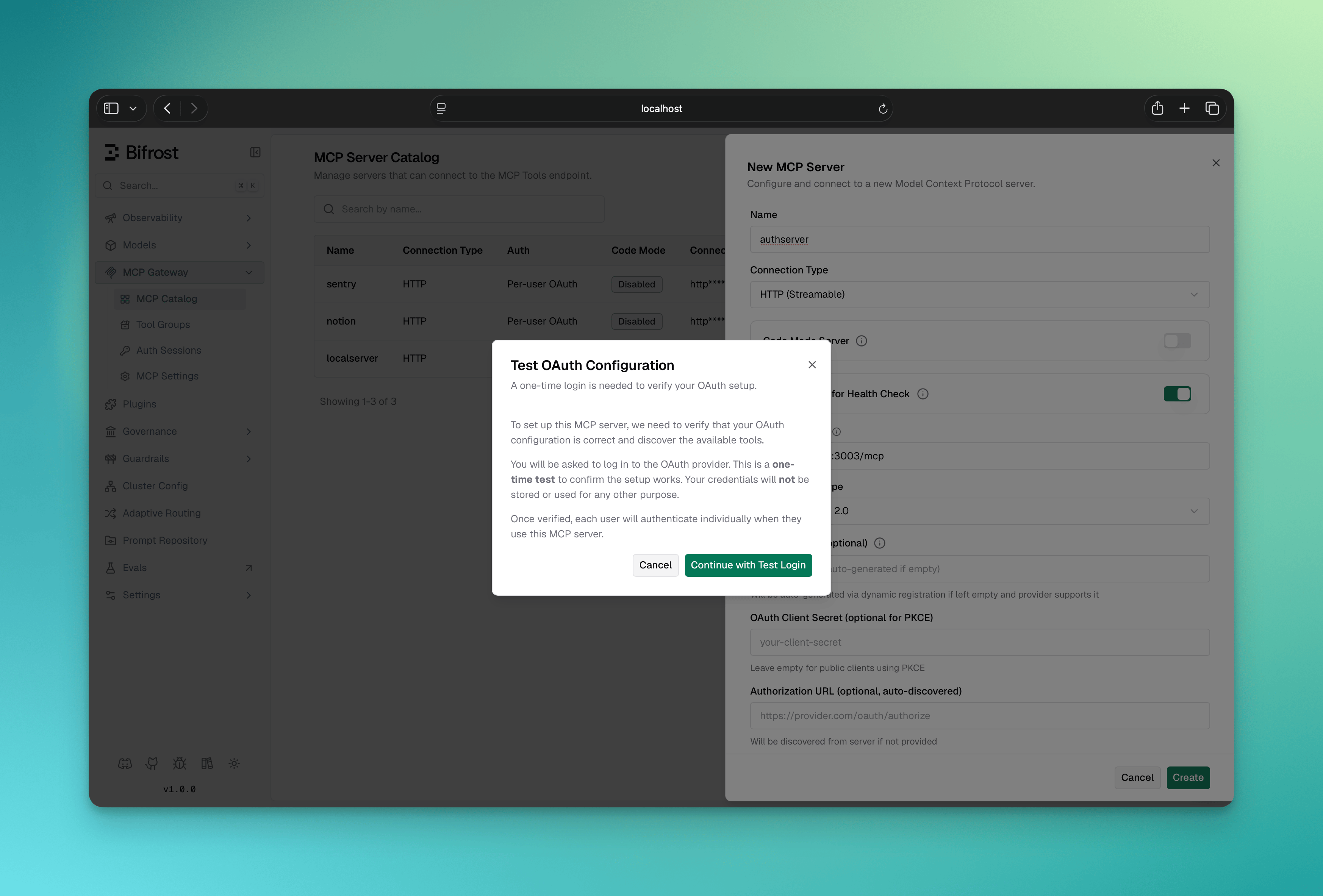
Per-user OAuth needs a one-time admin test login so Bifrost can verify the OAuth configuration and discover the tool list from the upstream service. The admin's bootstrap token is retained after verification as the [admin discovery credential](#admin-discovery-credential), used only to keep the tool list fresh; per-user tokens are minted lazily by end-users at runtime, and end-user traffic never uses the admin token.
You can run the admin verification either from the **Web UI** during create, or from a `config.json`-declared client by clicking **Verify** in the UI after Bifrost boots.
1. Navigate to **MCP Gateway** in the sidebar
2. Click **New MCP Server**
3. Pick **HTTP** or **SSE** as the connection type, fill in the **Connection URL**
4. Set **Auth Type** to **Per-User OAuth 2.0**
5. Fill in the OAuth fields:
* **Client ID** (optional — leave blank for Dynamic Client Registration)
* **Client Secret** (optional — omit for PKCE public clients)
* **Authorize URL** / **Token URL** (optional — leave blank for OAuth discovery)
* **Scopes** (comma-separated)
6. Click **Create** — Bifrost runs a test OAuth flow in a popup as the admin
7. Complete the upstream sign-in
8. The MCP client is persisted with the discovered tool list and made available for end-users
 Declare the client with an inline `oauth_config` block:
```json theme={null}
{
"mcp": {
"client_configs": [
{
"name": "notion",
"connection_type": "http",
"connection_string": "https://mcp.notion.so/sse",
"auth_type": "per_user_oauth",
"oauth_config": {
"client_id": "your-client-id",
"scopes": ["read_user", "read_database"]
},
"tools_to_execute": ["*"]
}
]
}
}
```
The `oauth_config` block itself is optional, and every inner field is optional. `authorize_url` / `token_url` come from RFC 8414 discovery off `connection_string` when the upstream supports it, and `client_id` / `client_secret` can be obtained via RFC 7591 Dynamic Client Registration. The minimum viable declaration is `{ "auth_type": "per_user_oauth", "connection_string": "..." }`.
`client_id` and `client_secret` support `env.VAR_NAME` and `vault.path` references — `"client_secret": "env.GITHUB_SECRET"` resolves from the environment at runtime, and the reference (not the resolved secret) is what gets stored. Plain values also work (encrypted at rest, redacted in API responses). The other fields (`authorize_url`, `token_url`, `registration_url`, `scopes`) take literal values only.
At boot the client lands in **`pending_verification`** state. From the MCP Gateway UI, open the client and click **Verify** — Bifrost runs the same admin test login popup the Web UI flow uses. On success the client transitions to `healthy` with the tool list discovered, and the admin's bootstrap token is retained as the [admin discovery credential](#admin-discovery-credential) for later tool-list refresh.
The same flow is scriptable: `POST /api/mcp/client/{id}/initiate-verification` (`{id}` = MCP client ID) returns `authorize_url` plus `status_url` / `complete_url` hints — open `authorize_url` in a browser for the one-time admin login, poll `status_url` until `authorized`, then POST `complete_url` to run verification and tool discovery.
**Lifecycle across restarts and config edits:** the verified state (`oauth_config_id` + discovered tools) is server-side and survives restarts and config.json re-syncs. Mutable fields (tool lists, headers, pricing, etc.) can be edited freely in config.json. Immutable fields (`auth_type`, `connection_type`, `connection_string`, `stdio_config`) cannot be changed after creation: file edits to them are **ignored**, matching the update API, and Bifrost logs a warning naming the ignored fields at the next boot. To change any of them, delete the client, update the block, and restart (the recreated client re-enters `pending_verification`). The `oauth_config` block is different: editing it on an already-verified client **rotates** the stored OAuth credentials in place and flips every bound token (end-user tokens and the admin discovery credential alike) to `needs_reauth`, with a boot warning that existing sessions must re-authenticate. The same rotation is available over the API via `PUT /api/mcp/client/{id}` with an `oauth_config` body; see [Rotation on the OAuth 2.0 page](./oauth#rotation) for the full field-preservation semantics.
If the upstream server supports OAuth Discovery (RFC 8414), you can leave the authorize and token URLs blank and provide only the **Connection URL** plus client ID. Bifrost discovers the endpoints automatically.
Providers that only issue refresh tokens on explicit request (Google needs `access_type=offline&prompt=consent`) will otherwise hand out access-token-only grants that expire within about an hour and flip to `needs_reauth`. Append the provider's offline-access parameters to `authorize_url`; Bifrost preserves query parameters already present on it. See the [refresh-token warning on the OAuth 2.0 page](./oauth#automatic-refresh).
***
## How it works
The same lazy-auth pattern is used on both the **MCP Gateway** (`/mcp`) and the **LLM Gateway** (`/v1/chat/completions`):
1. The caller sends a request with an identity (header or SSO).
2. The LLM (or MCP client) asks to invoke a tool on a per-user OAuth service.
3. Bifrost looks up an existing token for `(identity, mcp_client)`:
* **Token found and `active`** → upstream call goes out transparently
* **Missing, `orphaned`, or `needs_reauth`** → Bifrost returns an `mcp_auth_required` payload with an inline `authorize_url`. The tool is **not** executed.
4. The user opens the URL, completes the upstream OAuth flow, and Bifrost stores the resulting token against their identity.
5. The next request executes the tool normally.
Declare the client with an inline `oauth_config` block:
```json theme={null}
{
"mcp": {
"client_configs": [
{
"name": "notion",
"connection_type": "http",
"connection_string": "https://mcp.notion.so/sse",
"auth_type": "per_user_oauth",
"oauth_config": {
"client_id": "your-client-id",
"scopes": ["read_user", "read_database"]
},
"tools_to_execute": ["*"]
}
]
}
}
```
The `oauth_config` block itself is optional, and every inner field is optional. `authorize_url` / `token_url` come from RFC 8414 discovery off `connection_string` when the upstream supports it, and `client_id` / `client_secret` can be obtained via RFC 7591 Dynamic Client Registration. The minimum viable declaration is `{ "auth_type": "per_user_oauth", "connection_string": "..." }`.
`client_id` and `client_secret` support `env.VAR_NAME` and `vault.path` references — `"client_secret": "env.GITHUB_SECRET"` resolves from the environment at runtime, and the reference (not the resolved secret) is what gets stored. Plain values also work (encrypted at rest, redacted in API responses). The other fields (`authorize_url`, `token_url`, `registration_url`, `scopes`) take literal values only.
At boot the client lands in **`pending_verification`** state. From the MCP Gateway UI, open the client and click **Verify** — Bifrost runs the same admin test login popup the Web UI flow uses. On success the client transitions to `healthy` with the tool list discovered, and the admin's bootstrap token is retained as the [admin discovery credential](#admin-discovery-credential) for later tool-list refresh.
The same flow is scriptable: `POST /api/mcp/client/{id}/initiate-verification` (`{id}` = MCP client ID) returns `authorize_url` plus `status_url` / `complete_url` hints — open `authorize_url` in a browser for the one-time admin login, poll `status_url` until `authorized`, then POST `complete_url` to run verification and tool discovery.
**Lifecycle across restarts and config edits:** the verified state (`oauth_config_id` + discovered tools) is server-side and survives restarts and config.json re-syncs. Mutable fields (tool lists, headers, pricing, etc.) can be edited freely in config.json. Immutable fields (`auth_type`, `connection_type`, `connection_string`, `stdio_config`) cannot be changed after creation: file edits to them are **ignored**, matching the update API, and Bifrost logs a warning naming the ignored fields at the next boot. To change any of them, delete the client, update the block, and restart (the recreated client re-enters `pending_verification`). The `oauth_config` block is different: editing it on an already-verified client **rotates** the stored OAuth credentials in place and flips every bound token (end-user tokens and the admin discovery credential alike) to `needs_reauth`, with a boot warning that existing sessions must re-authenticate. The same rotation is available over the API via `PUT /api/mcp/client/{id}` with an `oauth_config` body; see [Rotation on the OAuth 2.0 page](./oauth#rotation) for the full field-preservation semantics.
If the upstream server supports OAuth Discovery (RFC 8414), you can leave the authorize and token URLs blank and provide only the **Connection URL** plus client ID. Bifrost discovers the endpoints automatically.
Providers that only issue refresh tokens on explicit request (Google needs `access_type=offline&prompt=consent`) will otherwise hand out access-token-only grants that expire within about an hour and flip to `needs_reauth`. Append the provider's offline-access parameters to `authorize_url`; Bifrost preserves query parameters already present on it. See the [refresh-token warning on the OAuth 2.0 page](./oauth#automatic-refresh).
***
## How it works
The same lazy-auth pattern is used on both the **MCP Gateway** (`/mcp`) and the **LLM Gateway** (`/v1/chat/completions`):
1. The caller sends a request with an identity (header or SSO).
2. The LLM (or MCP client) asks to invoke a tool on a per-user OAuth service.
3. Bifrost looks up an existing token for `(identity, mcp_client)`:
* **Token found and `active`** → upstream call goes out transparently
* **Missing, `orphaned`, or `needs_reauth`** → Bifrost returns an `mcp_auth_required` payload with an inline `authorize_url`. The tool is **not** executed.
4. The user opens the URL, completes the upstream OAuth flow, and Bifrost stores the resulting token against their identity.
5. The next request executes the tool normally.
 ### What the auth URL looks like
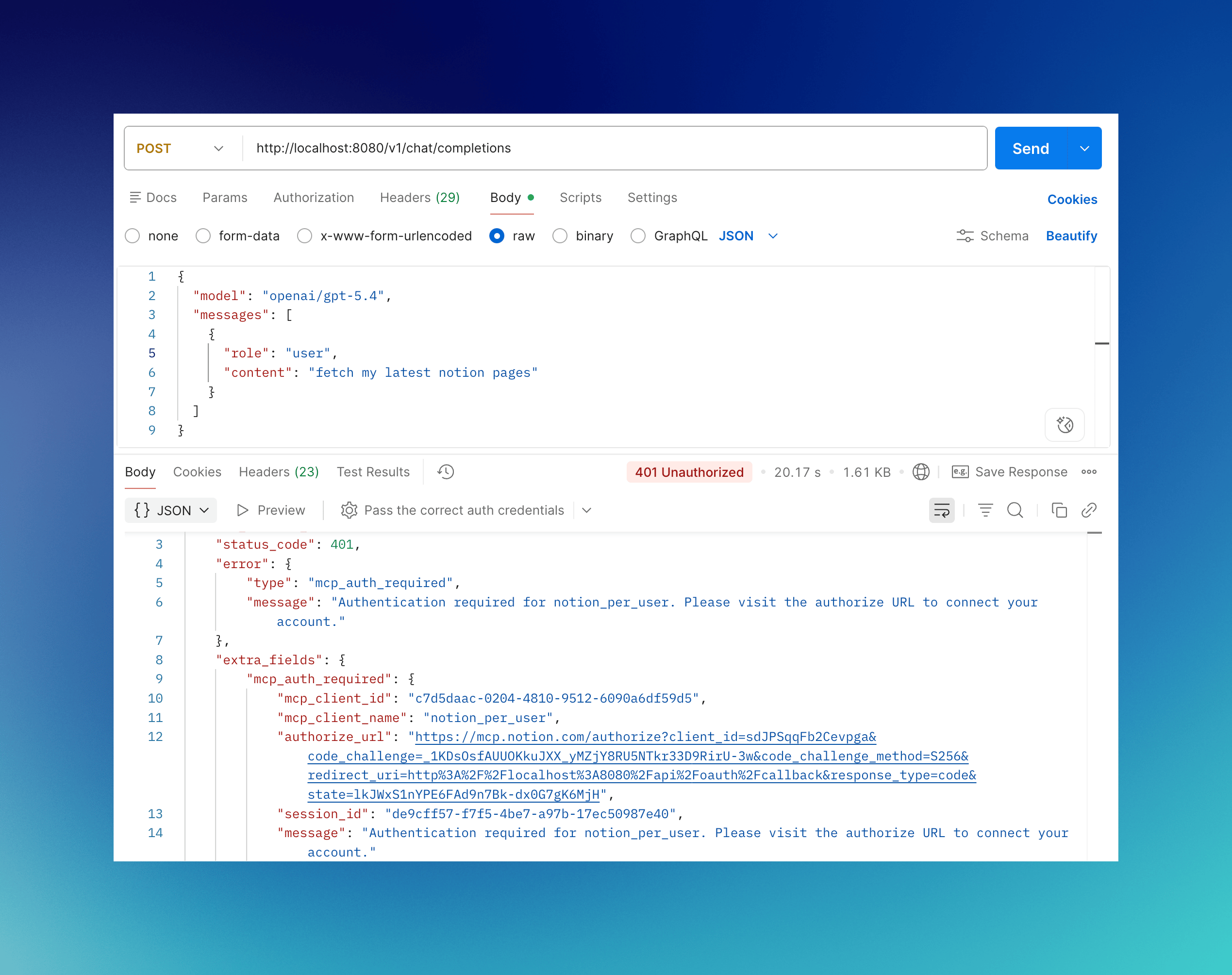
**LLM Gateway** — `authorize_url` is on the response's `extra_fields.mcp_auth_required` block, and also embedded in the natural-language message so plain-text clients see it too:
```text theme={null}
Authentication required for Notion. Open this URL to connect your account: https://your-bifrost-domain.com/workspace/mcp-sessions/auth?flow=
```
VK and session-mode URLs may also carry a `#t=` fragment when [`mcp_enable_temp_token_auth`](./overview#the-mcp_enable_temp_token_auth-toggle) is turned on. User-mode URLs never do — they require SSO login regardless.
### What the auth URL looks like
**LLM Gateway** — `authorize_url` is on the response's `extra_fields.mcp_auth_required` block, and also embedded in the natural-language message so plain-text clients see it too:
```text theme={null}
Authentication required for Notion. Open this URL to connect your account: https://your-bifrost-domain.com/workspace/mcp-sessions/auth?flow=
```
VK and session-mode URLs may also carry a `#t=` fragment when [`mcp_enable_temp_token_auth`](./overview#the-mcp_enable_temp_token_auth-toggle) is turned on. User-mode URLs never do — they require SSO login regardless.
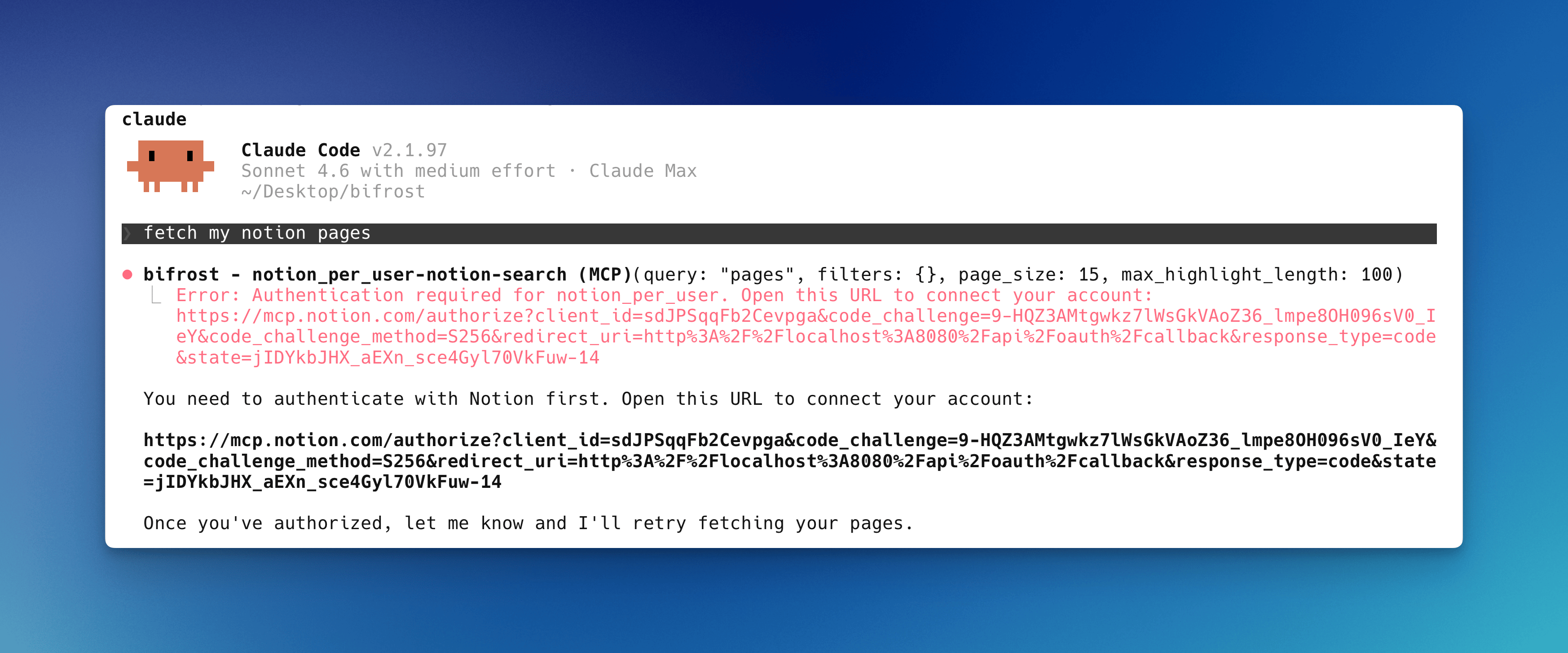
 **MCP Gateway** — same string surfaces as a tool result message, so OAuth-capable MCP clients like Claude Code and Cursor see the URL inline in chat:
 ### The consent page
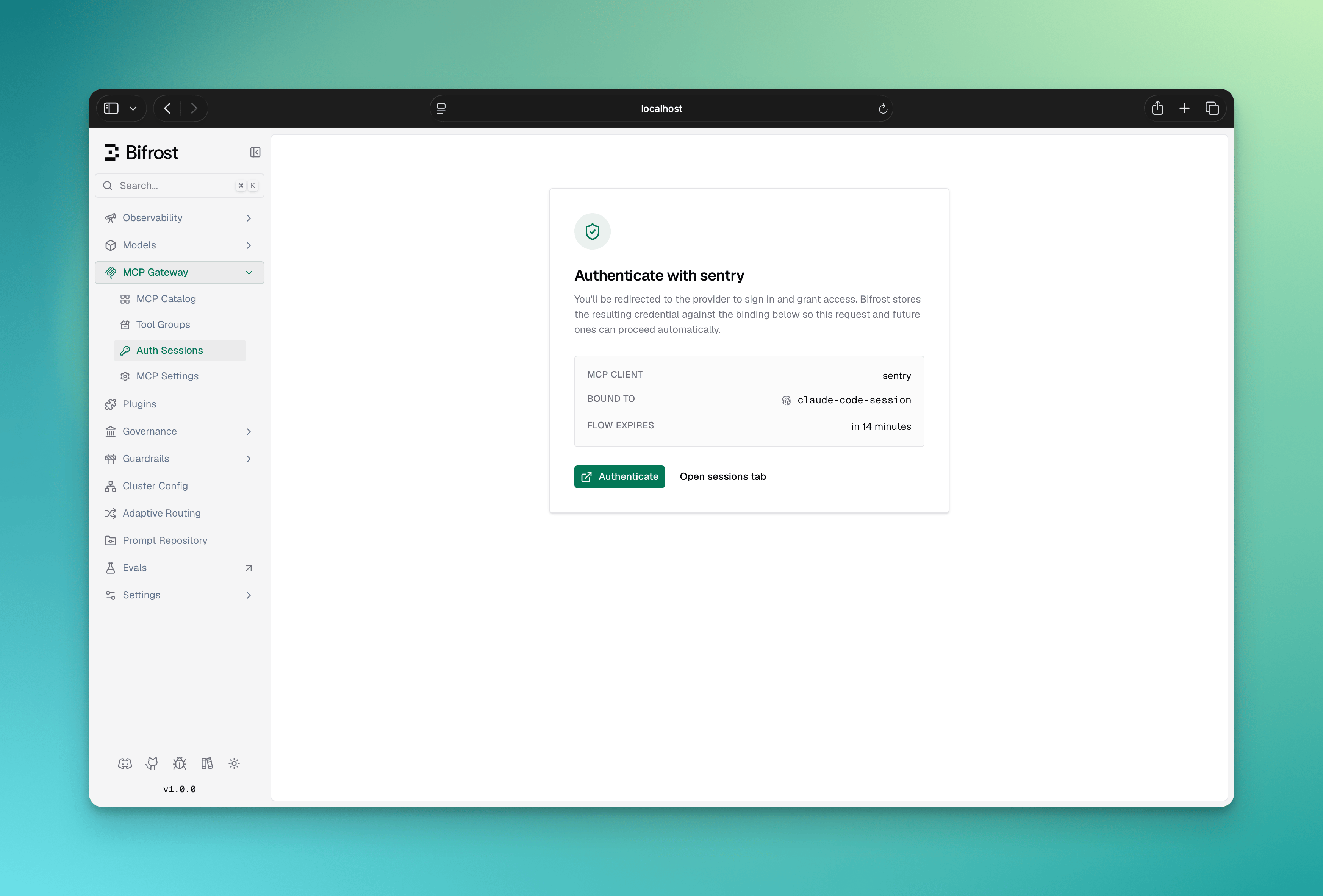
The URL points at a Bifrost dashboard page. It shows:
* Which **MCP server** is asking for authentication
* Which **identity** the resulting token will be bound to (VK name, signed-in user, or session ID)
* An **Authenticate** button that redirects to the upstream provider
After completing upstream OAuth, the user is redirected back to `/api/oauth/callback`, the code is exchanged for tokens server-side, and the token is stored against the identity.
### The consent page
The URL points at a Bifrost dashboard page. It shows:
* Which **MCP server** is asking for authentication
* Which **identity** the resulting token will be bound to (VK name, signed-in user, or session ID)
* An **Authenticate** button that redirects to the upstream provider
After completing upstream OAuth, the user is redirected back to `/api/oauth/callback`, the code is exchanged for tokens server-side, and the token is stored against the identity.
 When the `#t=` URL fragment is present, it authorizes anonymous browser visitors to complete the flow without a dashboard session. The fragment never reaches server logs (fragments are not sent in the request line). User-mode flow URLs never carry a temp token — visitors must complete SSO login first, and only the bound SSO user can finish the flow. See [Flow mode and access rules](./overview#flow-mode-and-access-rules) for the per-mode behavior and how to enable temp tokens for VK/session flows.
### Multi-server auth
If a single LLM turn triggers tool calls against multiple unauthenticated per-user MCP servers, the LLM only ever sees one `mcp_auth_required` at a time (the first un-authed service Bifrost hits). The user authenticates that one, retries, and the LLM is then prompted for the next un-authed service — until everything required for the turn is authenticated. There is no upfront "connect all your services" screen.
***
## Identity modes
Every per-user OAuth row is bound to **exactly one** identity column. The mode is derived from request context at lookup time, with priority `user` > `vk` > `session`. See [Identity modes on the Auth overview](./overview#identity-modes) for the full table.
A per-user request **without any identity** is rejected with an `mcp_auth_required` payload that explains the caller must send a VK, sign in, or set `x-bf-mcp-session-id`.
***
## Cross-gateway token sharing
Tokens are stored against an **identity**, not against a gateway. As long as the same identity reaches the gateway, the token is reused.
* Authenticate via the **LLM Gateway** with `vk_xyz` → that token is immediately usable on the **MCP Gateway** as long as the inbound request also carries `vk_xyz`.
* Authenticate via the **MCP Gateway** with `x-bf-mcp-session-id=abc` → the **LLM Gateway** can reuse it by sending the same `x-bf-mcp-session-id` header.
* Authenticate via enterprise SSO as user `u_123` on either gateway → the other gateway also reuses the token automatically (no header to set).
***
## Configuration reference
After an MCP client is verified (via Web UI Create or via the `config.json` bootstrap flow), its `auth_type` is `per_user_oauth` with an `oauth_config_id` linking to the OAuth credentials Bifrost stored. You'll see this shape in API responses:
```json theme={null}
{
"name": "notion",
"connection_type": "http",
"connection_string": "https://mcp.notion.so/sse",
"auth_type": "per_user_oauth",
"oauth_config_id": "oauth_cfg_abc123",
"tools_to_execute": ["*"]
}
```
| Field | Type | Notes |
| ----------------- | ------ | ---------------------------------------------------------------------------------------------------------------- |
| `auth_type` | string | `"per_user_oauth"` |
| `oauth_config_id` | string | ID of the OAuth credentials row. Set automatically when admin verification completes; not a `config.json` input. |
MCP client names cannot contain hyphens — Bifrost prefixes tools as `-` and uses the hyphen to split the two halves at execution time.
***
## Managing user tokens
Every per-user OAuth token shows up on the **MCP Sessions** page. From there callers can re-authenticate stale tokens, revoke rows outright, and see status (`active`, `orphaned`, `needs_reauth`).
See [MCP Sessions](../sessions) for the full lifecycle, the difference between `orphaned` and `needs_reauth`, and the auto-orphan-on-VK-change behavior.
***
## Admin discovery credential
The admin's one-time bootstrap token is not thrown away after verification: Bifrost retains it as a client-level **admin discovery credential** (auth mode `admin`). Its role is deliberately narrow:
* **Tool-list refresh only.** The periodic tool syncer uses it for a one-shot connect, `tools/list`, disconnect cycle on the client's [tool sync interval](#periodic-tool-sync). It is **never** used for end-user tool calls; those always run under the caller's own token.
* **Proactively refreshed.** The background token refresh worker keeps it alive alongside shared-client tokens, so tool discovery keeps working without anyone logging in again.
* **Invisible on the sessions page.** Admin credentials are excluded from [MCP Sessions](../sessions); they are managed from the client sheet instead.
If the admin credential permanently dies (refresh rejected, provider-side revocation, or a credential rotation), the client list projects a **`needs_reauth`** badge next to the client's **View sessions** link. This is a display-level state: end-user credentials and tool calls keep working, only tool-list refresh pauses until an admin repairs it. Clients verified before Bifrost retained admin credentials have no admin row and simply stay healthy.
To repair it, open the client sheet and click **Repair OAuth**: Bifrost redoes the admin consent flow, verifies the fresh token upstream, re-discovers tools, and installs the token as the new admin credential. If verification fails, the fresh token is revoked and the previous credential and tool set are left untouched, so the repair is safely retryable.
When the `#t=` URL fragment is present, it authorizes anonymous browser visitors to complete the flow without a dashboard session. The fragment never reaches server logs (fragments are not sent in the request line). User-mode flow URLs never carry a temp token — visitors must complete SSO login first, and only the bound SSO user can finish the flow. See [Flow mode and access rules](./overview#flow-mode-and-access-rules) for the per-mode behavior and how to enable temp tokens for VK/session flows.
### Multi-server auth
If a single LLM turn triggers tool calls against multiple unauthenticated per-user MCP servers, the LLM only ever sees one `mcp_auth_required` at a time (the first un-authed service Bifrost hits). The user authenticates that one, retries, and the LLM is then prompted for the next un-authed service — until everything required for the turn is authenticated. There is no upfront "connect all your services" screen.
***
## Identity modes
Every per-user OAuth row is bound to **exactly one** identity column. The mode is derived from request context at lookup time, with priority `user` > `vk` > `session`. See [Identity modes on the Auth overview](./overview#identity-modes) for the full table.
A per-user request **without any identity** is rejected with an `mcp_auth_required` payload that explains the caller must send a VK, sign in, or set `x-bf-mcp-session-id`.
***
## Cross-gateway token sharing
Tokens are stored against an **identity**, not against a gateway. As long as the same identity reaches the gateway, the token is reused.
* Authenticate via the **LLM Gateway** with `vk_xyz` → that token is immediately usable on the **MCP Gateway** as long as the inbound request also carries `vk_xyz`.
* Authenticate via the **MCP Gateway** with `x-bf-mcp-session-id=abc` → the **LLM Gateway** can reuse it by sending the same `x-bf-mcp-session-id` header.
* Authenticate via enterprise SSO as user `u_123` on either gateway → the other gateway also reuses the token automatically (no header to set).
***
## Configuration reference
After an MCP client is verified (via Web UI Create or via the `config.json` bootstrap flow), its `auth_type` is `per_user_oauth` with an `oauth_config_id` linking to the OAuth credentials Bifrost stored. You'll see this shape in API responses:
```json theme={null}
{
"name": "notion",
"connection_type": "http",
"connection_string": "https://mcp.notion.so/sse",
"auth_type": "per_user_oauth",
"oauth_config_id": "oauth_cfg_abc123",
"tools_to_execute": ["*"]
}
```
| Field | Type | Notes |
| ----------------- | ------ | ---------------------------------------------------------------------------------------------------------------- |
| `auth_type` | string | `"per_user_oauth"` |
| `oauth_config_id` | string | ID of the OAuth credentials row. Set automatically when admin verification completes; not a `config.json` input. |
MCP client names cannot contain hyphens — Bifrost prefixes tools as `-` and uses the hyphen to split the two halves at execution time.
***
## Managing user tokens
Every per-user OAuth token shows up on the **MCP Sessions** page. From there callers can re-authenticate stale tokens, revoke rows outright, and see status (`active`, `orphaned`, `needs_reauth`).
See [MCP Sessions](../sessions) for the full lifecycle, the difference between `orphaned` and `needs_reauth`, and the auto-orphan-on-VK-change behavior.
***
## Admin discovery credential
The admin's one-time bootstrap token is not thrown away after verification: Bifrost retains it as a client-level **admin discovery credential** (auth mode `admin`). Its role is deliberately narrow:
* **Tool-list refresh only.** The periodic tool syncer uses it for a one-shot connect, `tools/list`, disconnect cycle on the client's [tool sync interval](#periodic-tool-sync). It is **never** used for end-user tool calls; those always run under the caller's own token.
* **Proactively refreshed.** The background token refresh worker keeps it alive alongside shared-client tokens, so tool discovery keeps working without anyone logging in again.
* **Invisible on the sessions page.** Admin credentials are excluded from [MCP Sessions](../sessions); they are managed from the client sheet instead.
If the admin credential permanently dies (refresh rejected, provider-side revocation, or a credential rotation), the client list projects a **`needs_reauth`** badge next to the client's **View sessions** link. This is a display-level state: end-user credentials and tool calls keep working, only tool-list refresh pauses until an admin repairs it. Clients verified before Bifrost retained admin credentials have no admin row and simply stay healthy.
To repair it, open the client sheet and click **Repair OAuth**: Bifrost redoes the admin consent flow, verifies the fresh token upstream, re-discovers tools, and installs the token as the new admin credential. If verification fails, the fresh token is revoked and the previous credential and tool set are left untouched, so the repair is safely retryable.
 The same repair is scriptable via `POST /api/mcp/client/{id}/reauthorize` (`{id}` = MCP client ID). For `per_user_oauth` clients the endpoint is strictly a repair surface: it returns **409** ("does not need repair or does not exist") unless the admin credential actually sits in `needs_reauth`, so it can never churn a healthy credential. The response is the standard `pending_oauth` payload (`authorize_url`, `status_url`, `complete_url`); complete it the same way as the [scriptable verification flow](#setup).
### Periodic tool sync
Per-user clients hold no persistent upstream connection, but their tool list still refreshes on a schedule using the admin discovery credential. The cadence follows the per-client `tool_sync_interval` (minutes, on the create/update API):
* **Positive**: sync every N minutes for this client
* **`0` / unset**: inherit the global `mcp_tool_sync_interval` client setting (minutes, default 10)
* **Negative**: disable periodic sync for this client
A failed sync keeps the existing tool set and retries on the next cycle. In `config.json`, the field also accepts duration strings such as `"10m"` (recommended); a bare number there is a legacy nanosecond value, unlike the API which takes minutes.
Every sync's result persists to the database (skipped when it's byte-identical to what's already stored), so a restart doesn't revert the tool list to whatever was discovered at the client's original bootstrap verification.
***
## Public URL configuration
The consent page URL Bifrost builds (`/workspace/mcp-sessions/auth?flow=…`) and the `redirect_uri` Bifrost registers with upstream OAuth providers are both derived from the request `Host` header by default. Behind a reverse proxy, override them with:
* `mcp_external_client_url` — public base URL for both the consent page and the `redirect_uri` Bifrost registers with upstream providers
See [Reverse Proxy configuration →](../../deployment-guides/config-json/client#reverse-proxy) for the full reference.
**Changing `mcp_external_client_url` after an upstream provider has been registered breaks already-authorized clients.** Upstream providers lock the `redirect_uri` to whatever was registered during Dynamic Client Registration. To recover, clear the stored OAuth client credentials for the affected MCP server so Bifrost re-registers with the new URL.
***
## Next Steps
* [Per-User Headers](./per-user-headers) — when there's no upstream OAuth, just per-user API keys
* [OAuth 2.0](./oauth) — admin authenticates once, shared token for all requests
* [MCP Sessions](../sessions) — token states, re-authenticate, revoke
* [MCP Gateway Mode](../gateway) — expose Bifrost as an MCP server for Claude Code / Cursor
The same repair is scriptable via `POST /api/mcp/client/{id}/reauthorize` (`{id}` = MCP client ID). For `per_user_oauth` clients the endpoint is strictly a repair surface: it returns **409** ("does not need repair or does not exist") unless the admin credential actually sits in `needs_reauth`, so it can never churn a healthy credential. The response is the standard `pending_oauth` payload (`authorize_url`, `status_url`, `complete_url`); complete it the same way as the [scriptable verification flow](#setup).
### Periodic tool sync
Per-user clients hold no persistent upstream connection, but their tool list still refreshes on a schedule using the admin discovery credential. The cadence follows the per-client `tool_sync_interval` (minutes, on the create/update API):
* **Positive**: sync every N minutes for this client
* **`0` / unset**: inherit the global `mcp_tool_sync_interval` client setting (minutes, default 10)
* **Negative**: disable periodic sync for this client
A failed sync keeps the existing tool set and retries on the next cycle. In `config.json`, the field also accepts duration strings such as `"10m"` (recommended); a bare number there is a legacy nanosecond value, unlike the API which takes minutes.
Every sync's result persists to the database (skipped when it's byte-identical to what's already stored), so a restart doesn't revert the tool list to whatever was discovered at the client's original bootstrap verification.
***
## Public URL configuration
The consent page URL Bifrost builds (`/workspace/mcp-sessions/auth?flow=…`) and the `redirect_uri` Bifrost registers with upstream OAuth providers are both derived from the request `Host` header by default. Behind a reverse proxy, override them with:
* `mcp_external_client_url` — public base URL for both the consent page and the `redirect_uri` Bifrost registers with upstream providers
See [Reverse Proxy configuration →](../../deployment-guides/config-json/client#reverse-proxy) for the full reference.
**Changing `mcp_external_client_url` after an upstream provider has been registered breaks already-authorized clients.** Upstream providers lock the `redirect_uri` to whatever was registered during Dynamic Client Registration. To recover, clear the stored OAuth client credentials for the affected MCP server so Bifrost re-registers with the new URL.
***
## Next Steps
* [Per-User Headers](./per-user-headers) — when there's no upstream OAuth, just per-user API keys
* [OAuth 2.0](./oauth) — admin authenticates once, shared token for all requests
* [MCP Sessions](../sessions) — token states, re-authenticate, revoke
* [MCP Gateway Mode](../gateway) — expose Bifrost as an MCP server for Claude Code / Cursor