> ## Documentation Index
> Fetch the complete documentation index at: https://bifrost-dev.mintlify.site/llms.txt
> Use this file to discover all available pages before exploring further.
# OAuth 2.0 Authentication
> Admin-side OAuth 2.0 for MCP servers. Single shared token, automatic refresh, PKCE, dynamic client registration.
## Overview
`auth_type: "oauth"` covers **server-level OAuth**: the admin authenticates once during MCP client setup, Bifrost stores the resulting token, and every subsequent request to that MCP server uses the same token regardless of which caller hit Bifrost.
If you need each end-user to authenticate themselves (personal Notion workspace, personal GitHub repos, etc.), use [Per-User OAuth](./per-user-oauth) instead.
This auth type is only valid for **HTTP** and **SSE** connections.
What Bifrost handles for you:
* **Automatic token refresh** before expiration
* **PKCE** for public clients (no client secret)
* **Dynamic Client Registration** (RFC 7591)
* **OAuth discovery** from server URLs (`.well-known/oauth-authorization-server`, `.well-known/openid-configuration`)
* **Secure token storage** (encrypted at rest)
***
## OAuth flow
Bifrost implements the **Authorization Code** flow:
```mermaid theme={null}
sequenceDiagram
participant User as "Admin"
participant Bifrost
participant AuthServer as "OAuth Provider"
participant MCPServer as "MCP Server"
User->>Bifrost: Create MCP client (auth_type=oauth)
Bifrost-->>User: authorize_url
User->>AuthServer: Sign in and authorize
AuthServer-->>Bifrost: /api/oauth/callback?code=…&state=…
Bifrost->>AuthServer: Exchange code for token
AuthServer-->>Bifrost: access_token + refresh_token
Bifrost->>Bifrost: Encrypt and store
Bifrost->>MCPServer: Connect with Authorization: Bearer …
Bifrost-->>User: MCP client connected
```
***
## Configuration
1. Navigate to **MCP Gateway** and click **New MCP Server**
2. Pick **HTTP** or **SSE** as the connection type, fill in the **Connection URL**
3. Set **Auth Type** to **OAuth 2.0**
4. Fill in the OAuth fields:
* **Client ID** (optional — leave blank for Dynamic Client Registration)
* **Client Secret** (optional — omit for PKCE public clients)
* **Authorize URL** (optional — leave blank to use OAuth discovery)
* **Token URL** (optional — same)
* **Scopes** (comma-separated)
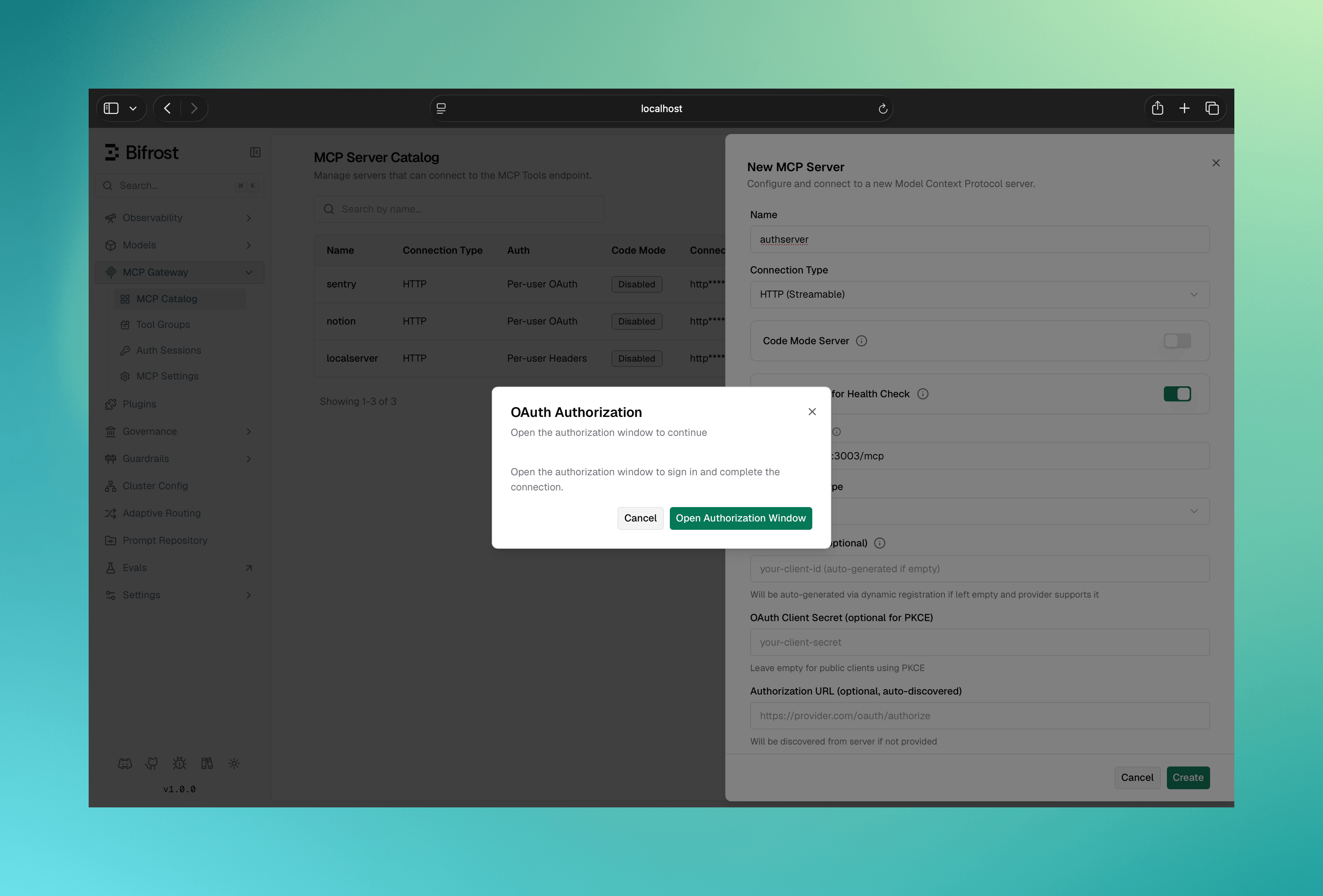
5. Click **Create** — Bifrost runs the OAuth dance in a popup
6. Sign in and authorize on the upstream provider
7. The popup closes and the MCP client is persisted with the token
 ```bash theme={null}
curl -X POST http://localhost:8080/api/mcp/client \
-H "Content-Type: application/json" \
-d '{
"name": "authenticated-service",
"connection_type": "http",
"connection_string": "https://api.example.com/mcp",
"auth_type": "oauth",
"oauth_config": {
"client_id": "your-client-id",
"client_secret": "your-client-secret",
"authorize_url": "https://auth.example.com/oauth/authorize",
"token_url": "https://auth.example.com/oauth/token",
"scopes": ["mcp:read", "mcp:write"]
},
"tools_to_execute": ["*"]
}'
```
Response:
```json theme={null}
{
"status": "pending_oauth",
"message": "OAuth authorization required",
"oauth_config_id": "oauth_cfg_abc123",
"authorize_url": "https://auth.example.com/oauth/authorize?client_id=…&state=…",
"expires_at": "2026-05-30T12:30:00Z",
"mcp_client_id": "mcp_client_abc123",
"complete_url": "/api/mcp/client/oauth_cfg_abc123/complete-oauth",
"status_url": "/api/oauth/config/oauth_cfg_abc123/status",
"next_steps": [
"1. Open authorize_url in a browser to approve access",
"2. Poll status_url to check when status becomes 'authorized'",
"3. POST complete_url to activate the MCP client"
]
}
```
Redirect the admin to `authorize_url`. After they authorize, the upstream redirects to `/api/oauth/callback`, Bifrost exchanges the code for tokens, and you finalize the client by POSTing `complete_url`:
```bash theme={null}
curl -X POST http://localhost:8080/api/mcp/client/oauth_cfg_abc123/complete-oauth
```
The path parameter of `complete-oauth` is the **`oauth_config_id`** from the response above — not the MCP client ID. Poll `status_url` until it reports `"authorized"` before calling it.
Declare the client with an inline `oauth_config` block:
```json theme={null}
{
"mcp": {
"client_configs": [
{
"name": "authenticated-service",
"connection_type": "http",
"connection_string": "https://api.example.com/mcp",
"auth_type": "oauth",
"oauth_config": {
"client_id": "your-client-id",
"client_secret": "your-client-secret",
"scopes": ["mcp:read"]
},
"tools_to_execute": ["*"]
}
]
}
}
```
The `oauth_config` block itself is optional, and every inner field is optional. `authorize_url` / `token_url` come from RFC 8414 discovery off `connection_string` when the upstream supports it, and `client_id` / `client_secret` can be obtained via RFC 7591 Dynamic Client Registration. The minimum viable declaration is `{ "auth_type": "oauth", "connection_string": "..." }`.
`client_id` and `client_secret` support `env.VAR_NAME` and `vault.path` references — `"client_secret": "env.GITHUB_SECRET"` resolves from the environment at runtime, and the reference (not the resolved secret) is what gets stored. Plain values also work (encrypted at rest, redacted in API responses). The other fields (`authorize_url`, `token_url`, `registration_url`, `scopes`) take literal values only.
At boot the client lands in **`pending_verification`** state because the OAuth flow still needs a live admin browser session to complete. From the MCP Gateway UI, open the client and click **Authorize** — the same browser popup the Web UI Create flow uses. On success the OAuth tokens are stored, the tool list is discovered, and the client transitions to `healthy`.
The same flow is scriptable: `POST /api/mcp/client/{id}/initiate-verification` (this time `{id}` *is* the MCP client ID) returns the same `authorize_url` / `status_url` / `complete_url` payload as the create flow above — open `authorize_url` in a browser, poll `status_url`, then POST `complete_url`. Safe to call again if a previous attempt expired or was abandoned.
Once authorized, the OAuth credentials live in the encrypted `oauth_configs` table and the `pending_oauth_config_json` stash is cleared from the row; see [Token management](#token-management).
**Lifecycle across restarts and config edits:** the authorized state is server-side and survives restarts and config.json re-syncs. Mutable fields (tool lists, headers, pricing, etc.) can be edited freely in config.json. Immutable fields (`auth_type`, `connection_type`, `connection_string`, `stdio_config`) cannot be changed after creation: file edits to them are **ignored**, matching the update API (which does not accept them), and Bifrost logs a warning naming the ignored fields at the next boot. To change any of them, delete the client, update the file entry, and restart. The `oauth_config` block is different: editing it on an already-authorized client **rotates** the stored OAuth credentials in place (see [Rotation](#rotation)), with a boot warning that existing sessions must re-authenticate. Only fields present in the file participate; absent fields keep their stored values.
By default this connection is per-call (a fresh connection and credential resolution per tool call, no shared upstream connection to keep alive) — see [Session Stickiness](../connecting-to-servers#session-stickiness-http-only) to make it sticky instead.
***
## PKCE for public clients
For applications without a client secret, omit `client_secret` and Bifrost will automatically generate PKCE code verifiers:
```json theme={null}
{
"oauth_config": {
"client_id": "your-public-client-id",
"authorize_url": "https://auth.example.com/oauth/authorize",
"token_url": "https://auth.example.com/oauth/token",
"scopes": ["mcp:read"]
}
}
```
***
## Dynamic Client Registration (RFC 7591)
If your OAuth provider supports DCR, omit `client_id` and `client_secret` and provide a `registration_url` (or just a `server_url` for discovery):
```json theme={null}
{
"oauth_config": {
"registration_url": "https://auth.example.com/oauth/register",
"server_url": "https://api.example.com",
"resource": "https://api.example.com",
"scopes": ["mcp:read", "mcp:write"]
}
}
```
Bifrost will:
1. Discover OAuth endpoints from `server_url` (if needed)
2. Send the OAuth `resource` indicator during authorization and token exchange only when `resource` is provided.
3. Register a new client via `registration_url`
4. Continue with the standard authorize / token exchange flow
The `redirect_uri` Bifrost registers with the upstream provider is locked to Bifrost's current public URL (`mcp_external_client_url`, or the request `Host` header if unset). If you change Bifrost's public URL later, the upstream provider will reject the next authorize call with **"Invalid redirect URI"**. Reauthorization reuses the registered client, so it cannot fix the mismatch on its own: delete the client and recreate it so Bifrost re-runs DCR against the new URL. (For manually registered credentials, add the new redirect URI in the provider's dashboard instead, then [reauthorize](#reauthorization).)
***
## OAuth discovery
If only `client_id` and `server_url` are provided, Bifrost will probe in order:
1. `/.well-known/oauth-authorization-server` (RFC 8414)
2. `/.well-known/openid-configuration`
3. MCP server metadata returned by the server itself
```json theme={null}
{
"oauth_config": {
"client_id": "your-client-id",
"server_url": "https://api.example.com",
"scopes": ["mcp:read"]
}
}
```
***
## Token management
### Status
```bash theme={null}
curl http://localhost:8080/api/oauth/config/oauth_cfg_abc123/status
```
```json theme={null}
{
"id": "oauth_cfg_abc123",
"status": "authorized",
"created_at": "2026-05-20T10:00:00Z",
"expires_at": "2026-05-27T10:00:00Z",
"token_id": "oauth_token_xyz",
"token_expires_at": "2026-05-22T10:00:00Z",
"token_scopes": ["mcp:read", "mcp:write"]
}
```
Status values:
* `pending` — admin hasn't authorized yet
* `authorized` — token is valid and active
* `failed` — authorization failed or token is invalid
* `revoked` — the token was revoked (via DELETE); the config row is retained with no live token
When a stored token permanently dies later (refresh rejected, provider-side revocation), the status flips on the **token row**, not on the OAuth config: the token moves to `needs_reauth` and the MCP client's connection state shows [`needs_reauth`](#reauthorization). The OAuth config itself stays `authorized`.
### Automatic refresh
Bifrost refreshes access tokens automatically using the stored refresh token, in two layers:
* **In the background** — a worker periodically refreshes tokens that are about to expire, so active clients always have a valid token ready.
* **On use** — if a token is already expired when a request needs it, Bifrost refreshes it inline before forwarding the request.
Background refresh only runs while the MCP client is enabled. Disabling a client pauses it; on re-enable, the token is refreshed on first use. If a client stays disabled long enough for the provider to expire the idle refresh token, [reauthorization](#reauthorization) is required.
Transient refresh failures (network blips, provider hiccups) keep retrying silently. Only a permanent rejection (the provider refuses the refresh token outright) flips the token to `needs_reauth`.
A successful background refresh doesn't just update the stored token: for shared clients it immediately recycles the live connection so it starts using the fresh credential. The recycle is [make-before-break](../gateway#reconnection-behavior) for HTTP and SSE clients, so the connection keeps serving tool calls throughout, and token expiry normally passes with zero failed calls. In a multi-node deployment, only the node that performed the refresh recycles its own connection; the other nodes' connections heal on their next auth failure via the retry described in [Auth failure recovery](../tool-execution#auth-failure-recovery).
**Some providers only issue a refresh token when you explicitly ask for one.** Google is the canonical case: without `access_type=offline&prompt=consent` on the authorize URL, the grant contains only an access token, and the client lands in `needs_reauth` at every token expiry (roughly hourly for Google). Bifrost preserves any query parameters already present on the configured `authorize_url`, so append the provider's offline-access parameters there, e.g. `"authorize_url": "https://accounts.google.com/o/oauth2/v2/auth?access_type=offline&prompt=consent"`.
### Rotation
`PUT /api/mcp/client/{id}` accepts an `oauth_config` block for clients with `auth_type` `oauth` or `per_user_oauth` (400 for any other auth type). Any field can be rotated: `client_id`, `client_secret`, `authorize_url`, `token_url`, `registration_url`, `resource`, `scopes`. Rotation applies the changed fields **in place** on the same OAuth config row; it does not create a new row and does not re-run discovery or client registration.
```bash theme={null}
curl -X PUT http://localhost:8080/api/mcp/client/mcp_client_abc123 \
-H "Content-Type: application/json" \
-d '{
"oauth_config": {
"client_id": "new-client-id",
"client_secret": "new-client-secret"
}
}'
```
Semantics:
* **Unset fields preserve stored values.** `client_id` / `client_secret` follow the SecretVar masked-placeholder convention (sending back the redacted value from a GET means "keep"); the other fields treat empty as "not provided".
* **Any actual change cascades.** Every token bound to that OAuth config flips to `needs_reauth`, regardless of auth mode: the shared connection token, every per-user token, and the retained admin discovery credential alike. Shared clients surface it on the next reconnect; per-user callers get the standard reauth URL on their next tool call.
* **A no-op round-trip is safe.** Re-sending the stored values does not cascade anything.
* **Cannot run while the client is (or is being) disabled** (400; enable the client first, or send the enable and rotation as separate requests).
The same rotation applies to config.json-declared clients: editing the `oauth_config` block of an already-authorized client rotates the stored config at the next boot and cascades `needs_reauth`, with a boot warning that existing sessions must re-authenticate.
Rotating `client_id` or `client_secret` immediately signs out every current session on the MCP client, shared and per-user alike. Everyone re-authenticates against the new credentials; for the shared connection itself, that means clicking **Reauthorize** (below).
### Reauthorization
A shared OAuth client whose credential permanently dies lands in the **`needs_reauth`** connection state: the client was authorized and connected at least once, but the token can no longer be refreshed (provider-side revocation, expired refresh token, or a credential rotation). This is distinct from `pending_verification`, which means initial setup never completed.
`needs_reauth` is sticky: the health monitor and enable/disable toggles will not flip the client back to `healthy` or `unstable`, and the **Reconnect** action is disabled for it (reconnecting cannot help when the credential itself is dead). Only a human redoing consent clears it.
From the dashboard, open the client and click **Reauthorize**: Bifrost redoes the OAuth consent flow in a popup against the currently stored credentials, and on completion reconnects the client.
```bash theme={null}
curl -X POST http://localhost:8080/api/mcp/client \
-H "Content-Type: application/json" \
-d '{
"name": "authenticated-service",
"connection_type": "http",
"connection_string": "https://api.example.com/mcp",
"auth_type": "oauth",
"oauth_config": {
"client_id": "your-client-id",
"client_secret": "your-client-secret",
"authorize_url": "https://auth.example.com/oauth/authorize",
"token_url": "https://auth.example.com/oauth/token",
"scopes": ["mcp:read", "mcp:write"]
},
"tools_to_execute": ["*"]
}'
```
Response:
```json theme={null}
{
"status": "pending_oauth",
"message": "OAuth authorization required",
"oauth_config_id": "oauth_cfg_abc123",
"authorize_url": "https://auth.example.com/oauth/authorize?client_id=…&state=…",
"expires_at": "2026-05-30T12:30:00Z",
"mcp_client_id": "mcp_client_abc123",
"complete_url": "/api/mcp/client/oauth_cfg_abc123/complete-oauth",
"status_url": "/api/oauth/config/oauth_cfg_abc123/status",
"next_steps": [
"1. Open authorize_url in a browser to approve access",
"2. Poll status_url to check when status becomes 'authorized'",
"3. POST complete_url to activate the MCP client"
]
}
```
Redirect the admin to `authorize_url`. After they authorize, the upstream redirects to `/api/oauth/callback`, Bifrost exchanges the code for tokens, and you finalize the client by POSTing `complete_url`:
```bash theme={null}
curl -X POST http://localhost:8080/api/mcp/client/oauth_cfg_abc123/complete-oauth
```
The path parameter of `complete-oauth` is the **`oauth_config_id`** from the response above — not the MCP client ID. Poll `status_url` until it reports `"authorized"` before calling it.
Declare the client with an inline `oauth_config` block:
```json theme={null}
{
"mcp": {
"client_configs": [
{
"name": "authenticated-service",
"connection_type": "http",
"connection_string": "https://api.example.com/mcp",
"auth_type": "oauth",
"oauth_config": {
"client_id": "your-client-id",
"client_secret": "your-client-secret",
"scopes": ["mcp:read"]
},
"tools_to_execute": ["*"]
}
]
}
}
```
The `oauth_config` block itself is optional, and every inner field is optional. `authorize_url` / `token_url` come from RFC 8414 discovery off `connection_string` when the upstream supports it, and `client_id` / `client_secret` can be obtained via RFC 7591 Dynamic Client Registration. The minimum viable declaration is `{ "auth_type": "oauth", "connection_string": "..." }`.
`client_id` and `client_secret` support `env.VAR_NAME` and `vault.path` references — `"client_secret": "env.GITHUB_SECRET"` resolves from the environment at runtime, and the reference (not the resolved secret) is what gets stored. Plain values also work (encrypted at rest, redacted in API responses). The other fields (`authorize_url`, `token_url`, `registration_url`, `scopes`) take literal values only.
At boot the client lands in **`pending_verification`** state because the OAuth flow still needs a live admin browser session to complete. From the MCP Gateway UI, open the client and click **Authorize** — the same browser popup the Web UI Create flow uses. On success the OAuth tokens are stored, the tool list is discovered, and the client transitions to `healthy`.
The same flow is scriptable: `POST /api/mcp/client/{id}/initiate-verification` (this time `{id}` *is* the MCP client ID) returns the same `authorize_url` / `status_url` / `complete_url` payload as the create flow above — open `authorize_url` in a browser, poll `status_url`, then POST `complete_url`. Safe to call again if a previous attempt expired or was abandoned.
Once authorized, the OAuth credentials live in the encrypted `oauth_configs` table and the `pending_oauth_config_json` stash is cleared from the row; see [Token management](#token-management).
**Lifecycle across restarts and config edits:** the authorized state is server-side and survives restarts and config.json re-syncs. Mutable fields (tool lists, headers, pricing, etc.) can be edited freely in config.json. Immutable fields (`auth_type`, `connection_type`, `connection_string`, `stdio_config`) cannot be changed after creation: file edits to them are **ignored**, matching the update API (which does not accept them), and Bifrost logs a warning naming the ignored fields at the next boot. To change any of them, delete the client, update the file entry, and restart. The `oauth_config` block is different: editing it on an already-authorized client **rotates** the stored OAuth credentials in place (see [Rotation](#rotation)), with a boot warning that existing sessions must re-authenticate. Only fields present in the file participate; absent fields keep their stored values.
By default this connection is per-call (a fresh connection and credential resolution per tool call, no shared upstream connection to keep alive) — see [Session Stickiness](../connecting-to-servers#session-stickiness-http-only) to make it sticky instead.
***
## PKCE for public clients
For applications without a client secret, omit `client_secret` and Bifrost will automatically generate PKCE code verifiers:
```json theme={null}
{
"oauth_config": {
"client_id": "your-public-client-id",
"authorize_url": "https://auth.example.com/oauth/authorize",
"token_url": "https://auth.example.com/oauth/token",
"scopes": ["mcp:read"]
}
}
```
***
## Dynamic Client Registration (RFC 7591)
If your OAuth provider supports DCR, omit `client_id` and `client_secret` and provide a `registration_url` (or just a `server_url` for discovery):
```json theme={null}
{
"oauth_config": {
"registration_url": "https://auth.example.com/oauth/register",
"server_url": "https://api.example.com",
"resource": "https://api.example.com",
"scopes": ["mcp:read", "mcp:write"]
}
}
```
Bifrost will:
1. Discover OAuth endpoints from `server_url` (if needed)
2. Send the OAuth `resource` indicator during authorization and token exchange only when `resource` is provided.
3. Register a new client via `registration_url`
4. Continue with the standard authorize / token exchange flow
The `redirect_uri` Bifrost registers with the upstream provider is locked to Bifrost's current public URL (`mcp_external_client_url`, or the request `Host` header if unset). If you change Bifrost's public URL later, the upstream provider will reject the next authorize call with **"Invalid redirect URI"**. Reauthorization reuses the registered client, so it cannot fix the mismatch on its own: delete the client and recreate it so Bifrost re-runs DCR against the new URL. (For manually registered credentials, add the new redirect URI in the provider's dashboard instead, then [reauthorize](#reauthorization).)
***
## OAuth discovery
If only `client_id` and `server_url` are provided, Bifrost will probe in order:
1. `/.well-known/oauth-authorization-server` (RFC 8414)
2. `/.well-known/openid-configuration`
3. MCP server metadata returned by the server itself
```json theme={null}
{
"oauth_config": {
"client_id": "your-client-id",
"server_url": "https://api.example.com",
"scopes": ["mcp:read"]
}
}
```
***
## Token management
### Status
```bash theme={null}
curl http://localhost:8080/api/oauth/config/oauth_cfg_abc123/status
```
```json theme={null}
{
"id": "oauth_cfg_abc123",
"status": "authorized",
"created_at": "2026-05-20T10:00:00Z",
"expires_at": "2026-05-27T10:00:00Z",
"token_id": "oauth_token_xyz",
"token_expires_at": "2026-05-22T10:00:00Z",
"token_scopes": ["mcp:read", "mcp:write"]
}
```
Status values:
* `pending` — admin hasn't authorized yet
* `authorized` — token is valid and active
* `failed` — authorization failed or token is invalid
* `revoked` — the token was revoked (via DELETE); the config row is retained with no live token
When a stored token permanently dies later (refresh rejected, provider-side revocation), the status flips on the **token row**, not on the OAuth config: the token moves to `needs_reauth` and the MCP client's connection state shows [`needs_reauth`](#reauthorization). The OAuth config itself stays `authorized`.
### Automatic refresh
Bifrost refreshes access tokens automatically using the stored refresh token, in two layers:
* **In the background** — a worker periodically refreshes tokens that are about to expire, so active clients always have a valid token ready.
* **On use** — if a token is already expired when a request needs it, Bifrost refreshes it inline before forwarding the request.
Background refresh only runs while the MCP client is enabled. Disabling a client pauses it; on re-enable, the token is refreshed on first use. If a client stays disabled long enough for the provider to expire the idle refresh token, [reauthorization](#reauthorization) is required.
Transient refresh failures (network blips, provider hiccups) keep retrying silently. Only a permanent rejection (the provider refuses the refresh token outright) flips the token to `needs_reauth`.
A successful background refresh doesn't just update the stored token: for shared clients it immediately recycles the live connection so it starts using the fresh credential. The recycle is [make-before-break](../gateway#reconnection-behavior) for HTTP and SSE clients, so the connection keeps serving tool calls throughout, and token expiry normally passes with zero failed calls. In a multi-node deployment, only the node that performed the refresh recycles its own connection; the other nodes' connections heal on their next auth failure via the retry described in [Auth failure recovery](../tool-execution#auth-failure-recovery).
**Some providers only issue a refresh token when you explicitly ask for one.** Google is the canonical case: without `access_type=offline&prompt=consent` on the authorize URL, the grant contains only an access token, and the client lands in `needs_reauth` at every token expiry (roughly hourly for Google). Bifrost preserves any query parameters already present on the configured `authorize_url`, so append the provider's offline-access parameters there, e.g. `"authorize_url": "https://accounts.google.com/o/oauth2/v2/auth?access_type=offline&prompt=consent"`.
### Rotation
`PUT /api/mcp/client/{id}` accepts an `oauth_config` block for clients with `auth_type` `oauth` or `per_user_oauth` (400 for any other auth type). Any field can be rotated: `client_id`, `client_secret`, `authorize_url`, `token_url`, `registration_url`, `resource`, `scopes`. Rotation applies the changed fields **in place** on the same OAuth config row; it does not create a new row and does not re-run discovery or client registration.
```bash theme={null}
curl -X PUT http://localhost:8080/api/mcp/client/mcp_client_abc123 \
-H "Content-Type: application/json" \
-d '{
"oauth_config": {
"client_id": "new-client-id",
"client_secret": "new-client-secret"
}
}'
```
Semantics:
* **Unset fields preserve stored values.** `client_id` / `client_secret` follow the SecretVar masked-placeholder convention (sending back the redacted value from a GET means "keep"); the other fields treat empty as "not provided".
* **Any actual change cascades.** Every token bound to that OAuth config flips to `needs_reauth`, regardless of auth mode: the shared connection token, every per-user token, and the retained admin discovery credential alike. Shared clients surface it on the next reconnect; per-user callers get the standard reauth URL on their next tool call.
* **A no-op round-trip is safe.** Re-sending the stored values does not cascade anything.
* **Cannot run while the client is (or is being) disabled** (400; enable the client first, or send the enable and rotation as separate requests).
The same rotation applies to config.json-declared clients: editing the `oauth_config` block of an already-authorized client rotates the stored config at the next boot and cascades `needs_reauth`, with a boot warning that existing sessions must re-authenticate.
Rotating `client_id` or `client_secret` immediately signs out every current session on the MCP client, shared and per-user alike. Everyone re-authenticates against the new credentials; for the shared connection itself, that means clicking **Reauthorize** (below).
### Reauthorization
A shared OAuth client whose credential permanently dies lands in the **`needs_reauth`** connection state: the client was authorized and connected at least once, but the token can no longer be refreshed (provider-side revocation, expired refresh token, or a credential rotation). This is distinct from `pending_verification`, which means initial setup never completed.
`needs_reauth` is sticky: the health monitor and enable/disable toggles will not flip the client back to `healthy` or `unstable`, and the **Reconnect** action is disabled for it (reconnecting cannot help when the credential itself is dead). Only a human redoing consent clears it.
From the dashboard, open the client and click **Reauthorize**: Bifrost redoes the OAuth consent flow in a popup against the currently stored credentials, and on completion reconnects the client.
 The same flow is scriptable via `POST /api/mcp/client/{id}/reauthorize` (`{id}` = MCP client ID):
```bash theme={null}
curl -X POST http://localhost:8080/api/mcp/client/mcp_client_abc123/reauthorize
```
The response is the same `pending_oauth` payload the create flow returns (`oauth_config_id`, `authorize_url`, `expires_at`, `complete_url`, `status_url`, `next_steps`): open `authorize_url` in a browser, poll `status_url` until `authorized`, then POST `complete_url`. On completion the client reconnects and the response reads `"MCP client re-authorized and reconnected successfully"`.
Error cases: 400 if the client's `auth_type` is not OAuth-based, or if it never completed initial authorization (use `initiate-verification` instead); 404 for an unknown ID; 503 when no OAuth provider is configured. For `per_user_oauth` clients the endpoint repairs the retained admin discovery credential instead, and is gated accordingly; see [Per-User OAuth](./per-user-oauth#admin-discovery-credential).
### Revoke
```bash theme={null}
curl -X DELETE http://localhost:8080/api/oauth/config/oauth_cfg_abc123
```
This deletes the stored token from Bifrost and marks the OAuth configuration `revoked` (the config row is kept, not deleted). Bifrost does **not** call the upstream provider's revocation endpoint — revoke at the provider's dashboard if you need the upstream token invalidated there.
***
## Provider snippets
### GitHub
```json theme={null}
{
"oauth_config": {
"client_id": "your-github-app-id",
"client_secret": "your-github-app-secret",
"authorize_url": "https://github.com/login/oauth/authorize",
"token_url": "https://github.com/login/oauth/access_token",
"scopes": ["repo", "user"]
}
}
```
1. GitHub → **Settings → Developer settings → OAuth Apps → New OAuth App**
2. **Homepage URL**: `https://your-bifrost-domain.com`
3. **Authorization callback URL**: `https://your-bifrost-domain.com/api/oauth/callback`
4. Copy **Client ID** and generate a **Client Secret**
5. Paste into the Bifrost config above
### Google
```json theme={null}
{
"oauth_config": {
"client_id": "your-google-client-id.apps.googleusercontent.com",
"client_secret": "your-google-client-secret",
"authorize_url": "https://accounts.google.com/o/oauth2/v2/auth",
"token_url": "https://oauth2.googleapis.com/token",
"scopes": ["openid", "email", "profile"]
}
}
```
1. [Google Cloud Console](https://console.cloud.google.com) → create a project
2. Configure the OAuth consent screen
3. Create an **OAuth 2.0 Client ID** (Web application)
4. Add `https://your-bifrost-domain.com/api/oauth/callback` to **Authorized redirect URIs**
5. Copy Client ID + Client Secret into the Bifrost config above
***
## Public URL configuration
The `redirect_uri` Bifrost registers and the consent URLs it builds are derived from the request `Host` header by default. Behind a reverse proxy, override them with:
* `mcp_external_client_url` — public base URL Bifrost uses both for the consent pages it surfaces and as the `redirect_uri` registered with upstream providers
See [Reverse Proxy configuration →](../../deployment-guides/config-json/client#reverse-proxy) for the full reference.
**Changing `mcp_external_client_url` after an upstream provider has been registered breaks already-authorized clients.** Upstream providers lock the `redirect_uri` to whatever was registered during DCR. To recover, delete and recreate the affected client so Bifrost re-registers with the new URL (reauthorization alone reuses the registered client and cannot fix the mismatch). For manually registered credentials, add the new redirect URI at the provider's dashboard, then [reauthorize](#reauthorization).
***
## Troubleshooting
* Ensure `auth_type` is exactly `"oauth"`
* Confirm `oauth_config` is on the request body
* Provide `authorize_url` or a `server_url` Bifrost can discover from
* Check that the refresh token is still valid (some providers expire refresh tokens after long idle)
* If the client was disabled for a long stretch, background refresh was paused for it — the refresh token may have expired at the provider in the meantime
* If the provider never issued a refresh token at all, the client will hit this at every access-token expiry; append the provider's offline-access parameters to `authorize_url` (see the warning under [Automatic refresh](#automatic-refresh))
* Verify scopes are still sufficient
* Re-authorize: click **Reauthorize** on the client (or `POST /api/mcp/client/{id}/reauthorize`); see [Reauthorization](#reauthorization)
* Confirm Bifrost is reachable at the registered redirect URI (DNS, firewall, reverse-proxy headers)
* Check `mcp_external_client_url` matches what was registered upstream
* Look at Bifrost logs for `oauth` errors
You changed Bifrost's public URL after the upstream client was registered. Delete and recreate the client so Bifrost re-runs DCR with the new URL; for manually registered credentials, add the new redirect URI at the provider's dashboard and then [reauthorize](#reauthorization).
***
## API reference
| Endpoint | Method | Purpose |
| -------------------------------------------- | ------ | ----------------------------------------------------------------------------------------------------------------------------------------------------------------- |
| `/api/mcp/client` | POST | Create MCP client; returns `pending_oauth` + `authorize_url` |
| `/api/mcp/client/{id}/initiate-verification` | POST | Start authorization for a `pending_verification` client declared in config.json (`{id}` = MCP client ID); returns `authorize_url` + `status_url` + `complete_url` |
| `/api/mcp/client/{id}/complete-oauth` | POST | Finalize after upstream redirect lands on `/api/oauth/callback` (`{id}` = `oauth_config_id`) |
| `/api/mcp/client/{id}/reauthorize` | POST | Redo consent for a `needs_reauth` client without delete-and-recreate (`{id}` = MCP client ID); returns the same `pending_oauth` payload as create |
| `/api/oauth/callback` | GET | Upstream provider redirects here; handled internally |
| `/api/oauth/config/{oauth_config_id}/status` | GET | Current OAuth config status + token metadata |
| `/api/oauth/config/{oauth_config_id}` | DELETE | Revoke token + remove OAuth config |
***
## Security notes
* Tokens are stored encrypted at rest (set `BIFROST_ENCRYPTION_KEY`)
* PKCE is enforced automatically for public clients
* The OAuth `state` parameter is verified server-side for CSRF protection
* Use HTTPS — most upstream providers refuse HTTP redirect URIs in production
* Request only the scopes your tools need
***
## Next Steps
* [Per-User OAuth](./per-user-oauth) — when each user should authenticate themselves
* [Headers](./headers) — when there's no OAuth, just a static key
* [MCP Sessions](../sessions) — per-user credential lifecycle (does not surface server-level OAuth)
The same flow is scriptable via `POST /api/mcp/client/{id}/reauthorize` (`{id}` = MCP client ID):
```bash theme={null}
curl -X POST http://localhost:8080/api/mcp/client/mcp_client_abc123/reauthorize
```
The response is the same `pending_oauth` payload the create flow returns (`oauth_config_id`, `authorize_url`, `expires_at`, `complete_url`, `status_url`, `next_steps`): open `authorize_url` in a browser, poll `status_url` until `authorized`, then POST `complete_url`. On completion the client reconnects and the response reads `"MCP client re-authorized and reconnected successfully"`.
Error cases: 400 if the client's `auth_type` is not OAuth-based, or if it never completed initial authorization (use `initiate-verification` instead); 404 for an unknown ID; 503 when no OAuth provider is configured. For `per_user_oauth` clients the endpoint repairs the retained admin discovery credential instead, and is gated accordingly; see [Per-User OAuth](./per-user-oauth#admin-discovery-credential).
### Revoke
```bash theme={null}
curl -X DELETE http://localhost:8080/api/oauth/config/oauth_cfg_abc123
```
This deletes the stored token from Bifrost and marks the OAuth configuration `revoked` (the config row is kept, not deleted). Bifrost does **not** call the upstream provider's revocation endpoint — revoke at the provider's dashboard if you need the upstream token invalidated there.
***
## Provider snippets
### GitHub
```json theme={null}
{
"oauth_config": {
"client_id": "your-github-app-id",
"client_secret": "your-github-app-secret",
"authorize_url": "https://github.com/login/oauth/authorize",
"token_url": "https://github.com/login/oauth/access_token",
"scopes": ["repo", "user"]
}
}
```
1. GitHub → **Settings → Developer settings → OAuth Apps → New OAuth App**
2. **Homepage URL**: `https://your-bifrost-domain.com`
3. **Authorization callback URL**: `https://your-bifrost-domain.com/api/oauth/callback`
4. Copy **Client ID** and generate a **Client Secret**
5. Paste into the Bifrost config above
### Google
```json theme={null}
{
"oauth_config": {
"client_id": "your-google-client-id.apps.googleusercontent.com",
"client_secret": "your-google-client-secret",
"authorize_url": "https://accounts.google.com/o/oauth2/v2/auth",
"token_url": "https://oauth2.googleapis.com/token",
"scopes": ["openid", "email", "profile"]
}
}
```
1. [Google Cloud Console](https://console.cloud.google.com) → create a project
2. Configure the OAuth consent screen
3. Create an **OAuth 2.0 Client ID** (Web application)
4. Add `https://your-bifrost-domain.com/api/oauth/callback` to **Authorized redirect URIs**
5. Copy Client ID + Client Secret into the Bifrost config above
***
## Public URL configuration
The `redirect_uri` Bifrost registers and the consent URLs it builds are derived from the request `Host` header by default. Behind a reverse proxy, override them with:
* `mcp_external_client_url` — public base URL Bifrost uses both for the consent pages it surfaces and as the `redirect_uri` registered with upstream providers
See [Reverse Proxy configuration →](../../deployment-guides/config-json/client#reverse-proxy) for the full reference.
**Changing `mcp_external_client_url` after an upstream provider has been registered breaks already-authorized clients.** Upstream providers lock the `redirect_uri` to whatever was registered during DCR. To recover, delete and recreate the affected client so Bifrost re-registers with the new URL (reauthorization alone reuses the registered client and cannot fix the mismatch). For manually registered credentials, add the new redirect URI at the provider's dashboard, then [reauthorize](#reauthorization).
***
## Troubleshooting
* Ensure `auth_type` is exactly `"oauth"`
* Confirm `oauth_config` is on the request body
* Provide `authorize_url` or a `server_url` Bifrost can discover from
* Check that the refresh token is still valid (some providers expire refresh tokens after long idle)
* If the client was disabled for a long stretch, background refresh was paused for it — the refresh token may have expired at the provider in the meantime
* If the provider never issued a refresh token at all, the client will hit this at every access-token expiry; append the provider's offline-access parameters to `authorize_url` (see the warning under [Automatic refresh](#automatic-refresh))
* Verify scopes are still sufficient
* Re-authorize: click **Reauthorize** on the client (or `POST /api/mcp/client/{id}/reauthorize`); see [Reauthorization](#reauthorization)
* Confirm Bifrost is reachable at the registered redirect URI (DNS, firewall, reverse-proxy headers)
* Check `mcp_external_client_url` matches what was registered upstream
* Look at Bifrost logs for `oauth` errors
You changed Bifrost's public URL after the upstream client was registered. Delete and recreate the client so Bifrost re-runs DCR with the new URL; for manually registered credentials, add the new redirect URI at the provider's dashboard and then [reauthorize](#reauthorization).
***
## API reference
| Endpoint | Method | Purpose |
| -------------------------------------------- | ------ | ----------------------------------------------------------------------------------------------------------------------------------------------------------------- |
| `/api/mcp/client` | POST | Create MCP client; returns `pending_oauth` + `authorize_url` |
| `/api/mcp/client/{id}/initiate-verification` | POST | Start authorization for a `pending_verification` client declared in config.json (`{id}` = MCP client ID); returns `authorize_url` + `status_url` + `complete_url` |
| `/api/mcp/client/{id}/complete-oauth` | POST | Finalize after upstream redirect lands on `/api/oauth/callback` (`{id}` = `oauth_config_id`) |
| `/api/mcp/client/{id}/reauthorize` | POST | Redo consent for a `needs_reauth` client without delete-and-recreate (`{id}` = MCP client ID); returns the same `pending_oauth` payload as create |
| `/api/oauth/callback` | GET | Upstream provider redirects here; handled internally |
| `/api/oauth/config/{oauth_config_id}/status` | GET | Current OAuth config status + token metadata |
| `/api/oauth/config/{oauth_config_id}` | DELETE | Revoke token + remove OAuth config |
***
## Security notes
* Tokens are stored encrypted at rest (set `BIFROST_ENCRYPTION_KEY`)
* PKCE is enforced automatically for public clients
* The OAuth `state` parameter is verified server-side for CSRF protection
* Use HTTPS — most upstream providers refuse HTTP redirect URIs in production
* Request only the scopes your tools need
***
## Next Steps
* [Per-User OAuth](./per-user-oauth) — when each user should authenticate themselves
* [Headers](./headers) — when there's no OAuth, just a static key
* [MCP Sessions](../sessions) — per-user credential lifecycle (does not surface server-level OAuth)