> ## Documentation Index
> Fetch the complete documentation index at: https://bifrost-dev.mintlify.site/llms.txt
> Use this file to discover all available pages before exploring further.
# A10 Guardrails
> Use an A10 Guardrails firewall with Bifrost Enterprise to block or rewrite LLM requests and responses according to A10 policies.
## Overview
Bifrost Enterprise supports **A10 Guardrails** as a third-party guardrail provider for LLM requests and responses.
A10 owns the policies and their decisions. Configure the rules on your A10 Guardrails firewall, then attach the A10 profile to a Bifrost rule to choose which traffic is evaluated. Bifrost sends the selected text to the firewall and enforces the result inline:
* **Allow:** Bifrost continues the request or response unchanged. A10 `FLAG` results are recorded but do not block.
* **Block:** Bifrost returns a guardrail intervention and does not continue that phase.
* **Rewrite:** A10 returns transformed text, for example after redacting a value. Bifrost replaces the matching request or response text with A10's version.
A10 is a **provider-managed transformation**: the firewall returns already-rewritten text, and Bifrost applies it. The A10 profile does not expose Bifrost `action`, `redaction_strategy`, or `redaction_mode` settings. See [Bifrost-Managed vs Provider-Managed Rewrites](/enterprise/guardrails/redaction#bifrost-managed-vs-provider-managed-rewrites).
## Prerequisites
* Bifrost Enterprise with guardrails enabled
* A reachable A10 Guardrails firewall deployment and its base URL
* An A10 client ID for that firewall
* Input and/or output guardrails configured on the firewall
* Network egress from Bifrost to the firewall
## How It Works
1. Create a Bifrost provider configuration with `provider_name: "a10"`.
2. Attach it to a guardrail rule that applies to `input`, `output`, or `both`.
3. Bifrost sends a `POST` request to `/v1/validateParsedText` with the client ID in the `x-eag-clientid` header. Bifrost also sets direction headers so the firewall applies its input or output guardrails.
4. A10 evaluates its rules and returns an overall action, per-rule results, and any transformed text.
5. Bifrost maps that result to the request or response path.
**Input evaluation** sends an OpenAI-compatible chat request with the routed model name. Each text segment is sent as its own message so that A10's transformed messages stay aligned with the original positions. Roles other than `system`, `developer`, `user`, `assistant`, and `tool` are sent as `user`.
**Output evaluation** sends an OpenAI-compatible `chat.completion` object, with each response text segment as a separate assistant choice.
### Decision Mapping
| A10 result | Bifrost behavior |
| - | - |
| Overall `Action` is `BLOCK`/`BLOCKED`, or any rule result is blocked | Guardrail intervention |
| `FLAG` or no action | Content continues unchanged |
| Transformed text returned (`FinalInputJson`, `ConsolidatedFinalInput`, or `ConsolidatedFinalOutput`) | Bifrost applies the rewritten text |
| A10 reports a redaction or transform (`REDACT`, `REDACTED`, `TRANSFORMED`, or a redacted rule), but Bifrost cannot apply it exactly | Guardrail intervention (fails closed) |
Bifrost records up to eight A10 rule names and actions with the guardrail result. Screened content is not included in that summary.
If A10 reports a redaction but the transformed messages cannot be mapped back to the original text, for example because the message count differs, Bifrost blocks instead of forwarding the original content.
## Configuration Fields
| Field | Type | Required | Default | Description |
| - | - | - | - | - |
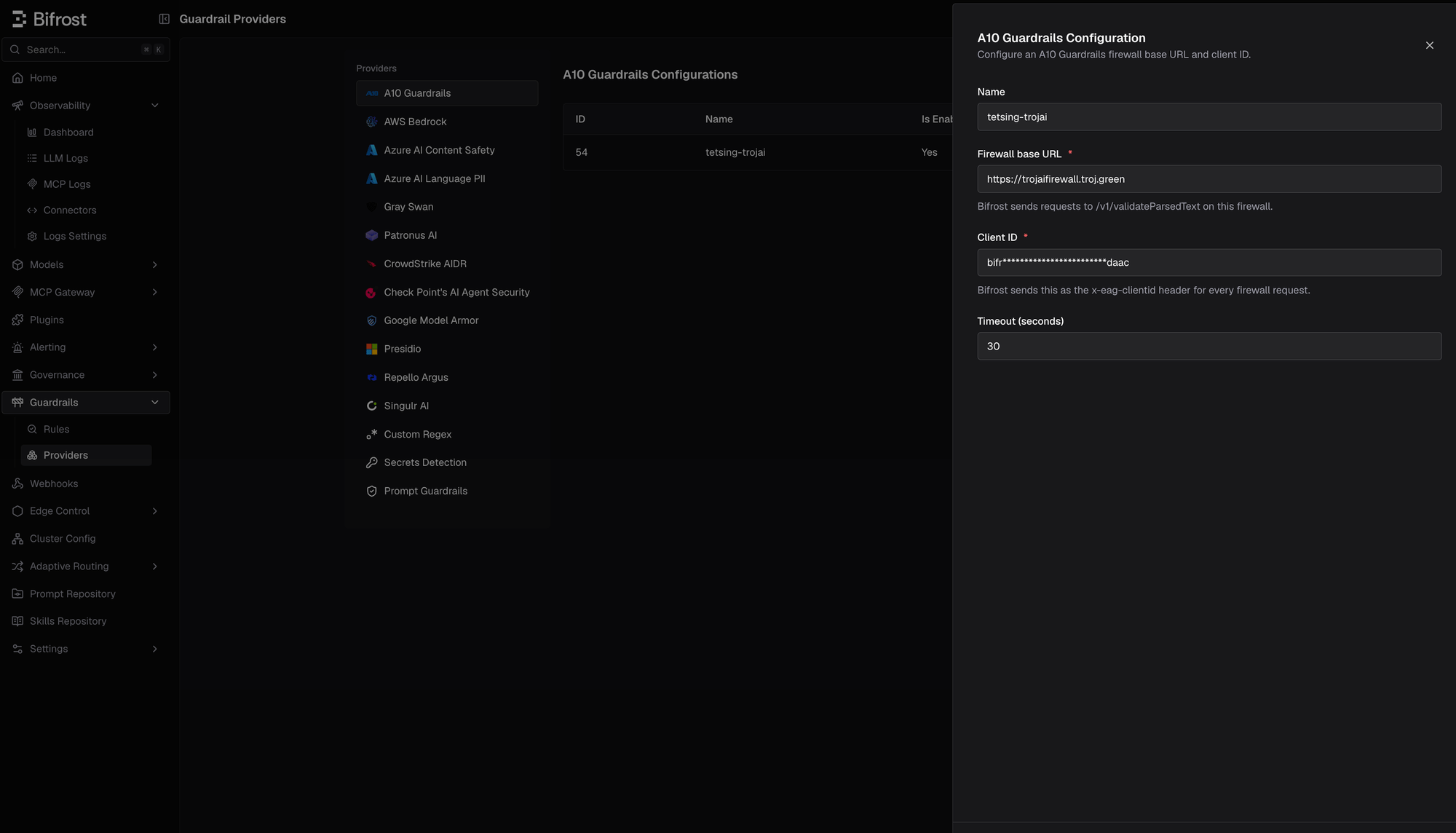
| `base_url` | string | Yes | - | Firewall origin, such as `https://firewall.example.com`. Must be an absolute `http` or `https` URL with no path, query, fragment, or credentials. A trailing slash is accepted. Bifrost appends `/v1/validateParsedText`. |
| `client_id` | string | Yes | - | A10 client ID sent as `x-eag-clientid`. Supports `env.A10_CLIENT_ID`. Stored encrypted and redacted in API responses. |
| `timeout` | integer | No | `30` | Provider execution timeout in seconds. A nearer request deadline takes precedence. |
## Configure Bifrost
1. Go to **Guardrails** > **Providers**.
2. Select **A10 Guardrails** and click **Add Configuration**.
3. Enter a descriptive **Name**.
4. Enter the **Firewall base URL** and **Client ID**.
5. Set the timeout, click **Verify**, enable the configuration, then save it.
6. Under **Guardrails** > **Rules**, attach the saved A10 profile to an input, output, or both-phase rule.
The configuration must be verified before it can be enabled. Changing any field other than **Enabled** requires verifying again.
 Create the A10 provider configuration with the management API:
```bash theme={null}
curl -X POST http://localhost:8080/api/guardrails/a10 \
-H "Content-Type: application/json" \
-d '{
"name": "a10-production",
"enabled": true,
"config": {
"base_url": "https://firewall.example.com",
"client_id": "env.A10_CLIENT_ID",
"timeout": 30
}
}'
```
Fetch the generated configuration ID:
```bash theme={null}
curl -X GET http://localhost:8080/api/guardrails/a10
```
Attach it to a rule by referencing `a10:` in `selectedGuardrailProfiles`:
```bash theme={null}
curl -X POST http://localhost:8080/api/guardrails/rules \
-H "Content-Type: application/json" \
-d '{
"name": "a10-all-traffic",
"description": "Apply A10 Guardrails policies to prompts and completions",
"enabled": true,
"celExpression": "provider == \"openai\"",
"applyTo": "both",
"samplingRate": 100,
"timeout": 60,
"selectedGuardrailProfiles": ["a10:26"]
}'
```
```json theme={null}
{
"guardrails_config": {
"guardrail_providers": [
{
"id": 26,
"provider_name": "a10",
"policy_name": "a10-production",
"enabled": true,
"timeout": 30,
"config": {
"base_url": "https://firewall.example.com",
"client_id": "env.A10_CLIENT_ID"
}
}
],
"guardrail_rules": [
{
"id": 261,
"name": "a10-all-traffic",
"description": "Apply A10 Guardrails policies to prompts and completions",
"enabled": true,
"cel_expression": "provider == 'openai'",
"apply_to": "both",
"sampling_rate": 100,
"timeout": 60,
"provider_config_ids": [26]
}
]
}
}
```
```yaml theme={null}
bifrost:
guardrails:
providers:
- id: 26
provider_name: "a10"
policy_name: "a10-production"
enabled: true
timeout: 30
config:
base_url: "https://firewall.example.com"
client_id: "env.A10_CLIENT_ID"
rules:
- id: 261
name: "a10-all-traffic"
description: "Apply A10 Guardrails policies to prompts and completions"
enabled: true
cel_expression: "provider == 'openai'"
apply_to: "both"
sampling_rate: 100
timeout: 60
provider_config_ids: [26]
```
## Supported Content and Limitations
* **LLM input and output:** A10 evaluates text-bearing request and response content. Each text segment is evaluated and rewritten in place.
* **Tool calls:** LLM tool-call arguments are sent to A10 as text segments and can be blocked or rewritten.
* **Single rewrite owner:** A10 rewrites cannot be combined with Bifrost-managed redaction or another provider's transformed output in the same request or response phase. Bifrost fails closed in that case.
* **Errors:** Non-2xx responses, timeouts, and unparseable A10 responses are treated as provider errors.
* **Images and files:** This integration sends text content, not image pixels, file bytes, or arbitrary binary payloads.
For shared rule behavior, CEL scoping, streaming replay, and audit logging, see [Guardrails](/enterprise/guardrails). For the general redaction model, see [Guardrail Redaction](/enterprise/guardrails/redaction).
This documentation is built and hosted on [Mintlify](https://mintlify.com), a developer documentation platform.
Create the A10 provider configuration with the management API:
```bash theme={null}
curl -X POST http://localhost:8080/api/guardrails/a10 \
-H "Content-Type: application/json" \
-d '{
"name": "a10-production",
"enabled": true,
"config": {
"base_url": "https://firewall.example.com",
"client_id": "env.A10_CLIENT_ID",
"timeout": 30
}
}'
```
Fetch the generated configuration ID:
```bash theme={null}
curl -X GET http://localhost:8080/api/guardrails/a10
```
Attach it to a rule by referencing `a10:` in `selectedGuardrailProfiles`:
```bash theme={null}
curl -X POST http://localhost:8080/api/guardrails/rules \
-H "Content-Type: application/json" \
-d '{
"name": "a10-all-traffic",
"description": "Apply A10 Guardrails policies to prompts and completions",
"enabled": true,
"celExpression": "provider == \"openai\"",
"applyTo": "both",
"samplingRate": 100,
"timeout": 60,
"selectedGuardrailProfiles": ["a10:26"]
}'
```
```json theme={null}
{
"guardrails_config": {
"guardrail_providers": [
{
"id": 26,
"provider_name": "a10",
"policy_name": "a10-production",
"enabled": true,
"timeout": 30,
"config": {
"base_url": "https://firewall.example.com",
"client_id": "env.A10_CLIENT_ID"
}
}
],
"guardrail_rules": [
{
"id": 261,
"name": "a10-all-traffic",
"description": "Apply A10 Guardrails policies to prompts and completions",
"enabled": true,
"cel_expression": "provider == 'openai'",
"apply_to": "both",
"sampling_rate": 100,
"timeout": 60,
"provider_config_ids": [26]
}
]
}
}
```
```yaml theme={null}
bifrost:
guardrails:
providers:
- id: 26
provider_name: "a10"
policy_name: "a10-production"
enabled: true
timeout: 30
config:
base_url: "https://firewall.example.com"
client_id: "env.A10_CLIENT_ID"
rules:
- id: 261
name: "a10-all-traffic"
description: "Apply A10 Guardrails policies to prompts and completions"
enabled: true
cel_expression: "provider == 'openai'"
apply_to: "both"
sampling_rate: 100
timeout: 60
provider_config_ids: [26]
```
## Supported Content and Limitations
* **LLM input and output:** A10 evaluates text-bearing request and response content. Each text segment is evaluated and rewritten in place.
* **Tool calls:** LLM tool-call arguments are sent to A10 as text segments and can be blocked or rewritten.
* **Single rewrite owner:** A10 rewrites cannot be combined with Bifrost-managed redaction or another provider's transformed output in the same request or response phase. Bifrost fails closed in that case.
* **Errors:** Non-2xx responses, timeouts, and unparseable A10 responses are treated as provider errors.
* **Images and files:** This integration sends text content, not image pixels, file bytes, or arbitrary binary payloads.
For shared rule behavior, CEL scoping, streaming replay, and audit logging, see [Guardrails](/enterprise/guardrails). For the general redaction model, see [Guardrail Redaction](/enterprise/guardrails/redaction).
This documentation is built and hosted on [Mintlify](https://mintlify.com), a developer documentation platform.