> ## Documentation Index
> Fetch the complete documentation index at: https://bifrost-dev.mintlify.site/llms.txt
> Use this file to discover all available pages before exploring further.
# Register your first agent
> Connect an existing A2A agent to Bifrost using the dashboard, config.json, or Helm.
You need a running A2A agent and its agent card URL. Bifrost must be able to reach both the card and the endpoints advertised in it.
We used our `library-research` agent, which answers questions about software libraries, for these screenshots. Follow the steps with your own A2A agent and replace the example name, domain, and credentials with yours.
## Register in the dashboard
Open **Agents → Agent Catalog** and select **New Agent**.
Give the registration a name such as `library-research`. Use lowercase letters, digits, and single hyphens. The name becomes part of the gateway URL.
For gRPC, agent names must be **63 characters or fewer** because the name becomes a DNS label, such as `library-research` in `library-research.a2a.example.com`. Longer names can still use JSON-RPC and REST.
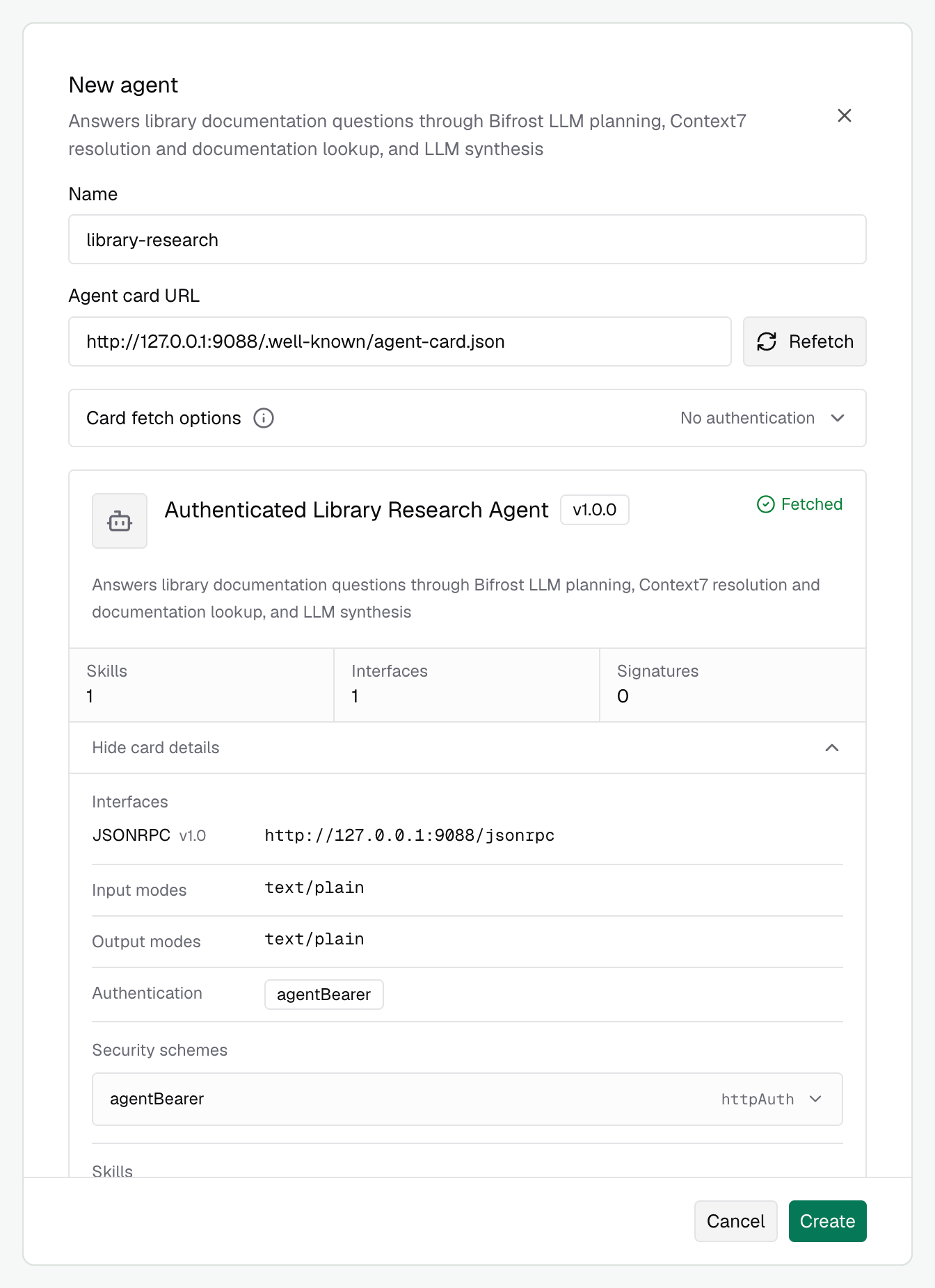
Enter the complete **agent card URL**, including the path to the card, for example `https://research.example.com/.well-known/agent-card.json`. The base URL alone, such as `https://research.example.com`, is not enough. Select **Fetch**.
Before selecting **Fetch**, expand **Card fetch options** and enter the credentials required to read the card. Bifrost uses these credentials for card discovery. Configure credentials for sending work separately under **Request authentication**.
The preview shows the agent's skills, interfaces, capabilities, and advertised authentication. Check that this is the agent you intended to register.
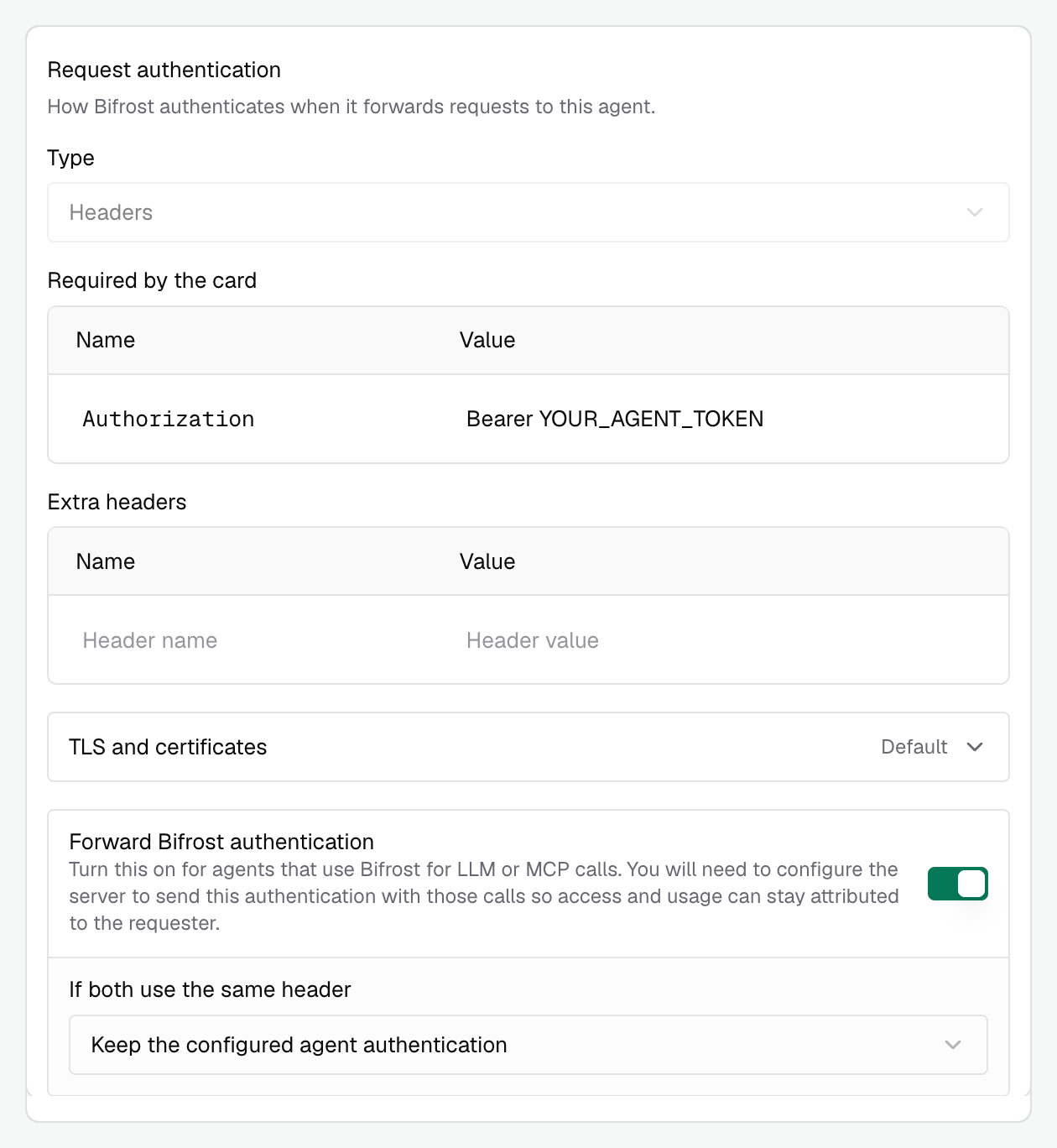
 The card's requirements select the request authentication fields. Fill in the credentials your agent expects.
### Authentication options
* **Configure manually** lets you override an inaccurate card or choose a different authentication setup. Use **TLS and certificates** for a private CA or mutual TLS.
* **Forward Bifrost authentication** passes the caller's credentials to agents that use Bifrost for LLM or MCP calls. Enable it and configure your agent to reuse those credentials on its model and tool requests to preserve caller attribution.
The [authentication guide](./authentication) explains auto-selection, overrides, and what happens when two credentials use the same header.
The card's requirements select the request authentication fields. Fill in the credentials your agent expects.
### Authentication options
* **Configure manually** lets you override an inaccurate card or choose a different authentication setup. Use **TLS and certificates** for a private CA or mutual TLS.
* **Forward Bifrost authentication** passes the caller's credentials to agents that use Bifrost for LLM or MCP calls. Enable it and configure your agent to reuse those credentials on its model and tool requests to preserve caller attribution.
The [authentication guide](./authentication) explains auto-selection, overrides, and what happens when two credentials use the same header.
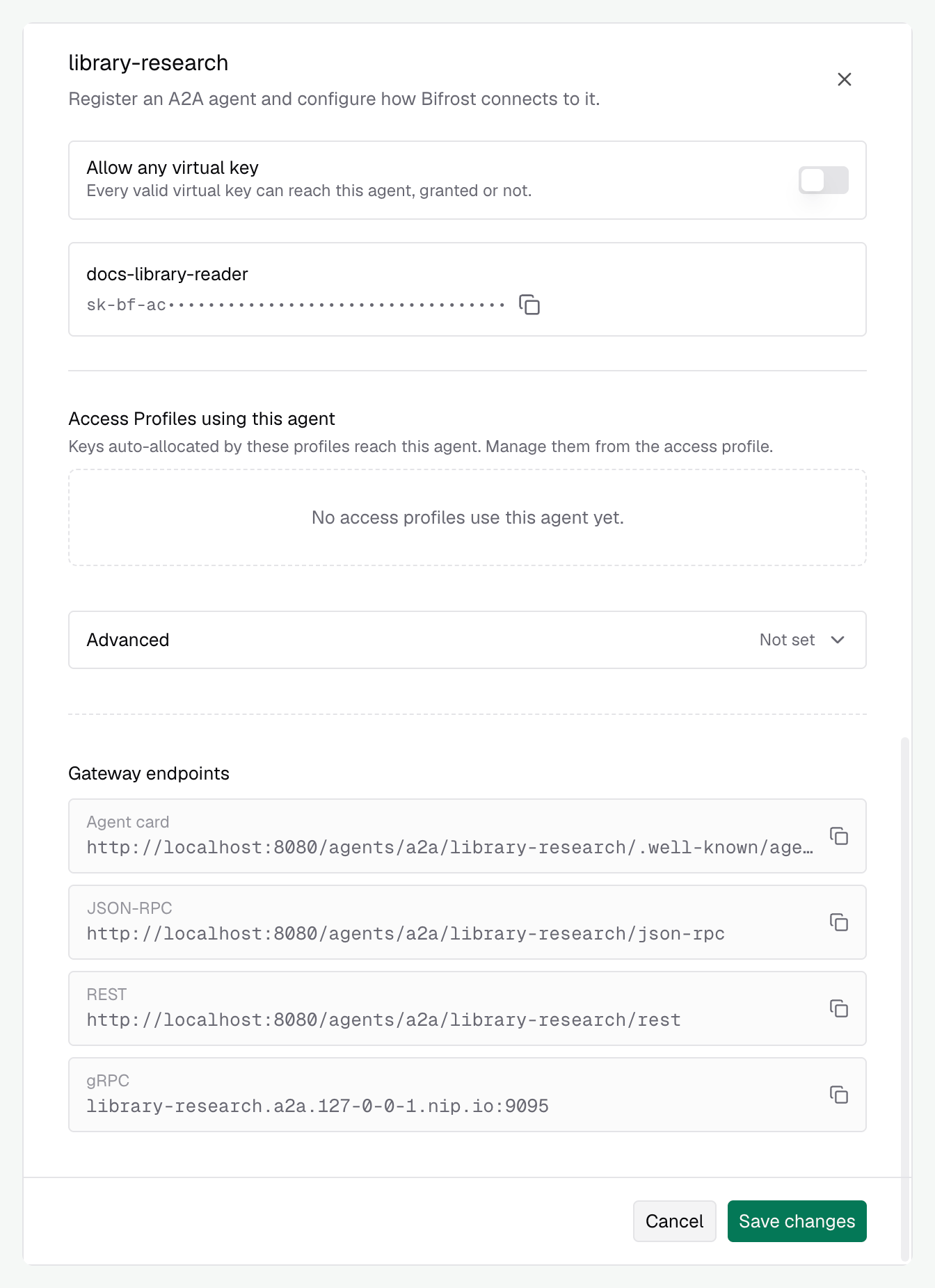
 Select the virtual keys allowed to call the agent. Leave **Allow any virtual key** off for a restricted agent, or turn it on to allow identified callers without an explicit agent grant.
Expand **Advanced** if you need to allow extension URIs for your A2A integration. Leave them empty for a basic registration. See [Advanced registration options](#advanced-registration-options) for their behavior.
Select **Create**, then reopen the registration to copy its gateway endpoints. Point your client at the Bifrost agent card, rather than the original server card, so discovery returns the gateway routes.
Agent grants restrict authenticated callers. Enable inference authentication enforcement for a deployment that must reject anonymous calls. See [access control](./access-control).
### Check your registered agent
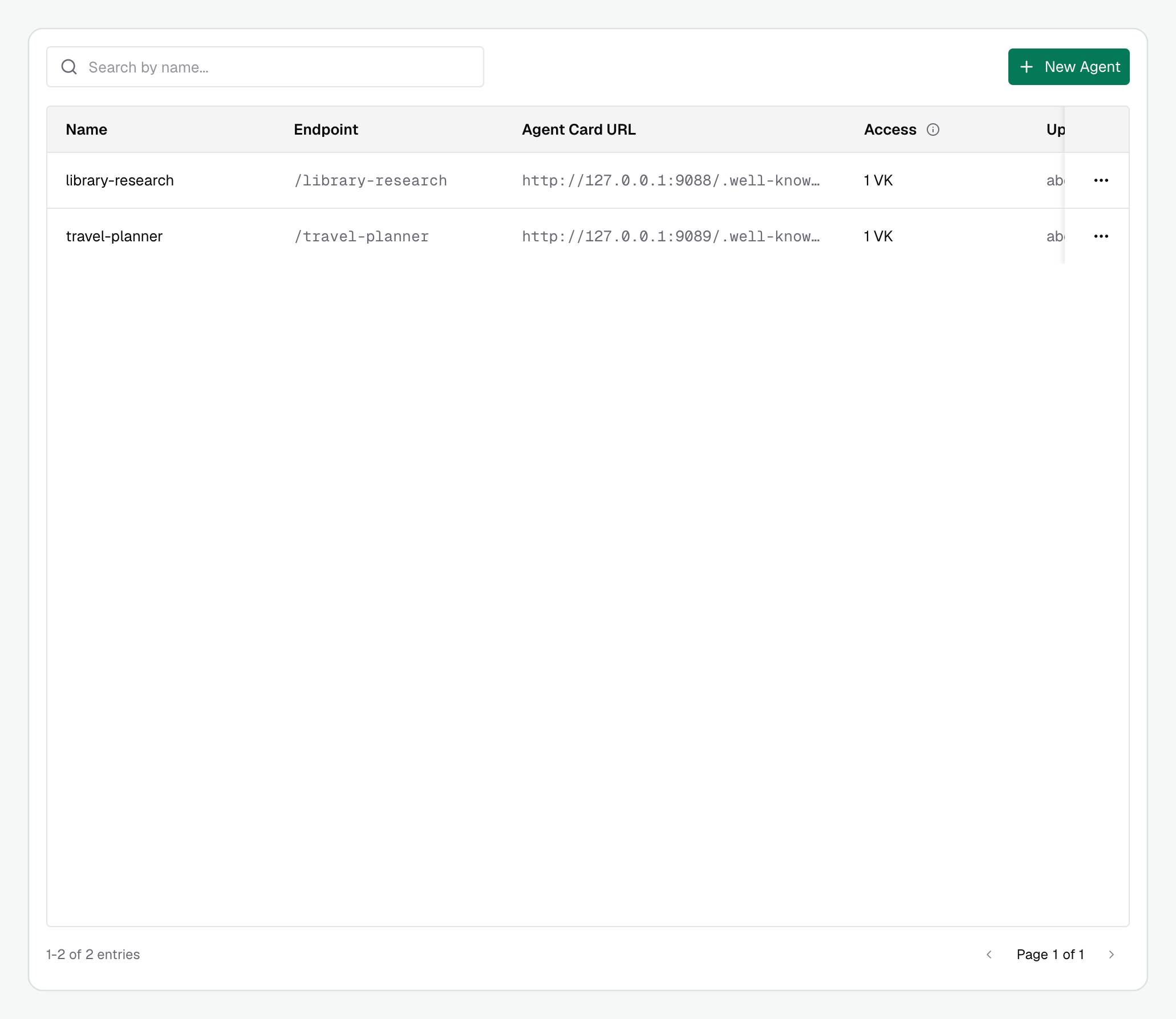
Your agent appears in **Agent Catalog** after registration. Reopen it to review its access and copy the gateway endpoints.
Select the virtual keys allowed to call the agent. Leave **Allow any virtual key** off for a restricted agent, or turn it on to allow identified callers without an explicit agent grant.
Expand **Advanced** if you need to allow extension URIs for your A2A integration. Leave them empty for a basic registration. See [Advanced registration options](#advanced-registration-options) for their behavior.
Select **Create**, then reopen the registration to copy its gateway endpoints. Point your client at the Bifrost agent card, rather than the original server card, so discovery returns the gateway routes.
Agent grants restrict authenticated callers. Enable inference authentication enforcement for a deployment that must reject anonymous calls. See [access control](./access-control).
### Check your registered agent
Your agent appears in **Agent Catalog** after registration. Reopen it to review its access and copy the gateway endpoints.
 Open the agent's action menu and select **Edit**. Under **Gateway endpoints**, use the copy button beside **Agent card**, **JSON-RPC**, **REST**, or **gRPC**. Give your client the gateway's agent card URL for discovery, or the endpoint for its chosen transport.
Each request to the gateway's agent card URL fetches the current card from your agent server, using the configured card-fetch authentication. Bifrost rewrites its endpoints and authentication requirements for gateway access before returning it. It does not return a cached registration-time card. If your server cannot provide the card, the request fails.
Open the agent's action menu and select **Edit**. Under **Gateway endpoints**, use the copy button beside **Agent card**, **JSON-RPC**, **REST**, or **gRPC**. Give your client the gateway's agent card URL for discovery, or the endpoint for its chosen transport.
Each request to the gateway's agent card URL fetches the current card from your agent server, using the configured card-fetch authentication. Bifrost rewrites its endpoints and authentication requirements for gateway access before returning it. It does not return a cached registration-time card. If your server cannot provide the card, the request fails.
 ## Register from deployment configuration
Add an `agents` entry to your configuration:
```json theme={null}
{
"agents": [
{
"name": "library-research",
"agent_card_url": "https://research.example.com/.well-known/agent-card.json",
"enabled": true,
"allow_by_default": false,
"virtual_key_ids": ["YOUR_VIRTUAL_KEY_ID"],
"forward_accepted_credential": true,
"runtime_auth": {
"type": "headers",
"headers": {"Authorization": "env.RESEARCH_AGENT_AUTHORIZATION"}
}
}
]
}
```
The virtual key must already exist or be declared in the deployment. Use its ID here, not its secret value. A runtime credential is only needed if your agent requires one.
The chart passes `bifrost.agents` into the top-level `agents` configuration. Agent fields use snake\_case, just as in config.json.
```yaml theme={null}
bifrost:
agents:
- name: library-research
agent_card_url: https://research.example.com/.well-known/agent-card.json
enabled: true
allow_by_default: false
virtual_key_ids:
- YOUR_VIRTUAL_KEY_ID
forward_accepted_credential: true
runtime_auth:
type: headers
headers:
Authorization: env.RESEARCH_AGENT_AUTHORIZATION
```
Supply `RESEARCH_AGENT_AUTHORIZATION` as the complete header value, such as `Bearer `, through your deployment's secret mechanism. See [Helm secret management](/deployment-guides/helm/secret-management).
Declarations reconcile by registration name at startup. Under the default `split` source of truth, removing an entry from the file does not delete its stored registration. With `source_of_truth: "config.json"`, a present `agents` list is authoritative. See [source of truth](/deployment-guides/config-json/source-of-truth) before mixing file and dashboard changes.
The [API reference](/api-reference/agent-gateway/register-agent) documents registration and card inspection endpoints. Management requests use dashboard or API authentication; that is separate from the credential used to call an agent.
`PUT /api/agents/{name}` replaces the registration. Include the settings and collections you intend to keep. Omitting authentication, extension URIs, or virtual-key IDs can remove them. The registration name stays fixed; use a new registration if you need a different route name.
## Make your first request
Use a virtual key granted access to this registration:
```bash theme={null}
curl http://localhost:8080/agents/a2a/library-research/.well-known/agent-card.json \
-H "x-bf-vk: $BIFROST_VK"
```
Then send a message over JSON-RPC. This example uses A2A v1 method names and JSON field names.
```bash theme={null}
curl http://localhost:8080/agents/a2a/library-research/json-rpc \
-H "x-bf-vk: $BIFROST_VK" \
-H "Content-Type: application/json" \
-H "A2A-Version: 1.0" \
-d '{
"jsonrpc": "2.0",
"id": "research-1",
"method": "SendMessage",
"params": {
"message": {
"messageId": "question-1",
"role": "user",
"parts": [{"text": "Explain how to reuse one HTTP client across requests."}]
}
}
}'
```
The agent may return a message or a task. See [Messages, tasks, and events](./messages-and-tasks) to continue the conversation or follow a task's progress.
## Advanced registration options
A2A extensions describe extra protocol behavior identified by a URI. Allow the extensions your integration needs and the agent supports in `agents[].extension_uris`. Your client must still request the extension through A2A negotiation. Adding an arbitrary URI does not implement it.
If the card declares a required extension you have not allowed, registration or discovery can fail. A request for an unsupported extension is rejected before its protocol operation reaches the agent. Registration accepts at most 32 extension URIs, with each URI at most 2048 bytes; negotiated extension payloads are limited to 64 KiB.
Next, review [Authentication](./authentication) for card fetching, agent credentials, and caller forwarding. Then configure [Agent access](./access-control) for your callers.
This documentation is built and hosted on [Mintlify](https://mintlify.com), a developer documentation platform.
## Register from deployment configuration
Add an `agents` entry to your configuration:
```json theme={null}
{
"agents": [
{
"name": "library-research",
"agent_card_url": "https://research.example.com/.well-known/agent-card.json",
"enabled": true,
"allow_by_default": false,
"virtual_key_ids": ["YOUR_VIRTUAL_KEY_ID"],
"forward_accepted_credential": true,
"runtime_auth": {
"type": "headers",
"headers": {"Authorization": "env.RESEARCH_AGENT_AUTHORIZATION"}
}
}
]
}
```
The virtual key must already exist or be declared in the deployment. Use its ID here, not its secret value. A runtime credential is only needed if your agent requires one.
The chart passes `bifrost.agents` into the top-level `agents` configuration. Agent fields use snake\_case, just as in config.json.
```yaml theme={null}
bifrost:
agents:
- name: library-research
agent_card_url: https://research.example.com/.well-known/agent-card.json
enabled: true
allow_by_default: false
virtual_key_ids:
- YOUR_VIRTUAL_KEY_ID
forward_accepted_credential: true
runtime_auth:
type: headers
headers:
Authorization: env.RESEARCH_AGENT_AUTHORIZATION
```
Supply `RESEARCH_AGENT_AUTHORIZATION` as the complete header value, such as `Bearer `, through your deployment's secret mechanism. See [Helm secret management](/deployment-guides/helm/secret-management).
Declarations reconcile by registration name at startup. Under the default `split` source of truth, removing an entry from the file does not delete its stored registration. With `source_of_truth: "config.json"`, a present `agents` list is authoritative. See [source of truth](/deployment-guides/config-json/source-of-truth) before mixing file and dashboard changes.
The [API reference](/api-reference/agent-gateway/register-agent) documents registration and card inspection endpoints. Management requests use dashboard or API authentication; that is separate from the credential used to call an agent.
`PUT /api/agents/{name}` replaces the registration. Include the settings and collections you intend to keep. Omitting authentication, extension URIs, or virtual-key IDs can remove them. The registration name stays fixed; use a new registration if you need a different route name.
## Make your first request
Use a virtual key granted access to this registration:
```bash theme={null}
curl http://localhost:8080/agents/a2a/library-research/.well-known/agent-card.json \
-H "x-bf-vk: $BIFROST_VK"
```
Then send a message over JSON-RPC. This example uses A2A v1 method names and JSON field names.
```bash theme={null}
curl http://localhost:8080/agents/a2a/library-research/json-rpc \
-H "x-bf-vk: $BIFROST_VK" \
-H "Content-Type: application/json" \
-H "A2A-Version: 1.0" \
-d '{
"jsonrpc": "2.0",
"id": "research-1",
"method": "SendMessage",
"params": {
"message": {
"messageId": "question-1",
"role": "user",
"parts": [{"text": "Explain how to reuse one HTTP client across requests."}]
}
}
}'
```
The agent may return a message or a task. See [Messages, tasks, and events](./messages-and-tasks) to continue the conversation or follow a task's progress.
## Advanced registration options
A2A extensions describe extra protocol behavior identified by a URI. Allow the extensions your integration needs and the agent supports in `agents[].extension_uris`. Your client must still request the extension through A2A negotiation. Adding an arbitrary URI does not implement it.
If the card declares a required extension you have not allowed, registration or discovery can fail. A request for an unsupported extension is rejected before its protocol operation reaches the agent. Registration accepts at most 32 extension URIs, with each URI at most 2048 bytes; negotiated extension payloads are limited to 64 KiB.
Next, review [Authentication](./authentication) for card fetching, agent credentials, and caller forwarding. Then configure [Agent access](./access-control) for your callers.
This documentation is built and hosted on [Mintlify](https://mintlify.com), a developer documentation platform.