> ## Documentation Index
> Fetch the complete documentation index at: https://bifrost-dev.mintlify.site/llms.txt
> Use this file to discover all available pages before exploring further.
# Role-Based Access Control
> Manage user access with fine-grained permissions across Bifrost resources using roles and permissions.
## Overview
Role-Based Access Control (RBAC) in Bifrost Enterprise provides fine-grained access management for your organization. RBAC allows you to define roles with specific permissions, controlling what users can view, create, update, or delete across all Bifrost resources.
**Key Benefits:**
* **Principle of Least Privilege** - Grant users only the permissions they need
* **Centralized Access Management** - Manage all permissions from a single interface
* **Audit-Ready** - Track who has access to what for compliance requirements
* **Flexible Role Design** - Use system roles or create custom roles for your organization
RBAC integrates seamlessly with [User Provisioning (OIDC)](./user-provisioning), automatically assigning roles based on your IdP groups and claims.
***
## Roles & Permissions
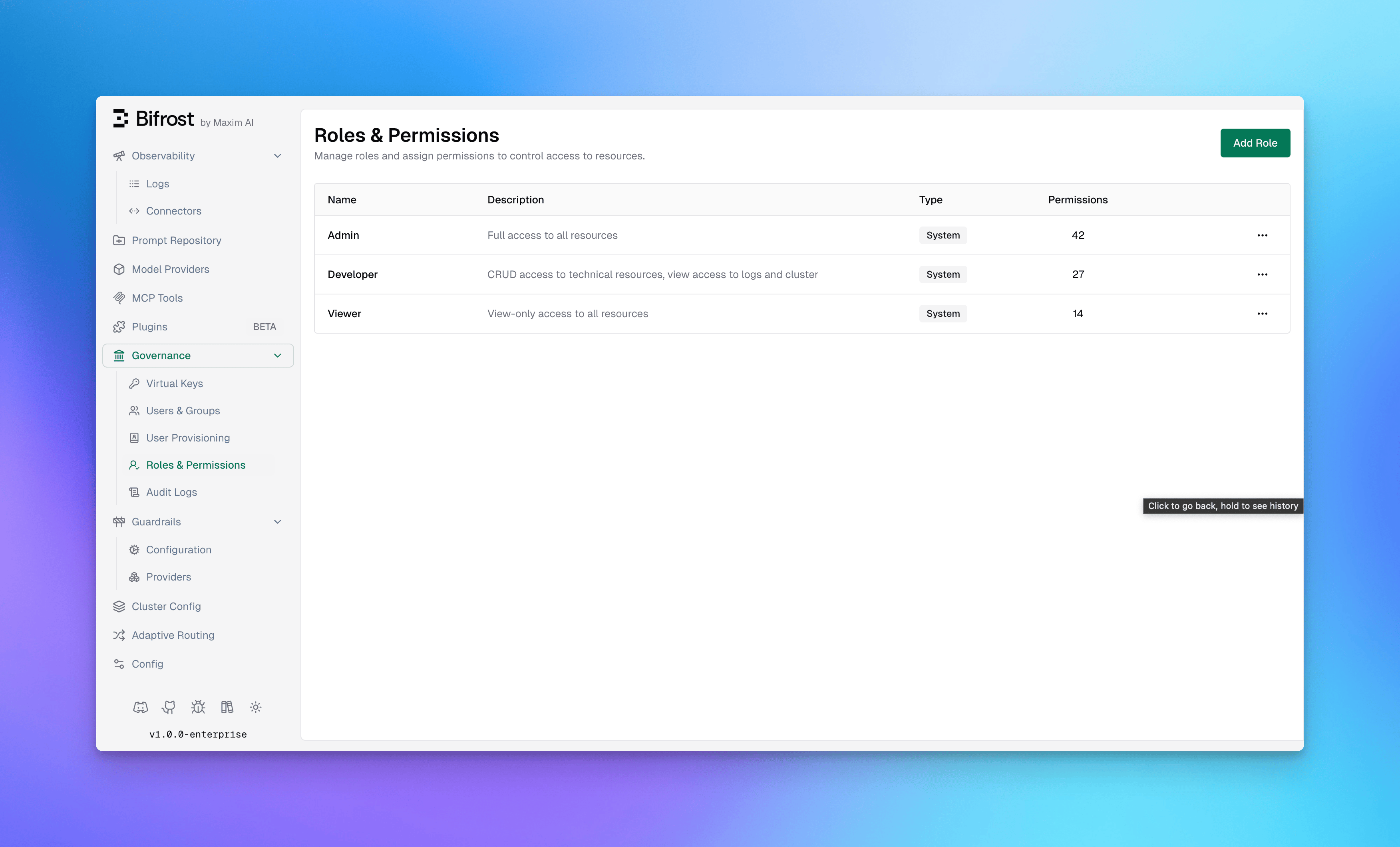
Navigate to **Governance** → **Roles & Permissions** in the Bifrost dashboard to manage roles.
 ### System Roles
Bifrost includes three pre-configured system roles that cover common access patterns:
| Role | Permissions | Description |
| - | - | - |
| **Admin** | 42 | Full access to all resources and operations |
| **Developer** | 27 | CRUD access to technical resources, view access to logs and cluster |
| **Viewer** | 14 | Read-only access to all resources |
System roles cannot be deleted, but their permissions can be customized to fit your organization's needs.
### Custom Roles
Create custom roles when system roles don't match your organizational structure. Custom roles are useful for:
* **Specialized Teams** - Create roles for QA, Security, or Compliance teams
* **Project-Based Access** - Limit access to specific resources per project
* **Temporary Access** - Grant limited permissions for contractors or auditors
**To create a custom role:**
1. Click **Add Role** in the top-right corner
2. Enter a **Role Name** (e.g., "Auditor", "QA Team")
3. Add a **Description** explaining the role's purpose
4. Click **Create Role**
5. Assign permissions using the Manage Permissions dialog
***
## Resources & Operations
RBAC permissions are defined as combinations of **Resources** and **Operations**.
### Protected Resources
Bifrost protects access to the following resources:
| Resource | Description |
| - | - |
| **Logs** | Request and response logs |
| **ModelProvider** | AI model provider configurations |
| **Observability** | Monitoring and metrics dashboards |
| **Plugins** | Plugin configurations and management |
| **VirtualKeys** | Virtual key management |
| **UserProvisioning** | User and group provisioning settings |
| **Users** | User account management |
| **AuditLogs** | Audit trail and compliance logs |
| **GuardrailsConfig** | Guardrail rules and configuration |
| **GuardrailsProviders** | Guardrail provider profiles |
| **Cluster** | Cluster configuration and nodes |
| **Settings** | Workspace settings |
| **MCPGateway** | MCP Gateway configurations |
| **VirtualMCPs** | Virtual MCP management (authorizes both `/api/mcp/virtual-mcps` and the deprecated `/api/mcp/tool-groups`) |
| **MCPLogs** | MCP tool execution logs |
| **AdaptiveRouter** | Adaptive load balancing: **View** reads the adaptive routing dashboard and the load balancer settings; **Update** changes the settings and releases [held keys](/enterprise/adaptive-load-balancing#releasing-held-keys) |
| **Warp** | Warp configuration and log index backfills. View reads the configuration; Update saves it, including which models Warp offers, and runs backfills |
| **WarpSession** | Warp sessions: chat and conversation history (View), and deleting your own conversations (Delete). The chat panel also reads the Warp configuration, so chat users need Warp View too. Chat users can switch between the models a Warp Update holder has exposed, and cannot add to them |
| **BackgroundJobs** | The background jobs list. View lists jobs and their progress; Update cancels a job. Only Admin holds it by default |
### Operations
Most resources support the standard CRUD operations. Some resources expose specialized operations for security-sensitive or non-CRUD workflows.
| Operation | Description |
| - | - |
| **View** | Read-only access to view the resource |
| **Create** | Ability to create new instances of the resource |
| **Update** | Ability to modify existing resources |
| **Delete** | Ability to remove resources |
| **Download** | Ability to download resources, such as audit logs |
| **Reveal** | Ability to reveal original values for reversible redactions in Bifrost logs |
| **Create Standalone** | On **VirtualKeys** only. Lets members create keys that are not governed by their access profile. Without it, a key they create is owned by them, governed by their [access profiles](/enterprise/access-profiles#keys-members-create), and locked. A user who holds no access profile still gets a key, with no profile governing it. Granted to every role that can create keys until you remove it |
| **Inference operations** | Ability to invoke specific inference surfaces, such as chat completions, embeddings, images, audio, and moderations |
***
## Managing Permissions
To assign or modify permissions for a role:
1. Navigate to **Governance** → **Roles & Permissions**
2. Click the **menu icon** (•••) on the role you want to modify
3. Select **Manage Permissions**
### System Roles
Bifrost includes three pre-configured system roles that cover common access patterns:
| Role | Permissions | Description |
| - | - | - |
| **Admin** | 42 | Full access to all resources and operations |
| **Developer** | 27 | CRUD access to technical resources, view access to logs and cluster |
| **Viewer** | 14 | Read-only access to all resources |
System roles cannot be deleted, but their permissions can be customized to fit your organization's needs.
### Custom Roles
Create custom roles when system roles don't match your organizational structure. Custom roles are useful for:
* **Specialized Teams** - Create roles for QA, Security, or Compliance teams
* **Project-Based Access** - Limit access to specific resources per project
* **Temporary Access** - Grant limited permissions for contractors or auditors
**To create a custom role:**
1. Click **Add Role** in the top-right corner
2. Enter a **Role Name** (e.g., "Auditor", "QA Team")
3. Add a **Description** explaining the role's purpose
4. Click **Create Role**
5. Assign permissions using the Manage Permissions dialog
***
## Resources & Operations
RBAC permissions are defined as combinations of **Resources** and **Operations**.
### Protected Resources
Bifrost protects access to the following resources:
| Resource | Description |
| - | - |
| **Logs** | Request and response logs |
| **ModelProvider** | AI model provider configurations |
| **Observability** | Monitoring and metrics dashboards |
| **Plugins** | Plugin configurations and management |
| **VirtualKeys** | Virtual key management |
| **UserProvisioning** | User and group provisioning settings |
| **Users** | User account management |
| **AuditLogs** | Audit trail and compliance logs |
| **GuardrailsConfig** | Guardrail rules and configuration |
| **GuardrailsProviders** | Guardrail provider profiles |
| **Cluster** | Cluster configuration and nodes |
| **Settings** | Workspace settings |
| **MCPGateway** | MCP Gateway configurations |
| **VirtualMCPs** | Virtual MCP management (authorizes both `/api/mcp/virtual-mcps` and the deprecated `/api/mcp/tool-groups`) |
| **MCPLogs** | MCP tool execution logs |
| **AdaptiveRouter** | Adaptive load balancing: **View** reads the adaptive routing dashboard and the load balancer settings; **Update** changes the settings and releases [held keys](/enterprise/adaptive-load-balancing#releasing-held-keys) |
| **Warp** | Warp configuration and log index backfills. View reads the configuration; Update saves it, including which models Warp offers, and runs backfills |
| **WarpSession** | Warp sessions: chat and conversation history (View), and deleting your own conversations (Delete). The chat panel also reads the Warp configuration, so chat users need Warp View too. Chat users can switch between the models a Warp Update holder has exposed, and cannot add to them |
| **BackgroundJobs** | The background jobs list. View lists jobs and their progress; Update cancels a job. Only Admin holds it by default |
### Operations
Most resources support the standard CRUD operations. Some resources expose specialized operations for security-sensitive or non-CRUD workflows.
| Operation | Description |
| - | - |
| **View** | Read-only access to view the resource |
| **Create** | Ability to create new instances of the resource |
| **Update** | Ability to modify existing resources |
| **Delete** | Ability to remove resources |
| **Download** | Ability to download resources, such as audit logs |
| **Reveal** | Ability to reveal original values for reversible redactions in Bifrost logs |
| **Create Standalone** | On **VirtualKeys** only. Lets members create keys that are not governed by their access profile. Without it, a key they create is owned by them, governed by their [access profiles](/enterprise/access-profiles#keys-members-create), and locked. A user who holds no access profile still gets a key, with no profile governing it. Granted to every role that can create keys until you remove it |
| **Inference operations** | Ability to invoke specific inference surfaces, such as chat completions, embeddings, images, audio, and moderations |
***
## Managing Permissions
To assign or modify permissions for a role:
1. Navigate to **Governance** → **Roles & Permissions**
2. Click the **menu icon** (•••) on the role you want to modify
3. Select **Manage Permissions**
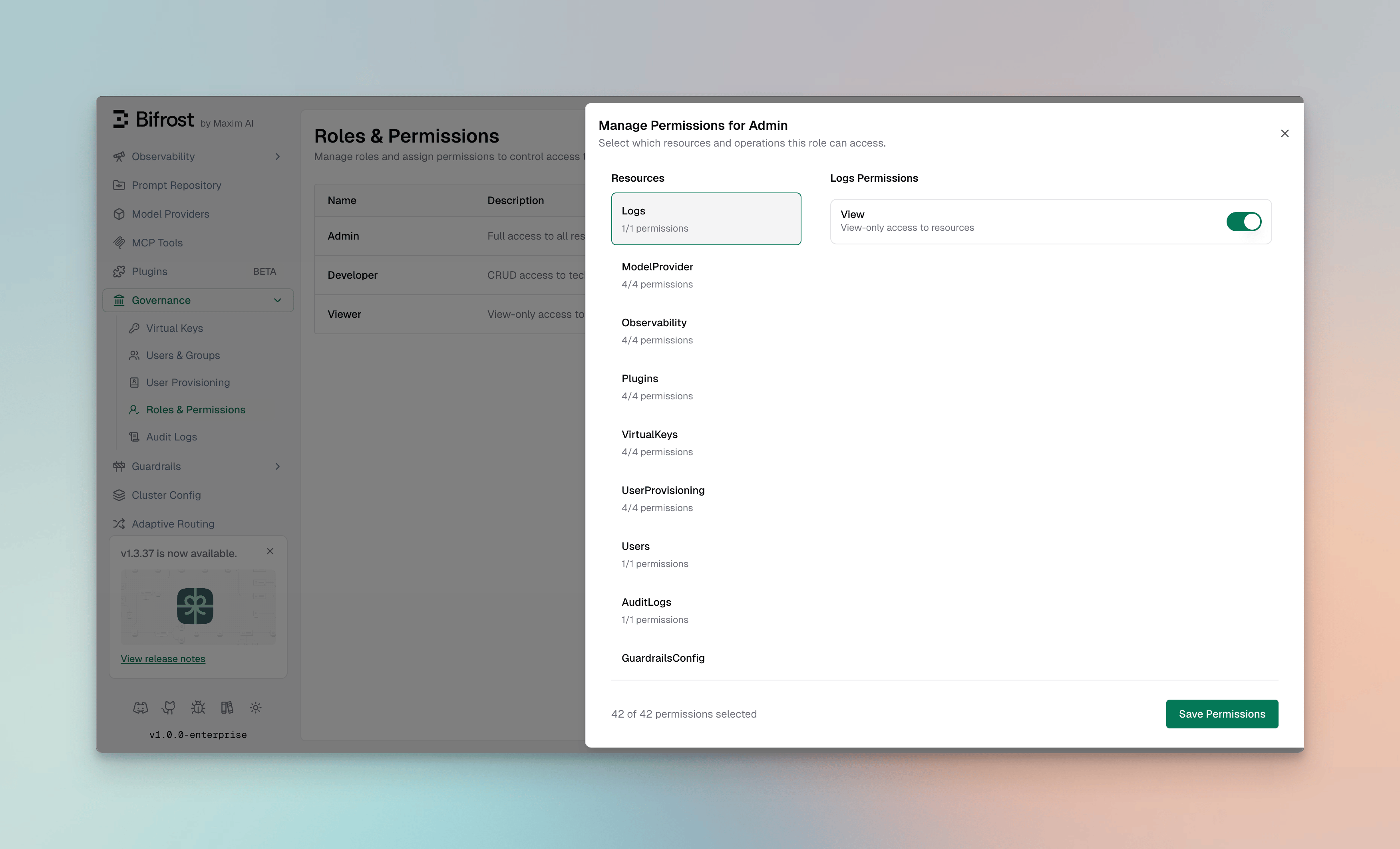 The Manage Permissions dialog provides a two-panel interface:
**Left Panel - Resources:**
* Lists all available resources
* Shows the count of enabled permissions per resource (e.g., "4/4 permissions")
* Click a resource to view its permissions
**Right Panel - Permissions:**
* Displays available operations for the selected resource
* Toggle switches to enable/disable each permission
* Shows operation descriptions for clarity
### Assigning Permissions
1. Select a **Resource** from the left panel
2. Toggle the **operations** you want to enable for this role
3. Repeat for other resources as needed
4. Click **Save Permissions** to apply changes
The footer shows the total permissions count (e.g., "42 of 42 permissions selected") to help track the role's access level.
***
## Best Practices
### Role Design
* **Start with System Roles** - Use Admin, Developer, and Viewer as templates
* **Follow Least Privilege** - Only grant permissions that are necessary
* **Document Role Purpose** - Use clear descriptions to explain each role's intent
* **Review Regularly** - Audit role assignments quarterly
### Permission Strategies
**For Development Teams:**
```
Developer role + specific resource access based on team focus
- Frontend team: VirtualKeys (View), Logs (View), Observability (View)
- Backend team: ModelProvider (CRUD), Plugins (CRUD), Logs (View)
```
**For Security/Compliance Teams:**
```
Custom "Auditor" role with:
- AuditLogs (View)
- Logs (View)
- GuardrailsConfig (View)
- Users (View)
```
**For Operations Teams:**
```
Custom "Ops" role with:
- Cluster (CRUD)
- Observability (View)
- Logs (View)
- Settings (View, Update)
```
***
## Integration with Identity Providers
When using [User Provisioning](./user-provisioning) with Okta, Entra, Zitadel, Keycloak, Google Workspace, Auth0, SailPoint, or a generic OIDC provider, roles can be assigned automatically from:
* **IdP Groups** - Map identity provider groups to Bifrost roles
* **App Roles** - Sync application roles from your IdP
* **Claims** - Use custom claims to determine role assignment
A user's role is re-checked at every sign-in, session refresh, and SCIM push, so a role change in your IdP reaches Bifrost without any manual step. A role value that matches one of your attribute mappings for roles replaces the user's current role. A role attribute whose value matches no mapping removes the role, and the sign-in is refused. If neither the token nor what Bifrost remembers from earlier sign-ins has any attribute your role mappings read, Bifrost treats it as a misconfiguration: the sign-in is refused with a `403`, and the user's role and data are kept as they are. In **SCIM only** mode, sign-in ignores the token: the role comes from what SCIM last sent, and a user whose SCIM data resolves no role is refused. There is no default role. See [How roles are decided](/enterprise/how-identity-sync-works#how-roles-are-decided).
What each role can **see** is set separately with its [data access scope](/enterprise/data-access-control).
***
## API Access
Roles and permissions can also be managed via the API:
**List all roles:**
```bash theme={null}
curl -X GET http://localhost:8080/api/roles \
-H "Authorization: Bearer "
```
**Get role permissions:**
```bash theme={null}
curl -X GET http://localhost:8080/api/roles/{role_id}/permissions \
-H "Authorization: Bearer "
```
**Update role permissions:**
```bash theme={null}
curl -X PUT http://localhost:8080/api/roles/{role_id}/permissions \
-H "Authorization: Bearer " \
-H "Content-Type: application/json" \
-d '{
"permission_ids": [1, 2, 3, 4, 5]
}'
```
**Create a custom role:**
```bash theme={null}
curl -X POST http://localhost:8080/api/roles \
-H "Authorization: Bearer " \
-H "Content-Type: application/json" \
-d '{
"name": "Auditor",
"description": "Read-only access for compliance auditing"
}'
```
***
## Next Steps
* **[Data Access Control](./data-access-control)** - Decide which records each role can see
* **[Access Profiles](./access-profiles)** - Attach provider, model, and budget policies to roles
* **[Setting up Okta](./setting-up-okta/oidc)** - Configure Okta for SSO with role sync
* **[Setting up Microsoft Entra](./setting-up-entra/oidc)** - Configure Entra ID for SSO with role sync
* **[Audit Logs](./audit-logs)** - Track permission usage and access patterns
This documentation is built and hosted on [Mintlify](https://mintlify.com), a developer documentation platform.
The Manage Permissions dialog provides a two-panel interface:
**Left Panel - Resources:**
* Lists all available resources
* Shows the count of enabled permissions per resource (e.g., "4/4 permissions")
* Click a resource to view its permissions
**Right Panel - Permissions:**
* Displays available operations for the selected resource
* Toggle switches to enable/disable each permission
* Shows operation descriptions for clarity
### Assigning Permissions
1. Select a **Resource** from the left panel
2. Toggle the **operations** you want to enable for this role
3. Repeat for other resources as needed
4. Click **Save Permissions** to apply changes
The footer shows the total permissions count (e.g., "42 of 42 permissions selected") to help track the role's access level.
***
## Best Practices
### Role Design
* **Start with System Roles** - Use Admin, Developer, and Viewer as templates
* **Follow Least Privilege** - Only grant permissions that are necessary
* **Document Role Purpose** - Use clear descriptions to explain each role's intent
* **Review Regularly** - Audit role assignments quarterly
### Permission Strategies
**For Development Teams:**
```
Developer role + specific resource access based on team focus
- Frontend team: VirtualKeys (View), Logs (View), Observability (View)
- Backend team: ModelProvider (CRUD), Plugins (CRUD), Logs (View)
```
**For Security/Compliance Teams:**
```
Custom "Auditor" role with:
- AuditLogs (View)
- Logs (View)
- GuardrailsConfig (View)
- Users (View)
```
**For Operations Teams:**
```
Custom "Ops" role with:
- Cluster (CRUD)
- Observability (View)
- Logs (View)
- Settings (View, Update)
```
***
## Integration with Identity Providers
When using [User Provisioning](./user-provisioning) with Okta, Entra, Zitadel, Keycloak, Google Workspace, Auth0, SailPoint, or a generic OIDC provider, roles can be assigned automatically from:
* **IdP Groups** - Map identity provider groups to Bifrost roles
* **App Roles** - Sync application roles from your IdP
* **Claims** - Use custom claims to determine role assignment
A user's role is re-checked at every sign-in, session refresh, and SCIM push, so a role change in your IdP reaches Bifrost without any manual step. A role value that matches one of your attribute mappings for roles replaces the user's current role. A role attribute whose value matches no mapping removes the role, and the sign-in is refused. If neither the token nor what Bifrost remembers from earlier sign-ins has any attribute your role mappings read, Bifrost treats it as a misconfiguration: the sign-in is refused with a `403`, and the user's role and data are kept as they are. In **SCIM only** mode, sign-in ignores the token: the role comes from what SCIM last sent, and a user whose SCIM data resolves no role is refused. There is no default role. See [How roles are decided](/enterprise/how-identity-sync-works#how-roles-are-decided).
What each role can **see** is set separately with its [data access scope](/enterprise/data-access-control).
***
## API Access
Roles and permissions can also be managed via the API:
**List all roles:**
```bash theme={null}
curl -X GET http://localhost:8080/api/roles \
-H "Authorization: Bearer "
```
**Get role permissions:**
```bash theme={null}
curl -X GET http://localhost:8080/api/roles/{role_id}/permissions \
-H "Authorization: Bearer "
```
**Update role permissions:**
```bash theme={null}
curl -X PUT http://localhost:8080/api/roles/{role_id}/permissions \
-H "Authorization: Bearer " \
-H "Content-Type: application/json" \
-d '{
"permission_ids": [1, 2, 3, 4, 5]
}'
```
**Create a custom role:**
```bash theme={null}
curl -X POST http://localhost:8080/api/roles \
-H "Authorization: Bearer " \
-H "Content-Type: application/json" \
-d '{
"name": "Auditor",
"description": "Read-only access for compliance auditing"
}'
```
***
## Next Steps
* **[Data Access Control](./data-access-control)** - Decide which records each role can see
* **[Access Profiles](./access-profiles)** - Attach provider, model, and budget policies to roles
* **[Setting up Okta](./setting-up-okta/oidc)** - Configure Okta for SSO with role sync
* **[Setting up Microsoft Entra](./setting-up-entra/oidc)** - Configure Entra ID for SSO with role sync
* **[Audit Logs](./audit-logs)** - Track permission usage and access patterns
This documentation is built and hosted on [Mintlify](https://mintlify.com), a developer documentation platform.